Text-to-SQL lets users query databases in plain English. Instead of writing SELECT AVG(salary) FROM salaries, a user asks "What is the average salary?" The agent then generates, validates, and runs the query on its own. In this blog, we build that agent with a safety-first approach. Regex validation blocks destructive operations, and failed queries are fixed automatically.
The dataset is the employees database. It is a SQLite port of the classic MySQL test database, with 300,024 employee records across 6 tables.
Prerequisites: langgraph, langchain-ollama, langchain-community, langchain-core, python-dotenv installed. Ollama running with qwen3. The employees_db-full-1.0.6.db SQLite file in a db/ subdirectory.
pip install -U langgraph langchain-ollama langchain-community langchain-core python-dotenv
ollama pull qwen3Setup and Database Connection
from typing_extensions import TypedDict, Annotated
from typing import List
import os
import re
import operator

from langgraph.graph import StateGraph, START, END
from langgraph.prebuilt import ToolNode
from langchain_ollama import ChatOllama
from langchain_core.tools import tool
from langchain_core.messages import HumanMessage, AIMessage, SystemMessage

from langchain_community.utilities import SQLDatabase

from dotenv import load_dotenv
load_dotenv()
LLM Configuration
LLM_MODEL = "qwen3"
BASE_URL = "http://localhost:11434"

llm = ChatOllama(model=LLM_MODEL, base_url=BASE_URL)

response = llm.invoke("Hello, how are you?")
response.pretty_print()
Database Setup
Connect to the SQLite employees database and load the full schema:
db = SQLDatabase.from_uri('sqlite:///db/employees_db-full-1.0.6.db')

tables = db.get_usable_table_names()


SCHEMA = db.get_table_info()
SCHEMA holds the CREATE TABLE statements and sample rows for all 6 tables. We pass it to the LLM as context when generating queries.
SQL Tools
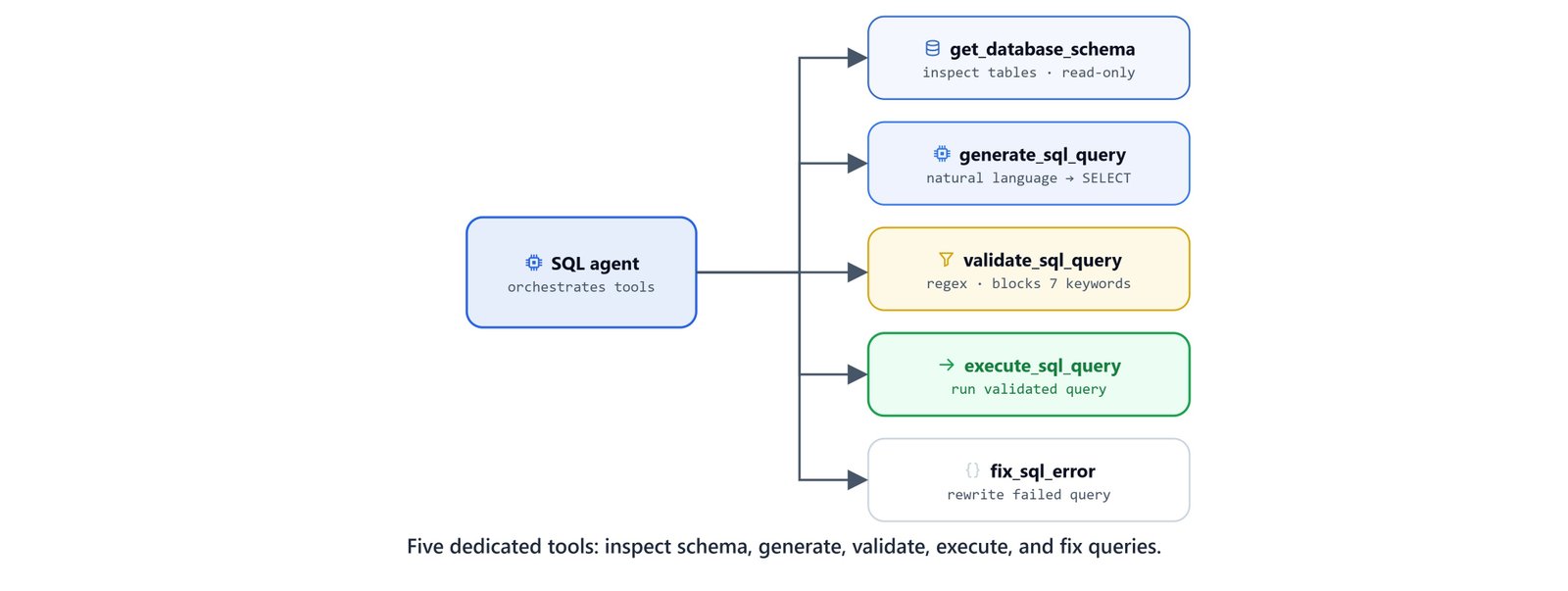
Tool 1, get_database_schema
Retrieves schema information for a specific table or all tables at once. The agent calls this first to understand table structure before generating queries:
@tool
def get_database_schema(table_name: str = None):
    """Get database schema information for SQL query generation.
    Use this first to understand table structure before creating queries."""

    if table_name:
        tables = db.get_usable_table_names()
        if table_name.lower() in [t.lower() for t in tables]:
            result = db.get_table_info([table_name])
            return result

        else:
            return f"Error: Table '{table_name}' not found. Available tables: '{', '.join(tables)}'"
    else:
        return SCHEMA
Tool 2, generate_sql_query
Generates a SELECT query from a plain-English question, using the schema as context:
@tool
def generate_sql_query(question: str, schema_info: str=None):
    """Generate a SQL SELECT query from a natural language question using database schema.
        Always use this after getting schema information."""

    schema_to_use = schema_info if schema_info else SCHEMA

    prompt = f"""Based on this database schema:
                {schema_to_use}

                Generate a SQL query to answer this question: {question}

                Rules:
                - Use only SELECT statements
                - Include only existing columns and tables
                - Add appropriate WHERE, GROUP BY, ORDER BY clauses as needed
                - Limit results to 10 rows unless specified otherwise
                - Use proper SQL syntax for SQLite

                Return only the SQL query, nothing else."""

    response = llm.invoke(prompt)
    sql_query = response.content.strip()
    print(f"[TOOL] Generated SQL Query: {sql_query[:30]}...")
    return sql_query
Tool 3, validate_sql_query
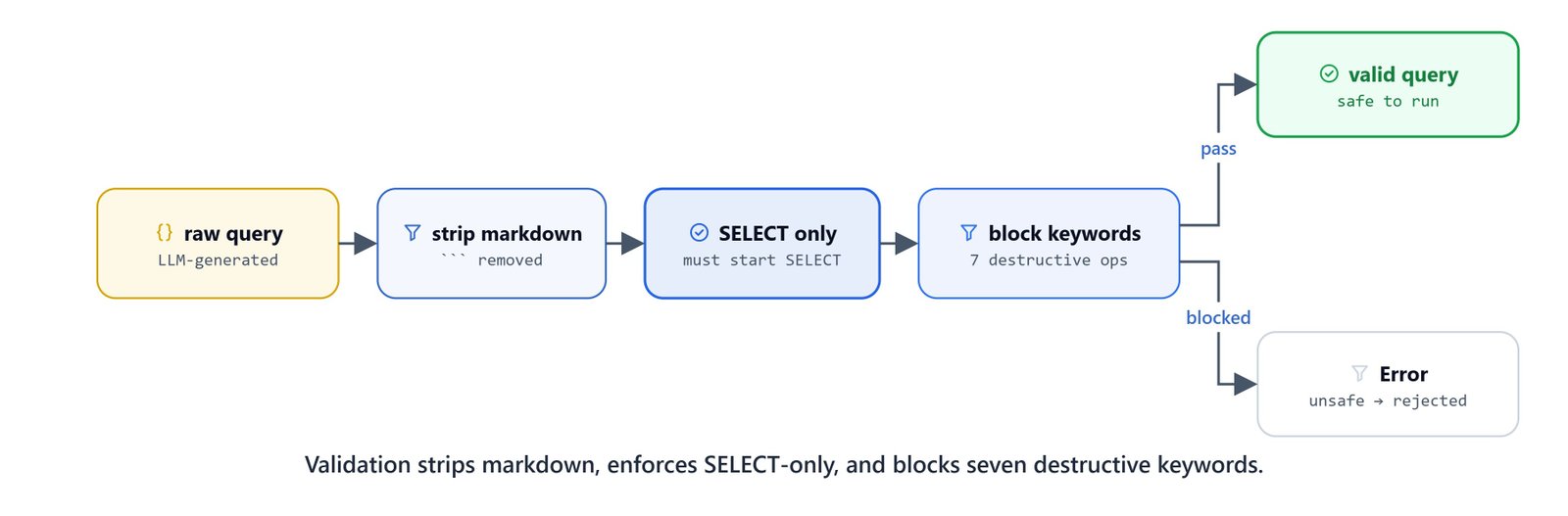
Validates generated SQL for safety before execution. Strips markdown code block markers and blocks all destructive operations:
@tool
def validate_sql_query(query: str):
    """Validate SQL query for safety and syntax before execution.
        Returns 'Valid: <query>' if safe or 'Error: <message>' if unsafe."""

    clean_query = query.strip()

    # remove sql code block
    clean_query = re.sub(r'```sql\s*', '', clean_query, flags=re.IGNORECASE)
    clean_query = re.sub(r'```\s*', '', clean_query, flags=re.IGNORECASE)

    clean_query = clean_query.strip().rstrip(';')

    if not clean_query.lower().startswith('select'):
        return "Error: only 'select' statements are allowed."

    # Check 2: Block dangerous SQL keywords
    dangerous_keywords = ['INSERT', 'UPDATE', 'DELETE', 'ALTER', 'DROP', 'CREATE', 'TRUNCATE']
    query_upper = clean_query

    for keyword in dangerous_keywords:
        if keyword in query_upper:
            return f"Error: {keyword} operations are not allowed."

    print("[TOOL] Your sql query is validated. Passed!")
    return clean_query
Tool 4, execute_sql_query
Executes a validated query against the database. Calls validate_sql_query internally before running:
@tool
def execute_sql_query(sql_query: str):
    """Execute a validated SQL query and return results.
    Only use this after validating the query for safety."""


    query = validate_sql_query.invoke(sql_query)
    if query.startswith('Error:'):
        return f"Query '{sql_query}' validation failed with Error: {query}"

    result = db.run(query)

    if result:
        return  f"Query Results: {result}"

    else:
        return f"Query Executed Sucessfully but No Result was Found!"
Tool 5, fix_sql_error
When a query fails, this tool writes a corrected version. It uses the error message and the original question as context:
@tool
def fix_sql_error(original_query: str, error_message: str, question):
    """Fix a failed SQL query by analyzing the error and generating a corrected version.
        Use this when validation or execution fails."""

    fix_prompt = f"""The following SQL query failed:
                    Query: {original_query}
                    Error: {error_message}
                    Original Question: {question}

                    Database Schema:
                    {SCHEMA}

                    Analyze the error and provide a corrected SQL query that:
                    1. Fixes the specific error mentioned
                    2. Still answers the original question
                    3. Uses only valid table and column names from the schema
                    4. Follows SQLite syntax rules

                    Return only the corrected SQL query, nothing else."""

    response = llm.invoke(fix_prompt)
    query = response.content.strip()

    print(f"[TOOL] Generated fixed SQL Query.")

return queryAgent Node and State
class AgentState(TypedDict):
    messages: Annotated[list, operator.add]

tools = [
    get_database_schema,
    generate_sql_query,
    execute_sql_query,
    fix_sql_error
]

llm_with_tools = llm.bind_tools(tools)
The agent node prepends a system prompt that spells out the SQL workflow. It covers schema lookup, query generation, execution, and error fixing:
def agent_node(state: AgentState):

    system_prompt = f"""You are an expert SQL analyst working with an employees database.

                    Database Schema:
                    {SCHEMA}

                    Your workflow for answering questions:
                    1. Use `get_database_schema` first to understand available tables and columns (if needed)
                    2. Use `generate_sql_query` to create SQL based on the question
                    3. Use `execute_sql_query` to run the validated query
                    4. If there's an error, use `fix_sql_error` to correct it and try again (up to 3 times)

                    Rules:
                    - Always follow the workflow step by step
                    - If a query fails, use the fix tool and try again
                    - Provide clear, informative answers
                    - Be precise with table and column names
                    - Handle errors gracefully and try to fix them
                    - If you fail after 3 attempts, explain what went wrong

                    Available tools:
                    - get_database_schema: Get table structure info
                    - generate_sql_query: Create SQL from question
                    - execute_sql_query: Run the query
                    - fix_sql_error: Fix failed queries

                    Remember: Always validate queries before executing them for safety."""


    messages = [SystemMessage(system_prompt)] + state['messages']

    response = llm_with_tools.invoke(messages)

    return {'messages': [response]}
Router Logic
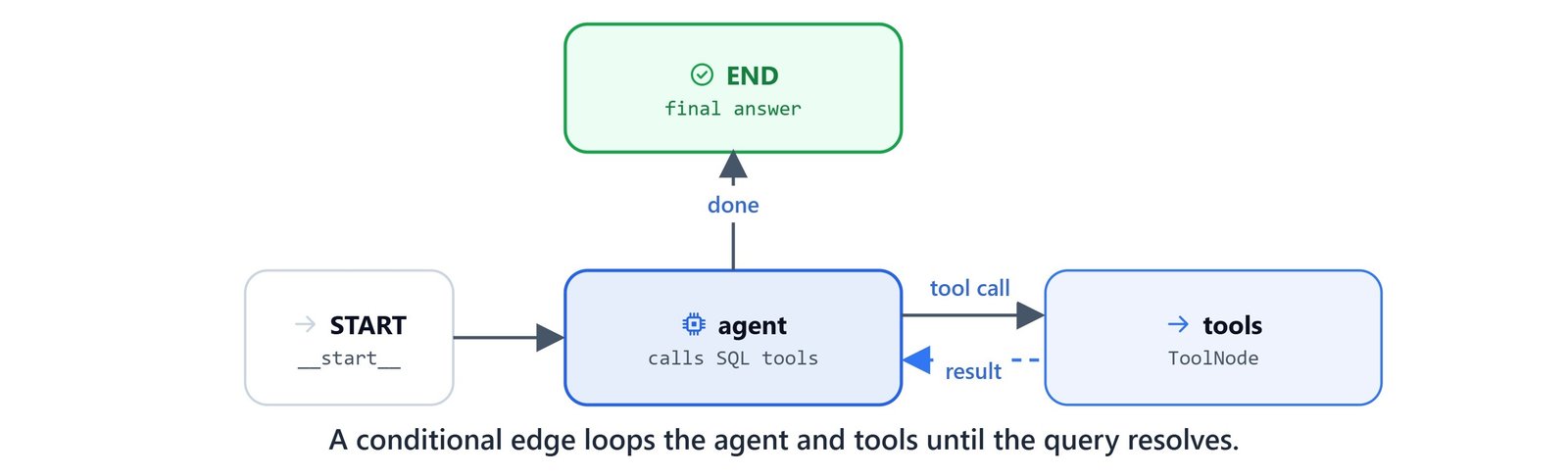
def should_continue(state: AgentState):

    last_message = state['messages'][-1]

    if hasattr(last_message, 'tool_calls') and last_message.tool_calls:
        print("[TOOL] Calling the tool")
        for tc in last_message.tool_calls:
            print(f"Callling tool: '{tc['name']}' with Args: '{tc['args']}'")

        return 'tools'

    else:
        print("[AGENT] Agent is processing your request...")
        return END
Build the Graph
def create_sql_agent():

    builder = StateGraph(AgentState)

    # add nodes
    builder.add_node('agent', agent_node)
    builder.add_node('tools', ToolNode(tools))

    # add edges
    builder.add_edge(START, 'agent')
    builder.add_edge('tools', 'agent')

    # add router
    builder.add_conditional_edges('agent', should_continue, ['tools', END])

    graph = builder.compile()

    return graph

agent = create_sql_agent()
agent
End-to-End Demos
Employee Count
query = "how many employees are there"
result = agent.invoke({'messages': [query]})
Verify the result directly:
db.run('SELECT COUNT(*) FROM employees;')result['messages'][-1].pretty_print()Here, we can see the agent call generate_sql_query to produce SELECT COUNT(*) FROM employees;. It validated the query, ran it, and reported 300,024 employees.
Average Salary by Department
query = "What is the average salary of each department show me top 5 department?"
result = agent.invoke({'messages': [query]})
result['messages'][-1].pretty_print()
Here, we can see the agent generate a multi-table JOIN query across employees, dept_emp, departments, and salaries. It groups by department, orders by average salary, and limits to 5 results.
Top Paid Employees
query = "Show me the top 5 highest paid employees with their title and salaries?"
result = agent.invoke({'messages': [query]})
result['messages'][-1].pretty_print()
This query needs a join across employees, salaries, and titles. The agent generates the correct three-table join with ORDER BY salary DESC LIMIT 5.
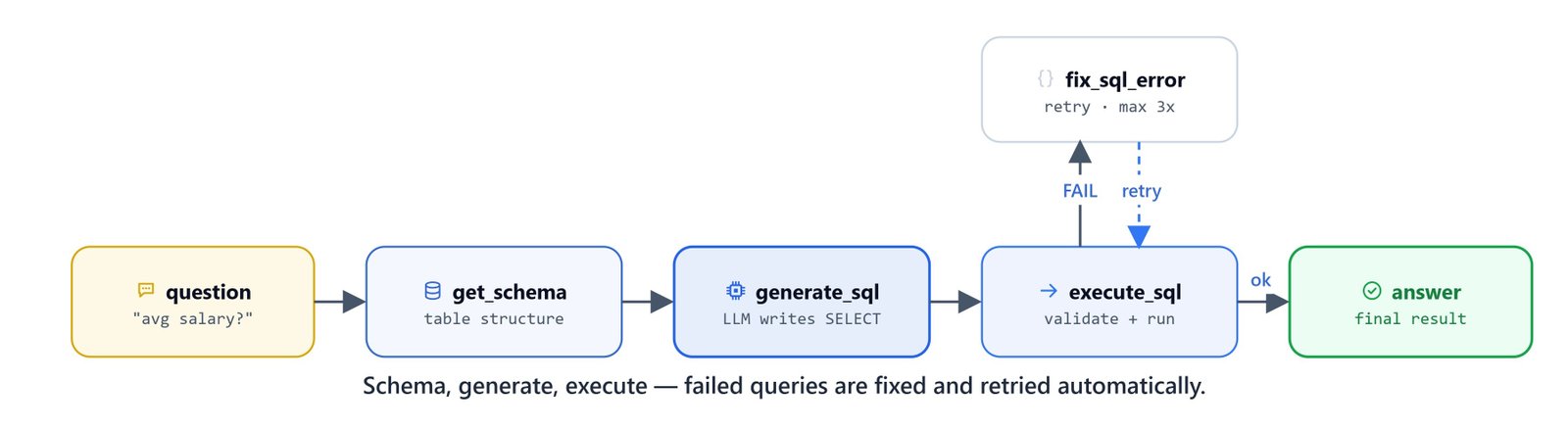
The SQL Agent Workflow
What You Built
In this blog, we built a Text-to-SQL agent with LangGraph:
| Tool | Role | Safety |
|---|---|---|
get_database_schema |
Inspect table structure before generating queries | Read-only |
generate_sql_query |
LLM generates SELECT query from natural language | SELECT only (instructed) |
validate_sql_query |
Regex validation, blocks 7 destructive keywords | Enforced by code, not LLM |
execute_sql_query |
Runs validated query against SQLite | Calls validate internally |
fix_sql_error |
LLM rewrites failed queries with error context | SELECT only (instructed) |
Key design decisions:
- Safety is enforced in code:
validate_sql_queryuses regex, not LLM judgment - Self-healing: the
fix_sql_error+ retry loop handles LLM SQL generation mistakes automatically - Schema in system prompt: the agent always has the full schema, so it invents fewer column names
- LangGraph workflow: the
StateGraphmanages the agent-tool loop cleanly with conditional edges
This is how a Text-to-SQL agent works. The agent inspects the schema and generates a query, and code-level validation keeps it read-only. If a query fails, a fix-and-retry loop repairs it.