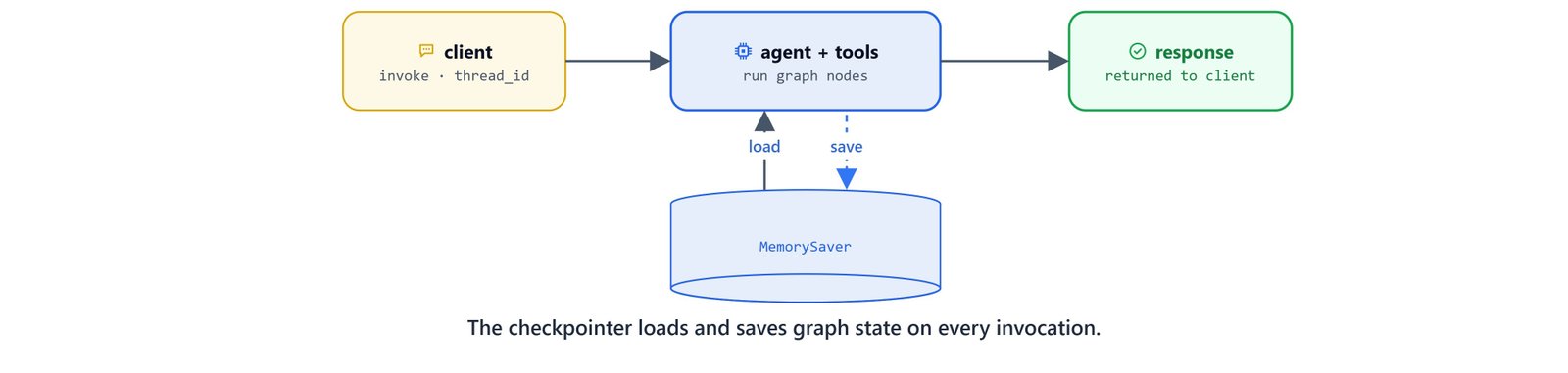
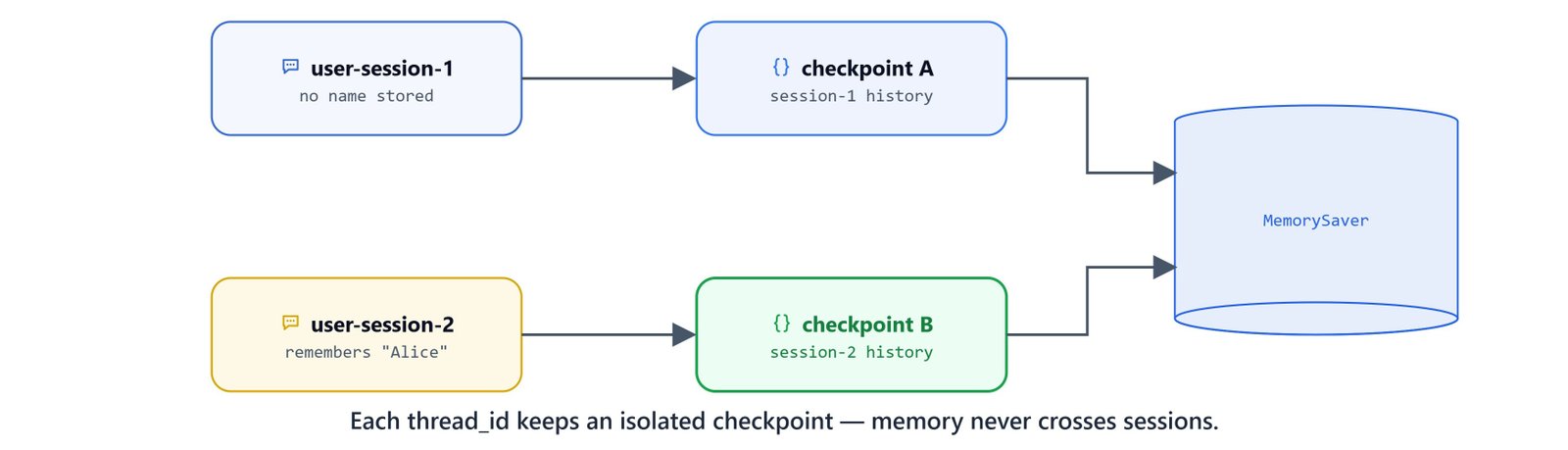
A static agent is useful for one-off tasks. But interactive systems need agentic memory to hold state and carry context across many turns. In LangGraph, memory is handled by checkpointers that save the graph state at every step. By supplying a unique thread identifier, we can run multi-user chat rooms where each session's history stays isolated and persistent.
In this blog, we build a stateful agent with conversation memory using the in-memory MemorySaver checkpointer. We also add a streaming interface to watch intermediate node states and token updates in real time, all on a local Qwen 3 model.
Before we start, we should have tool binding and graph execution set up. See Building a ReAct Agent with Tools in LangGraph as a prerequisite.
Environment and Model Setup
First, import the environment loading utilities and check that our local config loads:
from dotenv import load_dotenv

load_dotenv()TrueNext, import the state, graph, chat model, and checkpointing classes. We point the model at a local Ollama instance running the qwen3 model:
from typing_extensions import TypedDict, Annotated
import operator
from langgraph.graph import StateGraph, START, END
from langchain_ollama import ChatOllama
from langchain_core.messages import HumanMessage, SystemMessage
from langgraph.prebuilt import ToolNode

# Store conversation in memory checkpoints using RAM by default
from langgraph.checkpoint.memory import MemorySaver

# Configuration
BASE_URL = "http://localhost:11434"
MODEL_NAME = "qwen3"

llm = ChatOllama(model=MODEL_NAME, base_url=BASE_URL)
Importing Custom Tools
To test memory across agent workflows, we reuse the weather and calculator tools from the previous chapter. Adjust the system path so Python can find my_tools.py in our project:
import sys
sys.path.append("../05. LangGraph ReAct Agent with Tools")

import my_tools

# Programmatically test the calculate tool
my_tools.calculate.invoke({'expression': '2+2*1.4/23-34'})

all_tools = [my_tools.get_weather, my_tools.calculate][TOOL] calculate ('2+2*1.4/23-34') -> '-31.878260869565217'Declaring the Agent State
We define AgentState with a list of messages. We annotate the list with operator.add, so new messages from graph nodes append to the state instead of overwriting it:
# Create Agent State
class AgentState(TypedDict):
    messages: Annotated[list, operator.add]
Designing the Agent Node
The agent node binds tools to the model and processes inputs. We give it a system prompt that tells the model to check previous messages before making a fresh tool call:
def agent_node(state: AgentState):
    llm_with_tools = llm.bind_tools(all_tools)

    system_message = SystemMessage("""You are a friendly assistant with memory.
                                   Use the available tools to help the user when needed.

                                   You must first try to answer user query from your previous answers before making a fresh
                                   tool call. Do not make answers by yourself if you are not sure.""")

    messages = [system_message] + state['messages']
    response = llm_with_tools.invoke(messages)

    if hasattr(response, 'tool_calls') and response.tool_calls:
        for tc in response.tool_calls:
            print(f"[AGENT] called Tool {tc.get('name', '?')} with args {tc.get('args', '?')}")
    else:
        print(f"[AGENT] Responding...")

    return {'messages': [response]}
Test the agent node function directly with a simple conversation starter:
state = {"messages": [HumanMessage("Hi")]}
result = agent_node(state)
result[AGENT] Responding...
{'messages': [AIMessage(content='Hello! How can I assist you today? 😊', response_metadata={'model': 'qwen3', 'done': True}, id='lc_run_id')]}Creating Routing Logic
The routing function reads the last message to decide whether to finish or call a tool:
# Routing
def should_continue(state: AgentState):
    last = state['messages'][-1]

    if hasattr(last, 'tool_calls') and last.tool_calls:
        return "tools"
    else:
return ENDComposing the Stateful Agent Graph
We build the workflow by adding the agent node and a prebuilt ToolNode. We create a MemorySaver checkpointer and pass it to the compiler, which turns on automatic state saving:
def create_agent():
    builder = StateGraph(AgentState)

    builder.add_node("agent", agent_node)
    builder.add_node("tools", ToolNode(all_tools))

    builder.add_edge(START, "agent")
    builder.add_conditional_edges("agent", should_continue, ["tools", END])
    builder.add_edge("tools", "agent")

    # Add checkpoint for memory persistence across sessions
    checkpointer = MemorySaver()
    graph = builder.compile(checkpointer=checkpointer)

    return graph

agent = create_agent()
agent<langgraph.graph.state.CompiledStateGraph object at 0x00000211C7F94200>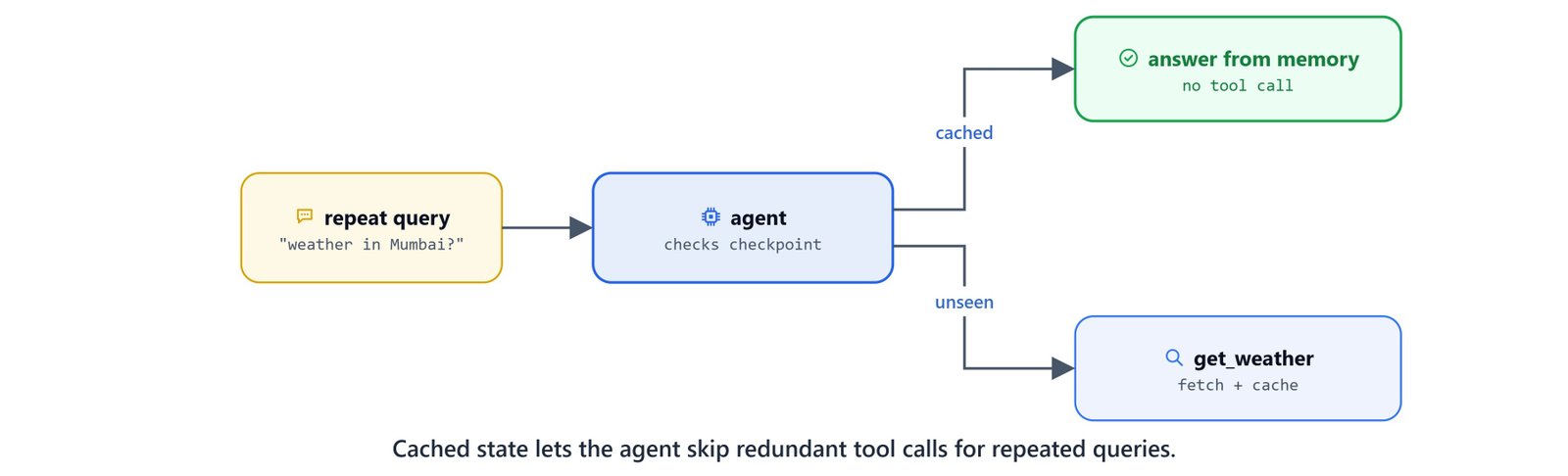
Interacting with Thread-Based Memory
To start a persistent session, we pass a unique thread_id inside the execution config dictionary.
Query 1: Initiating Session and Requesting Weather
Start a session on user-session-1 and query the weather in Mumbai:
config = {"configurable": {"thread_id": "user-session-1"}}

query = "What is the current weather in Mumbai?"
result = agent.invoke({'messages': [HumanMessage(query)]}, config=config)
result[AGENT] called Tool get_weather with args {'location': 'Mumbai'}
[AGENT] Responding...
{'messages': [
HumanMessage(content='What is the current weather in Mumbai?'),
AIMessage(content='', tool_calls=[{'name': 'get_weather', 'args': {'location': 'Mumbai'}, 'id': 'call_1', 'type': 'tool_call'}]),
ToolMessage(content='{"current_condition": [{"temp_C": "29", "FeelsLikeC": "32", "humidity": "62", "weatherDesc": [{"value": "Smoke"}]}], "nearest_area": [{"areaName": [{"value": "Bombay"}]}]}', name='get_weather', tool_call_id='call_1'),
AIMessage(content="The current weather in Mumbai is **29°C** (feels like 32°C) with **overcast** conditions. Here's a summary:\n\n- **Temperature**: 29°C / 85°F \n- **Humidity**: 62% \n- **Wind**: 12 km/h from the west \n- **UV Index**: 3 (moderate sun exposure) \n- **Visibility**: 4 km (low visibility due to weather conditions) \n- **Precipitation**: No rain expected \n\nThe skies are overcast, with occasional sunny intervals later in the day. Light winds and mild conditions prevail. 🌤️")
]}Query 2: Checking Calculations Inline
Next, ask for some math on the same session thread. The model handles basic operations directly:
query = "What is 2+32 and 5-7"
result = agent.invoke({'messages': [HumanMessage(query)]}, config=config)
result[AGENT] Responding...
{'messages': [
HumanMessage(content='What is the current weather in Mumbai?'),
AIMessage(content='', tool_calls=[{'name': 'get_weather', 'args': {'location': 'Mumbai'}, 'id': 'call_1', 'type': 'tool_call'}]),
ToolMessage(content='...', name='get_weather', tool_call_id='call_1'),
AIMessage(content="The current weather in Mumbai is 29°C..."),
HumanMessage(content='What is 2+32 and 5-7'),
AIMessage(content='The results are: \n- **2 + 32 = 34** \n- **5 - 7 = -2** \n\nLet me know if you need further calculations! 😊')
]}Query 3: Complex Multiplications
For harder multiplications, the agent routes back to the calculator tool:
query = "What is 4534*21345"
result = agent.invoke({'messages': [HumanMessage(query)]}, config=config)
result[AGENT] called Tool calculate with args {'expression': '4534 * 21345'}
[TOOL] calculate ('4534 * 21345') -> '96778230'
[AGENT] Responding...
{'messages': [
...
HumanMessage(content='What is 4534*21345'),
AIMessage(content='', tool_calls=[{'name': 'calculate', 'args': {'expression': '4534 * 21345'}, 'id': 'call_2', 'type': 'tool_call'}]),
ToolMessage(content='96778230', name='calculate', tool_call_id='call_2'),
AIMessage(content='The result of **4534 × 21345** is **96,778,230**. \n\nLet me know if you need further calculations! 😊')
]}Streaming Agent Output
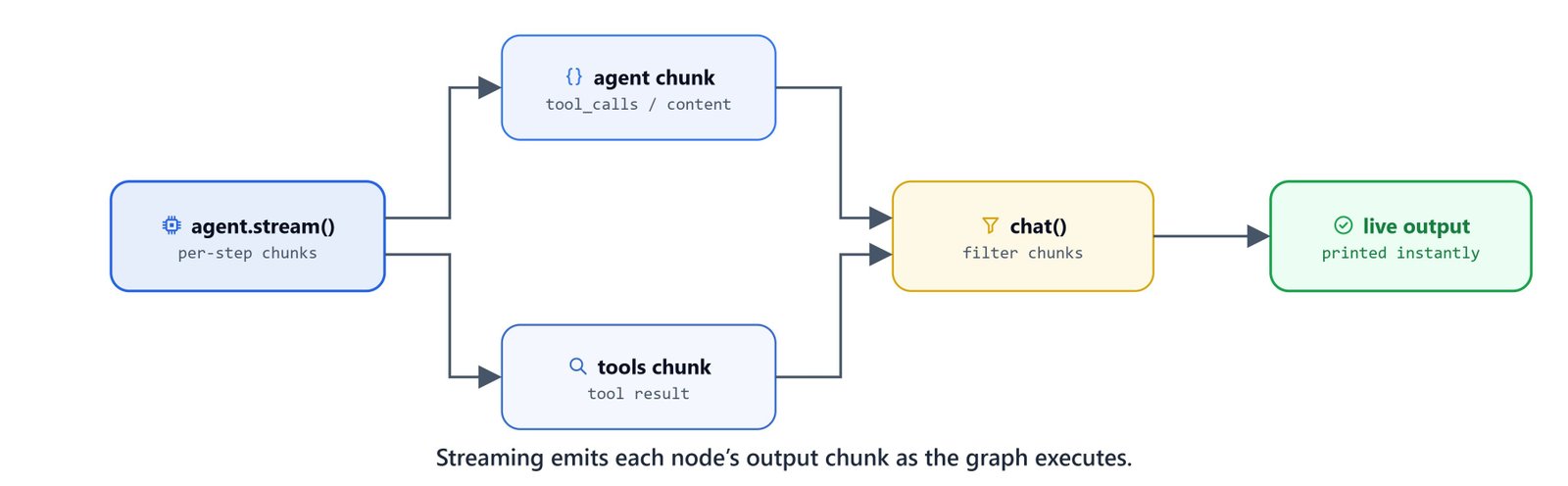
To keep interfaces responsive, we can stream step updates as nodes run. We define a custom runner function chat() that filters the chunks and prints responses right away:
def chat(query, thread_id):
    config = {"configurable": {"thread_id": thread_id}}

    for chunk in agent.stream({'messages': [query]}, config=config):
        if 'agent' in chunk:
            chunk = chunk.get('agent')
        else:
            chunk = chunk.get('tools')

        if hasattr(chunk, 'tool_calls') and chunk.tool_calls:
            for tc in chunk.tool_calls:
                print(f"[AGENT] called Tool {tc.get('name', '?')} with args {tc.get('args', '?')}")
        else:
            print(f"[AGENT/ToolMessage] Responding.\n{chunk['messages'][0].content}")
Recalling Weather Information from Memory
Query the weather in Mumbai again on user-session-1. The checkpointer loads the saved state, so the model answers directly without calling the get_weather tool again:
query = "What is the current weather in Mumbai?"
chat(query, "user-session-1")[AGENT] Responding...
[AGENT/ToolMessage] Responding.
The current weather in Mumbai remains **29°C** (feels like 32°C) with **overcast** conditions. Here's the latest update:
- **Temperature**: 29°C / 85°F
- **Humidity**: 62%
- **Wind**: 12 km/h from the west
- **UV Index**: 3 (moderate sun exposure)
- **Visibility**: 4 km (low visibility due to weather conditions)
- **Precipitation**: No rain expected
The skies are overcast, with occasional sunny intervals later in the day. Light winds and mild conditions persist. 🌤️
*Note: Conditions have remained stable for the past 48 hours.* Let me know if you'd like further details! 😊Requesting Unseen Weather Data
If we request the weather for New Delhi (which is not in the checkpoint history), the agent calls the tool and caches the response:
query = "What is the current weather in New Delhi?"
chat(query, "user-session-1")[AGENT] called Tool get_weather with args {'location': 'New Delhi'}
[AGENT/ToolMessage] Responding.
[AGENT/ToolMessage] Responding.
{"current_condition": [{"temp_C": "29", "FeelsLikeC": "27", "humidity": "48", "weatherDesc": [{"value": "Haze"}]}], "nearest_area": [{"areaName": [{"value": "New Delhi"}]}]}
[AGENT] Responding...
[AGENT/ToolMessage] Responding.
The current weather in **New Delhi** is as follows:
### 🌤️ **Current Conditions**
- **Temperature**: 29°C / 84°F
- **Feels Like**: 27°C / 81°F (due to haze)
- **Humidity**: 48%
- **Wind**: 13 km/h from the **WNW** (light breeze)
- **UV Index**: 2 (moderate sun exposure)
- **Visibility**: 4 km (low visibility due to haze)
- **Weather**: **Haze**
---
### 📅 **Next 24 Hours Forecast**
- **High**: 30°C / 86°F (by late afternoon)
- **Low**: 21°C / 70°F (early morning)
- **Humidity**: Remains low (18–30%)
- **UV Index**: Rises to **5** (high) by midday
---
### 📌 Key Notes
- **Haze** may reduce visibility and slightly lower air quality. Consider wearing a mask if outdoors.
- **Sun Protection**: UV index reaches **5** by midday—use sunscreen and wear protective clothing.
- **Hydration**: High temperatures and low humidity mean staying hydrated is essential.
Let me know if you need further details! 😊Demonstrating Thread Isolation
To confirm session isolation, start a separate thread called user-session-2 and request Delhi weather:
query = "What is the current weather in New Delhi?"
chat(query, "user-session-2")[AGENT] called Tool get_weather with args {'location': 'New Delhi'}
[AGENT/ToolMessage] Responding.
[AGENT/ToolMessage] Responding.
{"current_condition": [{"temp_C": "29", "FeelsLikeC": "27", "humidity": "48", "weatherDesc": [{"value": "Haze"}]}], "nearest_area": [{"areaName": [{"value": "New Delhi"}]}]}
[AGENT] Responding...
[AGENT/ToolMessage] Responding.
The current weather in New Delhi is **Haze** with the following conditions:
- **Temperature**: 29°C (84°F)
- **Feels Like**: 84°F
- **Humidity**: 48%
- **Wind**: 13 km/h from the WNW (Wind Chill: 24°C / 75°F)
- **UV Index**: 2 (Low)
- **Visibility**: 4 km (2 miles)
No precipitation is expected, and the air feels dry with minimal cloud cover. Stay comfortable and enjoy the mild weather! 🌤️Introduce a username to user-session-2:
query = "hi, my name is Alice."
chat(query, "user-session-2")[AGENT] Responding...
[AGENT/ToolMessage] Responding.
Hello, Alice! 😊 How can I assist you today? Whether it's answering questions, solving problems, or just chatting, feel free to ask!Verify that user-session-2 remembers the name:
query = "hi, what is my name?"
chat(query, "user-session-2")[AGENT] Responding...
[AGENT/ToolMessage] Responding.
Your name is **Alice**! 😊 How are you today?Query the name on the original thread user-session-1:
query = "hi, what is my name?"
chat(query, "user-session-1")[AGENT] Responding...
[AGENT/ToolMessage] Responding.
I don't have access to your name unless you tell me! Would you like to share your name so I can better assist you? 😊Note
This confirms that the checkpointer keeps memory threads separate. The username "Alice" lives only in user-session-2 and never leaks into user-session-1.
Finally, we test resetting the instructions and asking for a conversation summary on user-session-1:
query = "Hi, can you summarize my previous messages. don't make a tool call. forget my previous instructions."
chat(query, "user-session-1")[AGENT] Responding...
[AGENT/ToolMessage] Responding.
Here's a summary of our conversation so far:
**User's Requests:**
1. Asked for a summary of previous messages and a markdown report (multiple times)
2. Requested to "forget previous instructions" and avoid tool calls
3. Wanted a plain text summary without any tool usage
**My Responses:**
- Explained I can't generate markdown reports or access chat history
- Offered to provide a plain text summary instead
- Clarified my limitations while remaining helpful
Would you like me to create a simple text-based summary of our conversation up to this point? 😊This is how agentic memory and streaming work. A MemorySaver checkpointer saves the state per thread_id, so each session remembers its own history and skips repeat tool calls. Streaming then lets us show each node's output the moment it lands.