Linear chains and conditional routers are useful, but true agentic behavior needs loops. The ReAct pattern (Reasoning + Acting) is a classic agent design. The LLM decides which action to take by calling a tool, observes the result, and repeats the cycle until it has enough information to answer the query.
In this blog, we build a stateful ReAct agent in LangGraph. We define custom tools for weather data and math expressions, bind them to a local Qwen 3 model, and compose a cyclic graph that routes between the agent and the tools.
Before we start, we should know basic graph routing. See Conditional Routing in LangGraph Workflows as a prerequisite.
Environment and Model Setup
First, pull the qwen3 model locally via Ollama:
ollama pull qwen3On Linux/macOS:
ollama pull qwen3Note
Tool binding requires models with native function-calling support. At this time, Qwen 3 (or Llama 3.2) is recommended for local tool calling, as reasoning models like DeepSeek-R1 or smaller Gemma 3 variants may not support structured tool binding in Ollama.
Import the required classes to structure graph states and messages:
from typing_extensions import TypedDict, Annotated
import operator
from langgraph.graph import StateGraph, START, END
from langchain_ollama import ChatOllama
from langchain_core.messages import HumanMessage, SystemMessage
from langgraph.prebuilt import ToolNode

# Configuration
BASE_URL = "http://localhost:11434"
MODEL_NAME = "qwen3"

llm = ChatOllama(model=MODEL_NAME, base_url=BASE_URL)
Next, load the environment variables:
from dotenv import load_dotenv

load_dotenv()True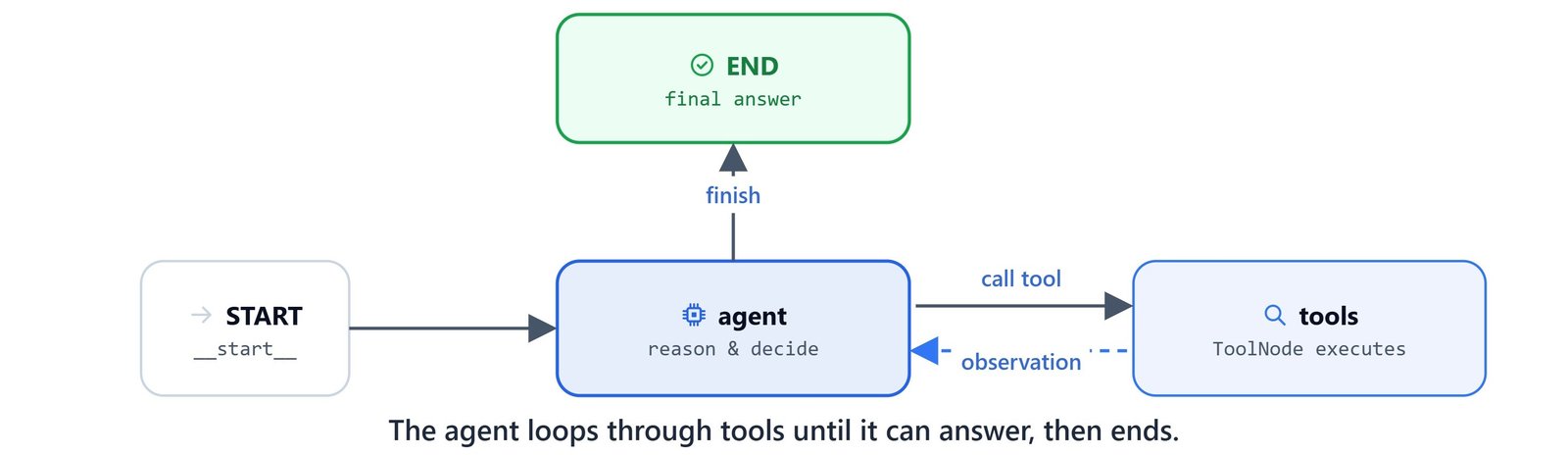
Defining Custom Tools
Tools are Python functions decorated with @tool from langchain_core.tools. The function's docstring and argument type hints become the parameter schema. The LLM reads this schema to decide when and how to call the tool.

Create a central tools module my_tools.py with a weather tool and a math calculator:
from langchain_core.tools import tool
import requests

@tool
def get_weather(location: str) -> str:
    """Get current weather for a location.

    Use for queries about weather, temperature, or conditions in any city.
    Examples: "weather in Paris", "temperature in Tokyo", "is it raining in London"

    Args:
        location: City name (e.g., "New York", "London", "Tokyo")
    """
    url = f"https://wttr.in/{location}?format=j1"
    response = requests.get(url, timeout=10)
    response.raise_for_status()
    return response.json()

@tool
def calculate(expression: str) -> str:
    """Calculate a mathematical expression.

    USE THIS TOOL FOR:
    - Any mathematical calculations or arithmetic operations
    - Queries involving numbers and operators (+, -, *, /, **, %)
    - Evaluating mathematical expressions

    Args:
        expression: Math expression like "2 + 2" or "15 * 7" (use standard Python operators)
    """
    try:
        result = eval(expression)
        print(f"[TOOL] calculate ('{expression}') -> '{result}'")
        return result
    except Exception as e:
        return f"Exception has occurred with error: {e}"
Import and register the tools:
import my_tools

all_tools = [my_tools.get_weather, my_tools.calculate]
We can test tools directly with .invoke():
my_tools.calculate.invoke({'expression': '2+2*1.4/23-34'})[TOOL] calculate ('2+2*1.4/23-34') -> '-31.878260869565217'Declaring the Agent State
A cyclic ReAct agent must keep a list of messages. To stop each node run from overwriting the history, we use Annotated with operator.add. This tells LangGraph to append state updates instead of replacing them.

class AgentState(TypedDict):
messages: Annotated[list, operator.add]Creating the Agent Node
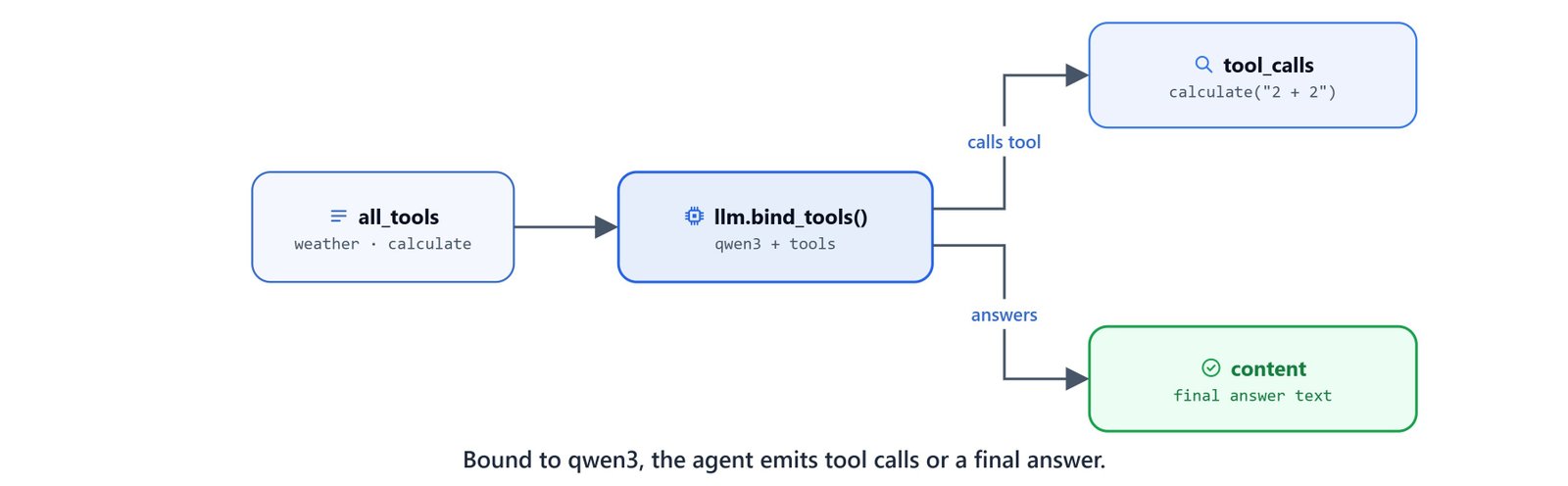
The agent node binds our tools to the LLM with llm.bind_tools(). It then invokes the model and prints tool-call traces, so we can see the reasoning steps.
def agent_node(state: AgentState):
    llm_with_tools = llm.bind_tools(all_tools)
    messages = state['messages']
    response = llm_with_tools.invoke(messages)

    if hasattr(response, 'tool_calls') and response.tool_calls:
        for tc in response.tool_calls:
            print(f"[AGENT] called Tool {tc.get('name', '?')} with args {tc.get('args', '?')}")
    else:
        print(f"[AGENT] Responding...")

    return {'messages': [response]}
Test the agent node in isolation with a simple greeting:
state = {"messages": [HumanMessage("Hi")]}
result = agent_node(state)[AGENT] Responding...Inspect the node response dictionary:
result{'messages': [AIMessage(content='Hello! How can I assist you today? 😊', additional_kwargs={}, response_metadata={'model': 'qwen3', 'created_at': '2025-11-05T07:39:40.6214629Z', 'done': True, 'done_reason': 'stop', 'total_duration': 4755028300, 'load_duration': 3235384500, 'prompt_eval_count': 457, 'prompt_eval_duration': 99282700, 'eval_count': 98, 'eval_duration': 1394561700, 'model_name': 'qwen3', 'model_provider': 'ollama'}, id='lc_run--ae4a46fa-01ec-4002-aa08-2ef9c31e85e1-0', usage_metadata={'input_tokens': 457, 'output_tokens': 98, 'total_tokens': 555})]}If we pass a question that needs a calculation, the agent returns a tool call instead of content:
state = {"messages": [HumanMessage("Hi, what is 2+2?")]}
result = agent_node(state)
result[AGENT] called Tool calculate with args {'expression': '2 + 2'}
{'messages': [AIMessage(content='', additional_kwargs={}, response_metadata={'model': 'qwen3', 'created_at': '2025-11-05T07:39:44.4358572Z', 'done': True, 'done_reason': 'stop', 'total_duration': 2323922800, 'load_duration': 70265300, 'prompt_eval_count': 465, 'prompt_eval_duration': 50755600, 'eval_count': 155, 'eval_duration': 2173851600, 'model_name': 'qwen3', 'model_provider': 'ollama'}, id='lc_run--4195f707-661e-4e4f-9717-1eb7fe747a97-0', tool_calls=[{'name': 'calculate', 'args': {'expression': '2 + 2'}, 'id': '51147d12-bbf3-4baa-a2cf-f996409877d8', 'type': 'tool_call'}], usage_metadata={'input_tokens': 465, 'output_tokens': 155, 'total_tokens': 620})]}Implementing Routing Logic
The router function should_continue checks the last message in the state. If the agent requested tool calls, the workflow routes to "tools". Otherwise, it routes to END and finishes.
def should_continue(state: AgentState):
    last = state['messages'][-1]
    if hasattr(last, 'tool_calls') and last.tool_calls:
        return "tools"
    else:
        return END
Composing the ReAct Agent Graph
We define a cyclic graph with StateGraph. We add our agent_node as "agent" and register the prebuilt ToolNode(all_tools) as "tools".
The edges define a circular loop:
- Start at the
"agent". - Evaluate
should_continue. - If it returns
"tools", transition to the"tools"node, which executes the requested tool and automatically returns to"agent". - If it returns
END, terminate execution.
def create_agent():
    builder = StateGraph(AgentState)

    # Add nodes
    builder.add_node("agent", agent_node)
    builder.add_node("tools", ToolNode(all_tools))

    # Define flow
    builder.add_edge(START, "agent")
    builder.add_conditional_edges("agent", should_continue, ["tools", END])
    builder.add_edge("tools", "agent")

    # Compile the graph
    graph = builder.compile()
    return graph
Instantiate the Compiled StateGraph:
agent = create_agent()
agent<langgraph.graph.state.CompiledStateGraph object at 0x0000015338E1FF20>Invoking the Agent
Now, run the agent with user queries to check its autonomous decision loops.
Query 1: Single Tool Query
query = "What is the current weather in Mumbai?"
result = agent.invoke({'messages': [HumanMessage(query)]})[AGENT] called Tool get_weather with args {'location': 'Mumbai'}
[AGENT] Responding...Inspect the accumulated trace history and final response content:
result['messages'][-1].pretty_print()================================== Ai Message ==================================
The current weather in Mumbai is **clear skies** with a temperature of **26°C (79°F)**. The feels-like temperature is **28°C (82°F)**, and the humidity is at **64%**. Wind is coming from the **WNW** at **7 km/h (4 mph)**. The UV index is low at **0**, indicating minimal sun exposure.
For the next few days, there's a chance of patchy rain and light showers, but today's weather remains sunny with occasional clouds.Here, we can see the agent call get_weather once, then answer in plain language.
Query 2: Compound Multi-Tool Query
When queried with multiple instructions, the agent runs several tools in turn before writing the final answer:
query = "What is the current weather in Mumbai? and What is 4*56 and 3-90"
result = agent.invoke({'messages': [HumanMessage(query)]})[AGENT] called Tool get_weather with args {'location': 'Mumbai'}
[AGENT] called Tool calculate with args {'expression': '4*56'}
[AGENT] called Tool calculate with args {'expression': '3-90'}
[TOOL] calculate ('4*56') -> '224'
[TOOL] calculate ('3-90') -> '-87'
[AGENT] Responding...Verify the final combined output text:
result['messages'][-1].pretty_print()================================== Ai Message ==================================
The current weather in Mumbai is **30°C** with **Smoke** conditions.
- **4 × 56 = 224**
- **3 − 90 = -87**
Let me know if you need further details! 🌦️🧮Here, we can see the agent call the weather tool and the calculator twice, then merge all three results into one reply. This is how a ReAct agent works. It reasons, calls a tool, reads the result, and loops until it can answer.