The Model Context Protocol (MCP) is an open standard that lets LLM agents discover and use tools from external servers. Instead of writing a custom API wrapper for every service, we connect to an MCP server that exposes a standard tool interface. The agent then discovers the available tools and their parameters, and calls them through one protocol.
In this blog, we use langchain-mcp-adapters to connect a LangGraph agent to the @openbnb/mcp-server-airbnb MCP server. The server exposes two tools for searching and inspecting Airbnb listings. The agent discovers them automatically at startup.

Prerequisites: Node.js (v18+) for npx, langgraph, langchain-ollama, langchain-mcp-adapters, python-dotenv installed. Ollama running with qwen3.
# Install Node.js from https://nodejs.org/
node --version  # Should show v18+

# Install Python dependencies
pip install -U langchain-mcp-adapters langgraph langchain-ollama python-dotenv

# Pull the model
ollama pull qwen3
Note
The Airbnb MCP server installs automatically via npx on first run, with no manual step. npx downloads @openbnb/mcp-server-airbnb from npm and runs it as a subprocess.
MCP Server Setup
Configuration
The MultiServerMCPClient connects to one or more MCP servers. Each server has a command, arguments, and transport type. The Airbnb server uses stdio transport. It runs as a subprocess and talks over stdin/stdout:
from langchain_mcp_adapters.client import MultiServerMCPClient

client = MultiServerMCPClient({
    "airbnb": {
        "command": "npx",
        "args": ["-y", "@openbnb/mcp-server-airbnb", "--ignore-robots-txt"],
        "transport": "stdio",
    }
})command:npx, the Node.js package runner.args:["-y", "@openbnb/mcp-server-airbnb", "--ignore-robots-txt"], auto-install the package and ignore robots.txt for testing.transport:"stdio", communicate via standard input/output.
Available Tools
The Airbnb MCP server exposes two tools:
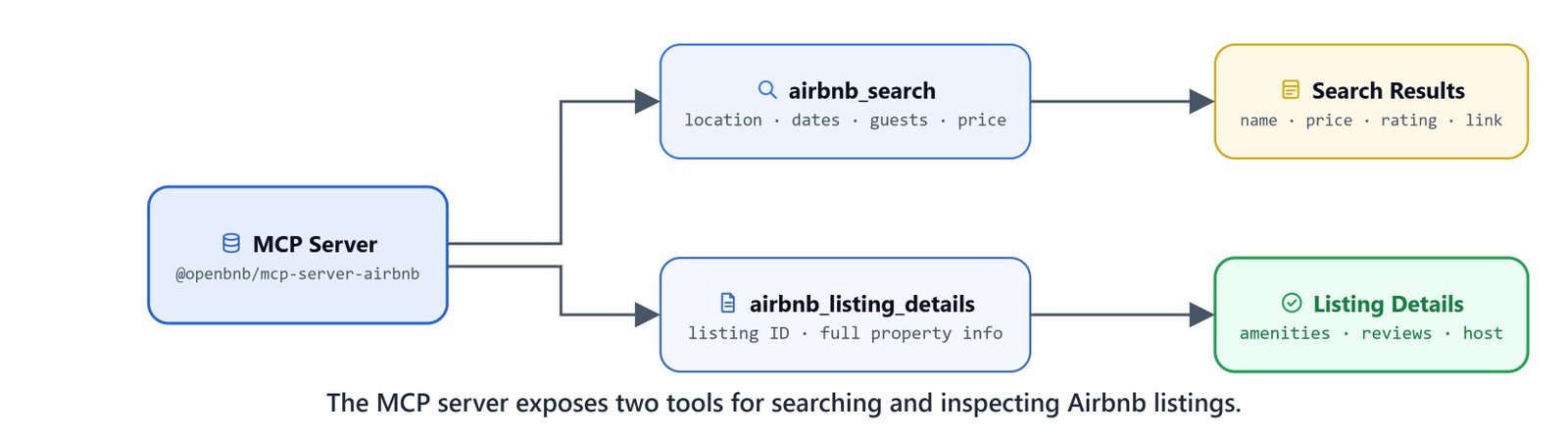
| Tool | Description | Required Parameters |
|---|---|---|
airbnb_search |
Search Airbnb listings with filters | location |
airbnb_listing_details |
Get detailed property information | id (listing ID) |
airbnb_search parameters:
location(required): City or area to search (e.g."San Francisco, CA")checkin/checkout: Dates inYYYY-MM-DDformatadults,children,infants,pets: Guest countsminPrice/maxPrice: Price range filterscursor: Pagination token
airbnb_listing_details parameters:
id(required): Airbnb listing IDcheckin,checkout,adults, etc. (optional)
The airbnb_mcp.py Module
The complete MCP agent is a standalone Python module. It uses async functions throughout, because MCP tool loading and execution are asynchronous:
"""Simple Airbnb MCP module."""

from langchain_ollama import ChatOllama
from langgraph.graph import StateGraph, START, END
from langgraph.prebuilt import ToolNode, tools_condition
from langchain_core.messages import HumanMessage

from typing_extensions import TypedDict, Annotated
import operator

# Config
LLM_MODEL = "qwen3"
BASE_URL = "http://localhost:11434"

llm = ChatOllama(model=LLM_MODEL, base_url=BASE_URL, temperature=0)


class AgentState(TypedDict):
    messages: Annotated[list, operator.add]
Async Tool Loading
from langchain_mcp_adapters.client import MultiServerMCPClient
import asyncio


async def get_tools():

    client = MultiServerMCPClient(
        {
            "airbnb": {
                "command": "npx",
                "args": ["-y", "@openbnb/mcp-server-airbnb", "--ignore-robots-txt"],
                "transport": "stdio"
            }
        }
    )


    tools = await client.get_tools()

    print(f"Loaded {len(tools)} Tools")
    print(f"Tools Available: {tools}")

    return tools
get_tools() connects to the MCP server, discovers all the tools, and returns them as LangChain StructuredTool objects. These work directly with llm.bind_tools() and ToolNode().

Async Agent Node
async def agent_node(state: AgentState):
    tools = await get_tools()

    llm_with_tools = llm.bind_tools(tools)

    response = llm_with_tools.invoke(state['messages'])

    return {'messages': [response]}
Async Graph Creation
async def create_agent():
    tools = await get_tools()

    builder = StateGraph(AgentState)
    builder.add_node('agent', agent_node)
    builder.add_node('tools', ToolNode(tools))


    # add edges
    builder.add_edge(START, 'agent')
    builder.add_edge('tools', 'agent')

    builder.add_conditional_edges('agent', tools_condition)

    graph = builder.compile()

    return graph
tools_condition from langgraph.prebuilt routes to tools if the agent's response has tool calls, or to END if it does not. It replaces the manual should_continue router from earlier lessons.
Search Function
async def search(query):
    agent = await create_agent()
    result = await agent.ainvoke({'messages': [HumanMessage(query)]})

    response = result['messages'][-1].content

    print(response)

    return response


if __name__=="__main__":
    query = "Show me premium hotels for party in Mumbai"
    asyncio.run(search(query))
Running from a Notebook
Jupyter notebooks run their own event loop, which conflicts with asyncio.run(). The workaround is to run the MCP agent as a subprocess:
import subprocess
import sys

def ask_airbnb(query):

    code = f"""
import asyncio
from airbnb_mcp import search
asyncio.run(search("{query}"))
"""

    result = subprocess.run([sys.executable, '-c', code], capture_output=True, text=True)

    return result.stdout
End-to-End Demo
query = "show me the best hotels in mumbai"
response = ask_airbnb(query)

print(response)Loaded 2 Tools
Tools Available: [StructuredTool(name='airbnb_search', ...), StructuredTool(name='airbnb_listing_details', ...)]Here, we can see the agent load the two MCP tools, call airbnb_search with location="mumbai", and return listing results with names, prices, ratings, and direct Airbnb links.
How MCP Integration Works
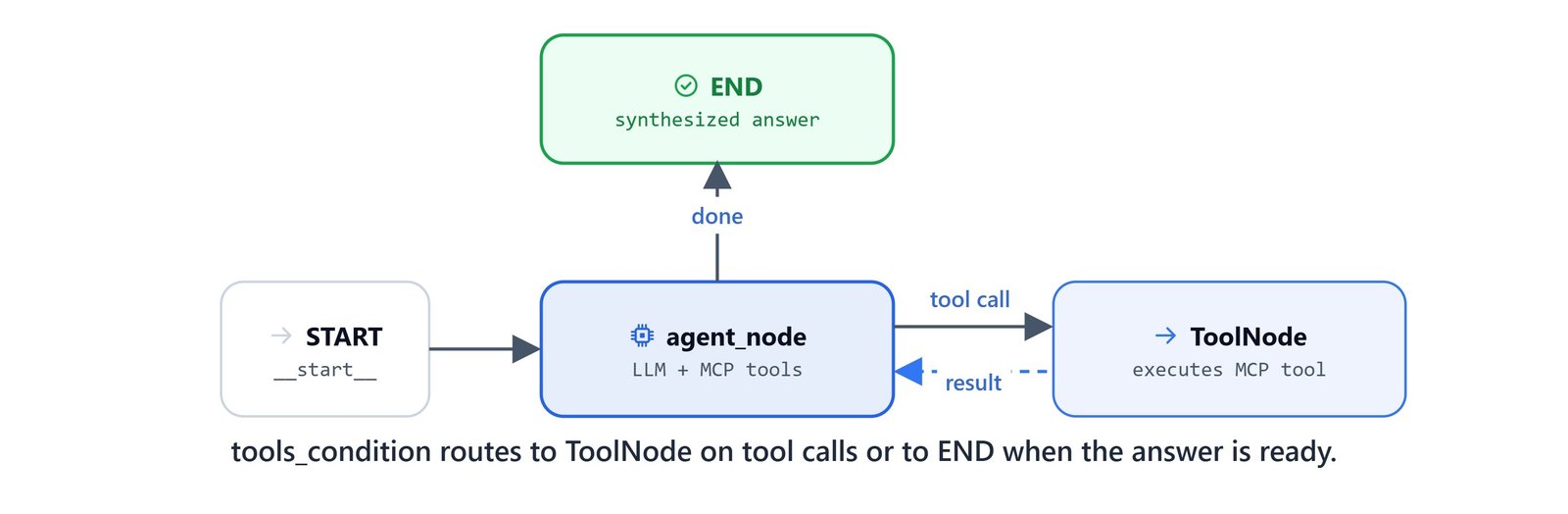
Here is the key advantage of MCP. The agent discovers tools at runtime instead of having them hardcoded. If the MCP server adds new tools or changes parameters, the agent adapts on the next get_tools() call.
Troubleshooting
npx not found:
# Install Node.js from https://nodejs.org/
node --version  # Should show v18+
On Linux/macOS: Install Node.js via your package manager (brew install node or sudo apt install nodejs npm).
Connection timeout:
- Check your internet connection,
npxdownloads the MCP server package on first run - Airbnb may be rate-limiting requests, wait and retry
Tool not found:
- Ensure
npxinstalled@openbnb/mcp-server-airbnbsuccessfully - Check terminal for error messages during the
npxexecution
What You Built
In this blog, we connected a LangGraph agent to an external MCP server:
- MCP protocol: standardized tool discovery and execution via
langchain-mcp-adapters - MultiServerMCPClient: configures server connections with command, args, and transport settings
- Async architecture:
async def agent_node,async def create_agent,await client.get_tools()for non-blocking MCP communication - tools_condition: automatic routing based on tool calls, replacing manual router functions
- Airbnb tools:
airbnb_search(search listings by location, dates, guests, price) andairbnb_listing_details(detailed property info) - Subprocess wrapper:
subprocess.run()workaround for running async MCP agents from Jupyter notebooks
MCP separates tool implementation from agent logic. Any MCP-compatible server (databases, APIs, file systems) plugs into the agent with a single entry in the MultiServerMCPClient config. This is how MCP connects a LangGraph agent to the outside world.