Text Extraction and Matching
spaCy is a free, open-source library for advanced Natural Language Processing (NLP) in Python.
When we work with a lot of text, we soon want to know more about it. For example, what is it about? What do the words mean in context? Who is doing what to whom? What companies and products are mentioned? Which texts are similar to each other?
spaCy is designed for production use and helps us build applications that process and "understand" large volumes of text. It can build information extraction or natural language understanding systems, or pre-process text for deep learning.
Below are some of spaCy's features. Some are about language ideas. Others are about general machine learning.
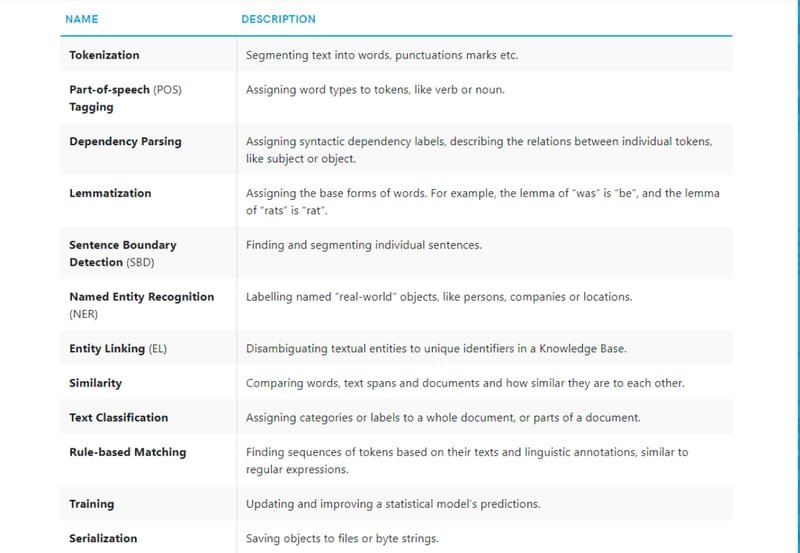
spaCy installation
We can run the following commands:-
pip install -U spacy
pip install -U spacy-lookups-data
python -m spacy download en_core_web_sm
spaCy Pipelining
When we call nlp on a text, spaCy first tokenizes the text to produce a Doc object. The Doc is then processed in several different steps, also referred to as the processing pipeline. The pipeline used by the default models consists of a tagger, a parser and an entity recognizer. Each pipeline component returns the processed Doc, which is then passed on to the next component.
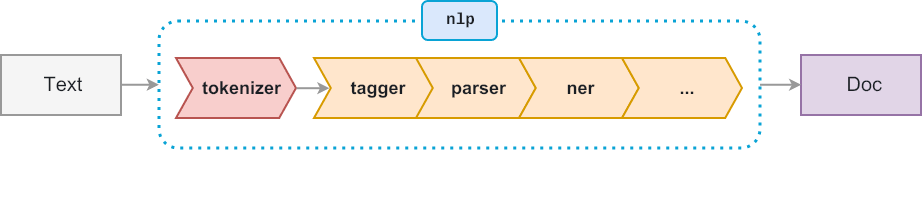
Rule-based matching
Compared to using regular expressions on raw text, spaCy's rule-based matcher engines and components not only let us find the words and phrases we are looking for, they also give us access to the tokens within the document and their relationships.
This means we can easily access and analyze the surrounding tokens, merge spans into single tokens, or add entries to the named entities in doc.ents.
Token-based matching
spaCy features a rule-matching engine, the Matcher, that operates over tokens, similar to regular expressions.
The rules can refer to token annotations (e.g. the token text or tag_, and flags (e.g. IS_PUNCT).
The rule matcher also lets us pass in a custom callback to act on matches, for example to merge entities and apply custom labels.
We can also associate patterns with entity IDs, to allow some basic entity linking or disambiguation. To match large terminology lists, we can use the PhraseMatcher, which accepts Doc objects as match patterns.
Adding patterns
To find a combination of three tokens, define a pattern like this:
- A token whose lowercase form matches "hello", e.g. "Hello" or "HELLO".
- A token whose
is_punctflag is set toTrue, i.e. any punctuation. - A token whose lowercase form matches "world", e.g. "World" or "WORLD".
[{"LOWER": "hello"}, {"IS_PUNCT": True}, {"LOWER": "world"}]
When writing patterns, keep in mind that each dictionary represents one token. If spaCy's tokenization doesn't match the tokens defined in a pattern, the pattern is not going to produce any results. When developing complex patterns, make sure to check examples against spaCy's tokenization
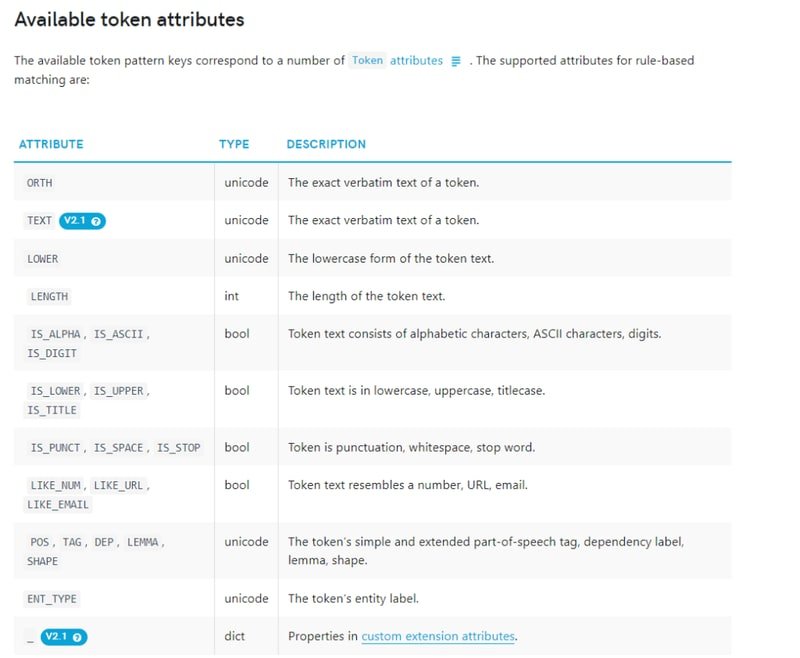
Here we are importing the necessary libraries.
import spacy
from spacy.matcher import Matcher
from spacy.tokens import Span
from spacy import displacy
spacy.load() loads a model. When we call nlp on a text, spaCy first tokenizes the text to produce a Doc object. The Doc is then processed using the pipeline.
nlp = spacy.load('en_core_web_sm')
doc = nlp('Hello World!')
docHello World!Now we will see the tokens in doc.
for token in doc:
print(token)Hello
World
!Now we are going to perform token based matching. We have defined a pattern which consists of-
- A token whose lowercase form matches "hello", e.g. "Hello" or "HELLO".
- A token whose is_punct flag is set to True, i.e. any punctuation.
- A token whose lowercase form matches "world", e.g. "World" or "WORLD".
The matcher also lets us use quantifiers, specified as the 'OP' key. Quantifiers let us define sequences of tokens to match, for example one or more punctuation marks, or specify optional tokens. 'OP':'?' makes the pattern optional, by allowing it to match 0 or 1 times.
pattern = [{"LOWER": "hello", 'OP':'?'}, {"IS_PUNCT": True, 'OP':'?'}, {"LOWER": "world"}]matcher.add() adds a rule to the matcher, consisting of an ID key, one or more patterns, and a callback function to act on the matches. In our case the ID key is HelloWorld. We have not passed a callback function hence we have passed None. The matcher returns a list of (match_id, start, end) tuples. The match_id is the hash value of the string ID "HelloWorld".
matcher = Matcher(nlp.vocab)
matcher.add('HelloWorld', None, pattern)
doc = nlp("Hello, world!")
matches = matcher(doc)
matches[(15578876784678163569, 0, 3), (15578876784678163569, 1, 3), (15578876784678163569, 2, 3)]for token in doc:
print(token)Hello
,
world
!To see which token is matched we can run the code below.
for match_id, start, end in matches:
    string_id = nlp.vocab.strings[match_id]
    span = doc[start:end]
print(match_id, string_id, start, end, span.text)15578876784678163569 HelloWorld 0 3 Hello, world
15578876784678163569 HelloWorld 1 3 , world
15578876784678163569 HelloWorld 2 3 worldWe can get a visual representation of Phrase Extraction by visiting this link.
https://explosion.ai/demos/matcher
Regular Expression
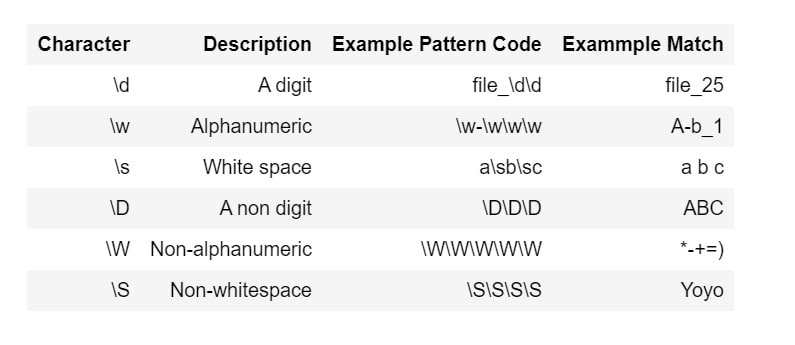
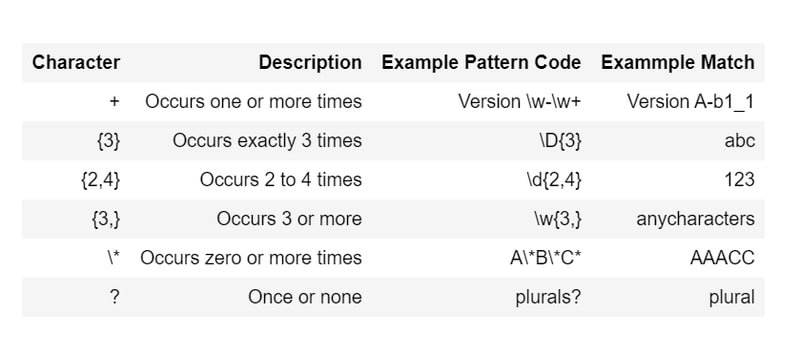
In some cases, only matching tokens and token attributes isn't enough. For example, we might want to match different spellings of a word, without adding a new pattern for each spelling. A regular expression is a string of text that lets us create patterns that help match, locate, and manage text.
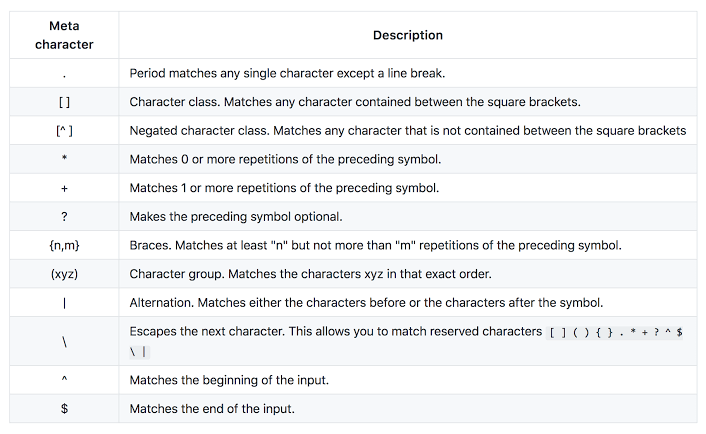
Identifiers
Quantifiers
Example
In this ^ represents start of line. The string should have characters from a-z/0-9/_. The length of the string should be between 3-15. $ represents end of line.
![Regex example showing ^[a-z0-9_]{3,15}$ pattern for validating usernames between 3 and 15 characters](/images/t7.png)
We will import re. This module provides regular expression matching operations.
This is the text we will be working on.
re.search() function will search the regular expression pattern and return the first occurrence. It returns a match object when the pattern is found and "null" if the pattern is not found. Now we are going to extract the phone number. To do that we are going to find a group of digits which is 10 character long.
Now we will find a group of digits which is 4 character long.
findall() is used to search for "all" occurrences that match a given pattern. In contrast, search() module will only return the first occurrence that matches the specified pattern. findall() will iterate over all the lines of the file and will return all non-overlapping matches of pattern in a single step. Now we will find a group of digits which has length between 3 and 10.
['1256', '1256348790']Now we will find all the words having alphanumeric characters and length equal to or greater than 4.
['phone', 'number', '1256', 'wrong', 'Correct', '1256348790', 'call']Wildcard text
Wildcards are special characters that can stand in for unknown characters.
Here we are finding all the words starting with c and having 2 characters after c.
['ct ', 'cal']Here we are finding three letter words with a as the middle character.
['cat', 'hat', 'wan', 'hat', ' an', 'cat']Here we will find strings which ends with a number.
['3']Here we will find strings which start with a number.
['3']Exclusion
'3 hi thanks for watching <3'Here we will extract the text excluding the numbers. ^ is the negated class character.
[' hi thanks for watching <']Now we will extract only the numbers. For that we will exclude the non digit characters using ^\D.
['33', '3']Now we will find all the words with hyphen.
['free-videos', 'kgp-talkie']Regular Expression in SpaCy
Match different spellings of token texts pattern = [{"TEXT": {"REGEX": "deff?in[ia]tely"}}]
Match tokens with fine-grained POS tags starting with 'V' pattern = [{"TAG": {"REGEX": "^V"}}]
'Google announced a new Pixel at Google I/O Google I/O is a great place to get all updates from Google.'We are going to extract Google I/O using spacy. We have created a pattern using TEXT. We have also defined a function callback_method to see which token is matched. The callback function will receive the arguments matcher, doc, i and matches.
Google I/O
Google I/O[(11578853341595296054, 6, 10), (11578853341595296054, 10, 14)]Now we will find the word 'Google'.
Google
Google
Google I
Google I/
Google I/O
Google
Google I
Google I/
Google I/O
Google[(11578853341595296054, 0, 1), (11578853341595296054, 6, 7), (11578853341595296054, 6, 8), (11578853341595296054, 6, 9), (11578853341595296054, 6, 10), (11578853341595296054, 10, 11), (11578853341595296054, 10, 12), (11578853341595296054, 10, 13), (11578853341595296054, 10, 14), (11578853341595296054, 23, 24)]Conclusion
In this blog, we used spaCy's Matcher and PhraseMatcher to extract specific phrases and patterns from text using token-level rules and regular expressions, with no statistical model training required.
Key takeaways:
Matcherrules are lists of token dictionaries, each specifying constraints on token attributes (LOWER,IS_PUNCT,SHAPE,OP,TEXT). The'OP': '?'quantifier makes a token optional, which allows flexible pattern matching.- spaCy tokenizes text before matching, so patterns operate on tokens rather than character offsets. This means regex-like logic combines with linguistic annotation (e.g., matching by POS tag or lemma).
PhraseMatcheris more efficient for large vocabulary lookups because it hashesDocobjects directly rather than evaluating per-token rules one attribute at a time.- Embedding
REGEXinside theTEXTattribute lets us combine spaCy's token graph with the power of regular expressions for patterns like email addresses or variant spellings.
Next steps:
- Build on this foundation by adding entity-level annotations with
EntityRuleras shown in Phone, Email & Emoji Extraction with spaCy. - Add custom
Matcherrules to an existing pipeline component usingnlp.add_pipefrom Processing Pipeline in spaCy. - Apply
PhraseMatcherfor large-scale keyword extraction on social media text in Custom Rules Using spaCy.