Combining NLP Models and Creation of Custom rules using SpaCy
Objective: In this blog, we will create some custom rules for our needs and add them to our pipeline, like expanding named entities and finding a person's organization name from a given text.
For example, the corpus spaCy's English models were trained on defines a PERSON entity as just the person name, without titles like "Mr" or "Dr". This makes sense, since it is easier to resolve the entity type back to a knowledge base. But what if we need the full names, including the titles?
- Mr. Laxmi Kant
- Mr. Roshan Kumar Gupta
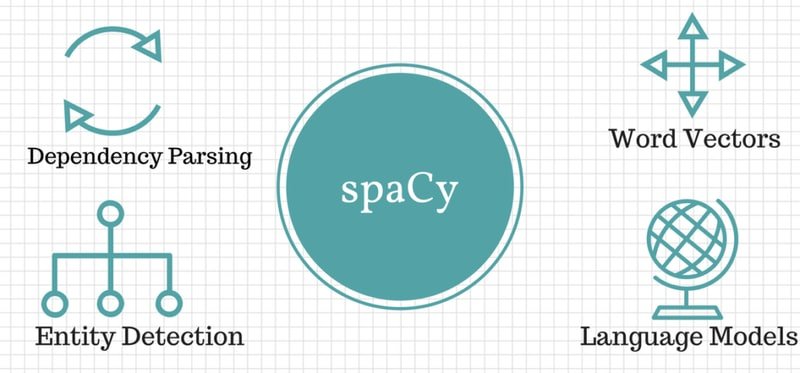
SpaCy
If a normal data analysis tool in Python for tabular and structured data has Pandas, then the data analysis tool in Natural Language Processing (NLP) for text and unstructured data has spaCy.
When we first start out as data scientists, we usually deal with structured data, which does not really need spaCy to handle complicated text.
In most cases, Pandas will fit our needs, since it can handle most data cleaning and analysis for structured data.
Once we start dealing with unstructured text data (basically NLP stuff) where Pandas can no longer help, spaCy comes in with built-in tools to process, analyze, and understand text through efficient NLP techniques.
SpaCy provides a one-stop-shop for tasks commonly used in any NLP project, including:
- Tokenisation
- Lemmatisation
- Part-of-speech tagging
- Entity recognition
- Dependency parsing
- Sentence recognition
- Word-to-vector transformations And Many convenience methods for cleaning and normalising text
By the end of this blog, we will have a working understanding of spaCy and how we can apply it in our own domain.
Additional Reading:
Language Processing Pipelines:
spaCy Processing Pipelines Documentation
Natural Language Processing and Computational Linguistics:
Natural Language Processing and Computational Linguistics (Packt)
Watch Full Video Here:
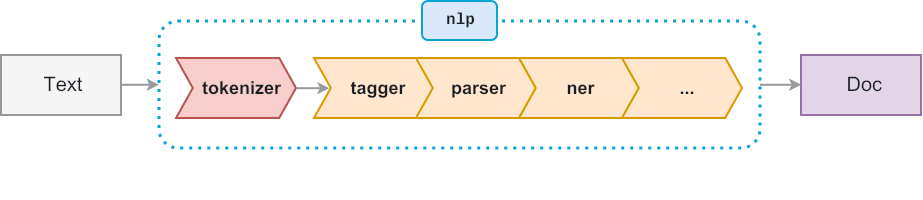
We can mix statistical and rule-based parts in many ways. A rule-based part can boost a statistical model by presetting tags, entities, or sentence breaks for certain tokens. The model usually respects these preset labels, which can improve its other choices too. We can also run a rule-based part after the model to fix common errors. And a rule-based part can read the attributes the model sets, so we can build more advanced logic.
Notebook Setup
Installing libraries
# !pip install -U spacy# !pip install -U spacy-lookups-data# !python -m spacy download en_core_web_smImporting libraries
import spacy
from spacy.matcher import Matcher
from spacy.tokens import Span
from spacy import displacy
One of spaCy's best features is its language models. A language model lets us do NLP tasks such as POS-tagging and NER-tagging.
Here, we are using spacy.load() method to load a model package by and return the NLP object.
#loading english language model

nlp = spacy.load('en_core_web_sm')
Next, we call nlp() on a string and spaCy tokenizes the text and creates a document object.
doc = nlp('Dr. Alex Smith chaired first board meeting at Google')doc
Dr. Alex Smith chaired first board meeting at Googleprint([(ent.text, ent.label_) for ent in doc.ents])[('Alex Smith', 'PERSON'), ('first', 'ORDINAL'), ('Google', 'ORG')]Use of Name Entity Recognition
Now we are creating our rule to add a title along with entity where entity label is PERSON.
Below are the steps which we are peforming:
- We create a function that takes the doc as input.
- We loop over each token. We keep a token if its entity label is PERSON and it does not start at position zero.
- We check if the token in front is one of ('Dr', 'Dr.', 'Mr', 'Mr.').
- We then use
Span()to build a rule that takes thePERSONlabel from the start of the title to the end of the name. - We assign the value back to the token entity values.
def add_title(doc):
    new_ents = []
    for ent in doc.ents:
        if ent.label_ == 'PERSON' and ent.start!=0:
            prev_token = doc[ent.start-1]
            if prev_token.text in ('Dr', 'Dr.', 'Mr', 'Mr.'):
                new_ent = Span(doc, ent.start-1, ent.end, label=ent.label)
                new_ents.append(new_ent)
            else:
                new_ents.append(ent)
    doc.ents = new_ents
return doc#loading english language model
nlp = spacy.load('en_core_web_sm')
nlp.add_pipe(add_title, after='ner')# call nlp() to tokenize the text and create a Doc object
doc = nlp('Dr. Alex Smith chaired first board meeting at Google')print([(ent.text, ent.label_) for ent in doc.ents])[('Dr. Alex Smith', 'PERSON')]Use of POS and Dep Parsing
Part-of-speech tagging labels each word with its part of speech. Dependency parsing looks at how the words in a sentence link to each other. Once a sentence is parsed, we learn how its words relate.
#loading english language model

nlp = spacy.load('en_core_web_sm')# call nlp() to tokenize the text and create a Doc object
doc = nlp('Alex Smith was working at Google')A parser splits a sentence into a subject and an object, which are a noun phrase and a verb phrase. The dependency parser treats the verb as the head of the sentence, and all links are built around it.
Example: Alex Smith was working at Google
displacy.render(doc, style='dep', options = {'compact':True, 'distance':100})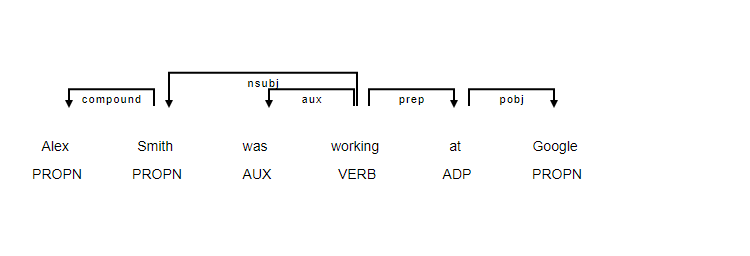
def get_person_orgs(doc):
    person_entities = [ent for ent in doc.ents if ent.label_=="PERSON"]
    for ent in person_entities:
        head = ent.root.head
        if head.lemma_ == 'work':
            preps = [token for token in head.children if token.dep_ == 'prep']
            for prep in preps:
                orgs = [token for token in prep.children if token.ent_type_ == 'ORG']
                print({'person': ent, 'orgs': orgs, 'past': head.tag_ == "VBD"})
return docfrom spacy.pipeline import merge_entities#loading english language model
nlp = spacy.load('en_core_web_sm')nlp.add_pipe(merge_entities)nlp.add_pipe(get_person_orgs)# call nlp() to tokenize the text and create a Doc object
doc = nlp('Alex Smith worked at Google'){'person': Alex Smith, 'orgs': [Google], 'past': True}Modify model
def get_person_orgs(doc):
    person_entities = [ent for ent in doc.ents if ent.label_=="PERSON"]
    for ent in person_entities:
        head = ent.root.head
        if head.lemma_ == 'work':
            preps = [token for token in head.children if token.dep_ == 'prep']
            for prep in preps:
                orgs = [token for token in prep.children if token.ent_type_ == 'ORG']

                aux = [token for token in head.children if token.dep_ == 'aux']
                past_aux = any(t.tag_ == 'VBD' for t in aux)
                past = head.tag_ == 'VBD' or head.tag_ == 'VBG' and past_aux

            print({'person': ent, 'orgs': orgs, 'past': past})
return docfrom spacy.pipeline import merge_entities#loading english language model
nlp = spacy.load('en_core_web_sm')nlp.add_pipe(merge_entities)nlp.add_pipe(get_person_orgs)# call nlp() to tokenize the text and create a Doc object
doc = nlp('Alex Smith was working at Google'){'person': Alex Smith, 'orgs': [Google], 'past': True}Conclusion
In this blog, we added two custom rule-based parts to spaCy's NER pipeline. The first is an add_title function that expands PERSON entities to include titles in front, like "Dr." and "Mr.". The second is a get_person_orgs parser that finds the organization an entity worked at. We plug both parts into the pipeline with nlp.add_pipe. This shows how rule logic sits cleanly on top of pretrained models.
Key takeaways:
- spaCy's pipeline is fully composable:
nlp.add_pipe(component, after='ner')inserts a custom function after any existing stage, without rewriting or retraining the base model. - The
SpanAPI lets you redefine entity boundaries:Span(doc, start-1, end, label=label)extends a PERSON entity one token backward to capture the preceding title. - Dependency parsing (
head.lemma_ == 'work',token.dep_ == 'prep') gives structured access to grammatical relationships, making it possible to extract "who worked where" from raw text without training a relation extraction model. merge_entitiesis a built-in pipeline component that collapses multi-token entities into single tokens, which is a prerequisite for clean downstream dependency traversal.
Next steps:
- Apply
EntityRulerpatterns for domain-specific entities (product names, internal codes) as shown in Rule-Based Text Extraction and Matching with spaCy. - Chain this pipeline with the processing pipeline components from Processing Pipeline in spaCy to handle batches of documents efficiently.
- Extend the
get_person_orgsextractor to output structured JSON for downstream knowledge-graph construction.