Text Extraction in SpaCy
spaCy is a free, open-source library for advanced Natural Language Processing (NLP) in Python.
When we work with a lot of text, we soon want to know more about it. For example, what is it about? What do the words mean in context? Who is doing what to whom? What companies and products are mentioned? Which texts are similar to each other?
spaCy is designed for production use and helps us build applications that process and "understand" large volumes of text. It can build information extraction or natural language understanding systems, or pre-process text for deep learning.
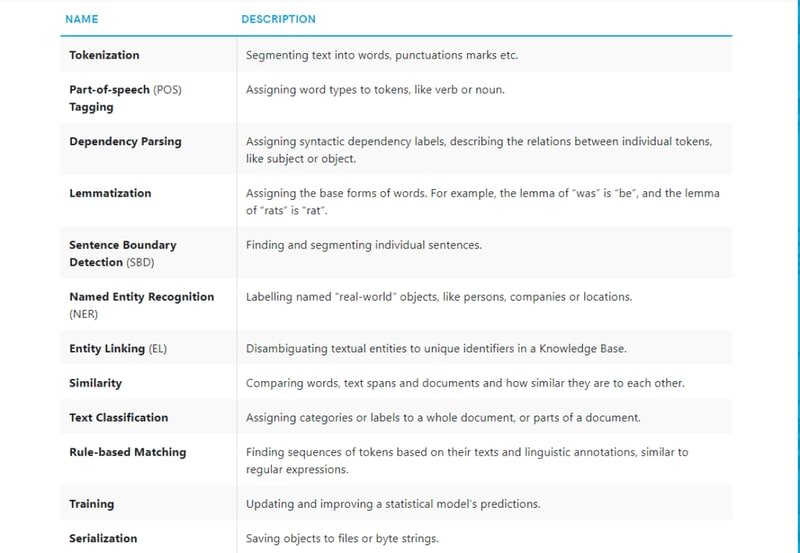
Below are some of spaCy's features. Some are about language ideas. Others are about general machine learning.
spaCy installation
We can run the following commands:-
pip install -U spacy
pip install -U spacy-lookups-data
python -m spacy download en_core_web_sm
We can check the first part of the blog here.
Rule-Based Phrase Text Extraction and Matching Using spaCy
We can even watch the video of the first part
Check out the video of this blog
Using Linguistic Annotations
Say we are analyzing user comments and want to find out what people are saying about Facebook. We start by finding adjectives after "Facebook is" or "Facebook was". This is a rough solution, but it is fast and a good way to get an idea of what is in our data. Our pattern could look like this:
[{"LOWER": "facebook"}, {"LEMMA": "be"}, {"POS": "ADV", "OP": "*"}, {"POS": "ADJ"}]
This translates to a token whose lowercase form matches "facebook" (like Facebook, facebook or FACEBOOK), followed by a token with the lemma "be" (for example, is, was, or 's), followed by an optional adverb, followed by an adjective.
This is the link for all the annotations-
https://spacy.io/api/annotation
Here we are importing the necessary libraries.
import spacy
from spacy.matcher import Matcher
from spacy.tokens import Span
from spacy import displacy
spacy.load() loads a model.
nlp = spacy.load('en_core_web_sm')matcher.add() adds a rule to the matcher, consisting of an ID key, one or more patterns, and a callback function to act on the matches. In our case the ID key is fb. The call back function is callback_method_fb(). The callback function will receive the arguments matcher, doc, i and matches. The matcher returns a list of (match_id, start, end) tuples. The match_id is the hash value of the string ID "fb".
We have used the same pattern explained above.
matcher = Matcher(nlp.vocab)
matched_sents = []
pattern = [{"LOWER": "facebook"}, {"LEMMA": "be"}, {"POS": "ADV", "OP": "*"}, {"POS": "ADJ"}]

def callback_method_fb(matcher, doc, i, matches):
    matched_id, start, end = matches[i]
    span = doc[start:end]
    sent = span.sent

    match_ents = [{
        'start':span.start_char - sent.start_char,
        'end': span.end_char - sent.start_char,
        'label': 'MATCH'
    }]

    matched_sents.append({'text': sent.text, 'ents':match_ents})

matcher.add("fb", callback_method_fb, pattern)
doc = nlp("I'd say that Facebook is evil. – Facebook is pretty cool, right?")
matches = matcher(doc)
matches[(8017838677478259815, 4, 7), (8017838677478259815, 9, 13)]We can see the matched sentences and their start and end positions.
matched_sents[{'text': "I'd say that Facebook is evil.", 'ents': [{'start': 13, 'end': 29, 'label': 'MATCH'}]}, {'text': '– Facebook is pretty cool, right?', 'ents': [{'start': 2, 'end': 25, 'label': 'MATCH'}]}]displacy visualizes dependencies and entities in the browser or in a notebook. displaCy can detect whether we are working in a Jupyter notebook, and will return markup that can be rendered in a cell straight away.
displacy.render(matched_sents, style='ent', manual = True)I'd say that Facebook is evil MATCH .– Facebook is pretty cool MATCH , right?
Phone numbers
Phone numbers can have many different formats and matching them is often tricky. During tokenization, spaCy will leave sequences of numbers intact and only split on whitespace and punctuation. This means our match pattern has to look out for number sequences of a certain length, surrounded by specific punctuation, depending on the national conventions.
We want to match like this (123) 4567 8901 or (123) 4567-8901
[{"ORTH": "("}, {"SHAPE": "ddd"}, {"ORTH": ")"}, {"SHAPE": "dddd"}, {"ORTH": "-", "OP": "?"}, {"SHAPE": "dddd"}]
In this pattern we are looking for a opening bracket. Then we are matching a number with 3 digits. Then a closing bracket. Then a number with 4 digits. Then a dash which is optional. Lastly, a number with 4 digits.
pattern = [{"ORTH": "("}, {"SHAPE": "ddd"}, {"ORTH": ")"}, {"SHAPE": "dddd"}, {"ORTH": "-", "OP": "?"}, {"SHAPE": "dddd"}]

matcher = Matcher(nlp.vocab)
matcher.add("PhoneNumber", None, pattern)

doc = nlp("Call me at (123) 4560-7890")

print([t.text for t in doc])['Call', 'me', 'at', '(', '123', ')', '4560', '-', '7890']A match is found between 3rd to 9th position.
matches = matcher(doc)
matches[(7978097794922043545, 3, 9)]We can get the matched number.
for match_id, start, end in matches:
    span = doc[start:end]
print(span.text)(123) 4560-7890Email Address Matching
In this the pattern checks for one or more character from a-zA-Z0-9-_.. Then a @. Then again one or more character from a-zA-Z0-9-_.]
pattern = [{"TEXT": {"REGEX": "[a-zA-Z0-9-_.]+@[a-zA-Z0-9-_.]+"}}]

matcher = Matcher(nlp.vocab)
matcher.add("Email", None, pattern)

text = "Email me at email2me@kgptalkie.com and talk.me@kgptalkie.com"
doc = nlp(text)

matches = matcher(doc)
matches[(11010771136823990775, 3, 4), (11010771136823990775, 5, 6)]for match_id, start, end in matches:
span = doc[start:end]
print(span.text)email2me@kgptalkie.com
talk.me@kgptalkie.comHashtags and emoji on social media
Social media posts, especially tweets, can be hard to work with. They are very short and often contain emoji and hashtags. If we only look at the plain text, we lose a lot of useful meaning.
Say we have extracted a large sample of social media posts on a specific topic, for example posts mentioning a brand name or product. As the first step of our data exploration, we want to filter out posts containing certain emoji and use them to assign a general sentiment score, based on whether the emotion is positive or negative, e.g. 😀 or 😞. We also want to find, merge and label hashtags like #MondayMotivation, so we can ignore or analyze them later.
By default, spaCy's tokenizer will split emoji into separate tokens. This means we can create a pattern for one or more emoji tokens. Valid hashtags usually consist of a #, plus a sequence of ASCII characters with no whitespace, so they're straightforward to match as well.
We have made a list of positive and negative emojis.
pos_emoji = ["😀", "😃", "😂", "🤣", "😊", "😍"] # Positive emoji
neg_emoji = ["😞", "😠", "😩", "😢", "😭", "😒"] # Negative emoji
pos_emojiNow we will create a pattern for positive and negative emojis.
# Add patterns to match one or more emoji tokens
pos_patterns = [[{"ORTH": emoji}] for emoji in pos_emoji]
neg_patterns = [[{"ORTH": emoji}] for emoji in neg_emoji]
pos_patterns[[{'ORTH': '😀'}], [{'ORTH': '😃'}], [{'ORTH': '😂'}], [{'ORTH': '🤣'}], [{'ORTH': '😊'}], [{'ORTH': '😍'}]]neg_patterns[[{'ORTH': '😞'}], [{'ORTH': '😠'}], [{'ORTH': '😩'}], [{'ORTH': '😢'}], [{'ORTH': '😭'}], [{'ORTH': '😒'}]]We will write a function label_sentiment() which will be called after every match to label the sentiment of the emoji. If the sentiment is positive then we are adding 0.1 to doc.sentiment and if the sentiment is negative then we are subtracting 0.1 from doc.sentiment.
def label_sentiment(matcher, doc, i, matches):
match_id, start, end = matches[i]
if doc.vocab.strings[match_id] == 'HAPPY':
doc.sentiment += 0.1
elif doc.vocab.strings[match_id] == 'SAD':
doc.sentiment -= 0.1Here with the HAPPY and SAD matchers we are also adding HASHTAG matcher to extract the hashtags. For hashtags we are going to match text which has atleast one '#'.
matcher = Matcher(nlp.vocab)
matcher.add("HAPPY", label_sentiment, *pos_patterns)
matcher.add('SAD', label_sentiment, *neg_patterns)
matcher.add('HASHTAG', None, [{'TEXT': '#'}, {'IS_ASCII': True}])
doc = nlp("Hello world 😀 #KGPTalkie")
matches = matcher(doc)
for match_id, start, end in matches:
string_id = doc.vocab.strings[match_id] # Look up string ID
span = doc[start:end]
print(string_id, span.text)HAPPY 😀
HASHTAG #KGPTalkieEfficient phrase matching
If we need to match large terminology lists, we can also use the PhraseMatcher and create Doc objects instead of token patterns, which is much more efficient. The Doc patterns can contain single or multiple tokens.
We are going to extract the names in terms from a document. We have made a pattern for the same.
from spacy.matcher import PhraseMatcher
matcher = PhraseMatcher(nlp.vocab)
terms = ['BARAC OBAMA', 'ANGELA MERKEL', 'WASHINGTON D.C.']
pattern = [nlp.make_doc(text) for text in terms]
pattern[BARAC OBAMA, ANGELA MERKEL, WASHINGTON D.C.]This is our document.
matcher.add('term', None, *pattern)
doc = nlp("German Chancellor ANGELA MERKEL and US President BARAC OBAMA "
"converse in the Oval Office inside the White House in WASHINGTON D.C.")
docGerman Chancellor ANGELA MERKEL and US President BARAC OBAMA converse in the Oval Office inside the White House in WASHINGTON D.C.We have found the matches.
matches = matcher(doc)
for match_id, start, end in matches:
    span = doc[start:end]
print(span.text)ANGELA MERKEL
BARAC OBAMA
WASHINGTON D.C.
matches
[(4519742297340331040, 2, 4), (4519742297340331040, 7, 9), (4519742297340331040, 19, 21)]Custom Rule Based Entity Recognition
The EntityRuler is a pipeline component that lets us add named entities based on pattern dictionaries, and makes it easy to combine rule-based and statistical named entity recognition for more accurate models.
Entity Patterns
Entity patterns are dictionaries with two keys: "label", specifying the label to assign to the entity if the pattern is matched, and "pattern", the match pattern.
The entity ruler accepts two types of patterns:
- Phrase Pattern
{"label": "ORG", "pattern": "Apple"} - Token Pattern
{"label": "GPE", "pattern": [{"LOWER": "san"}, {"LOWER": "francisco"}]}
Using the entity ruler
The EntityRuler is a pipeline component that's typically added via nlp.add_pipe. When the nlp object is called on a text, it will find matches in the doc and add them as entities to the doc.ents, using the specified pattern label as the entity label.
https://spacy.io/api/annotation#named-entities
We are importing EntityRuler from spacy.pipeline. Then we are loading a fresh model using spacy.load(). We have created a pattern which will label KGP Talkie as ORG and san francisco as GPE.
from spacy.pipeline import EntityRuler
nlp = spacy.load('en_core_web_sm')
ruler = EntityRuler(nlp)
patterns = [{"label": "ORG", "pattern": "KGP Talkie"},
            {"label": "GPE", "pattern": [{"LOWER": "san"}, {"LOWER": "francisco"}]}]
patterns[{'label': 'ORG', 'pattern': 'KGP Talkie'}, {'label': 'GPE', 'pattern': [{'LOWER': 'san'}, {'LOWER': 'francisco'}]}]ruler.add_patterns(patterns)
nlp.add_pipe(ruler)
doc = nlp("KGP Talkie is opening its first big office in San Francisco.")
docKGP Talkie is opening its first big office in San Francisco.We can see that KGP Talkie and San Francisco are considered as entites.
for ent in doc.ents:
print(ent.text, ent.label_)KGP Talkie PERSON
first ORDINAL
San Francisco GPECompared to using only regular expressions on raw text, spaCy's rule-based matcher engines and components not only let us find the words and phrases we are looking for, they also give us access to the tokens within the document and their relationships. This means we can easily access and analyze the surrounding tokens, merge spans into single tokens, or add entries to the named entities.
Conclusion
In this blog, we built spaCy Matcher pipelines for extracting phone numbers, email addresses, emojis, and named entities from raw text using token-level rule patterns. The same Matcher API handles pattern matching across all these domains, from digit-shape sequences for phone numbers to Unicode character matching for emoji sentiment scoring.
Key takeaways:
- spaCy's
Matcheroperates on token attributes (ORTH,SHAPE,TEXT,IS_PUNCT,POS) rather than raw characters, giving us linguistic context that regex alone cannot provide. REGEXwithin theTEXTattribute enables hybrid matching: regex power within spaCy's token graph, as shown by the email pattern[a-zA-Z0-9-_.]+@[a-zA-Z0-9-_.]+.- Callback functions (
label_sentiment) let us run side effects, such as updatingdoc.sentiment, on every match without post-processing loops. PhraseMatcheris significantly faster thanMatcherfor large terminology lists because it uses a compressed hash lookup onDocobjects rather than per-token rule evaluation.
Next steps:
- Chain these extraction components into a full spaCy processing pipeline using
nlp.add_pipeas shown in Processing Pipeline in spaCy. - Add custom
EntityRulerpatterns to label extracted phone numbers and emails asPHONEandEMAILentity types for downstream NER tasks. - Extend the emoji sentiment scorer to score full documents and compare results against a machine-learning sentiment classifier from spaCy NLP: Amazon and IMDB Review Sentiment.