What is SpaCy?
spaCy is a free, open-source library for advanced Natural Language Processing (NLP) in Python.
When we work with a lot of text, we soon want to know more about it. For example, what is it about? What do the words mean in context? Who is doing what to whom? What companies and products are mentioned? Which texts are similar to each other?
spaCy is designed for production use and helps us build applications that process and "understand" large volumes of text. It can be used to build information extraction or natural language understanding systems, or to pre-process text for deep learning.
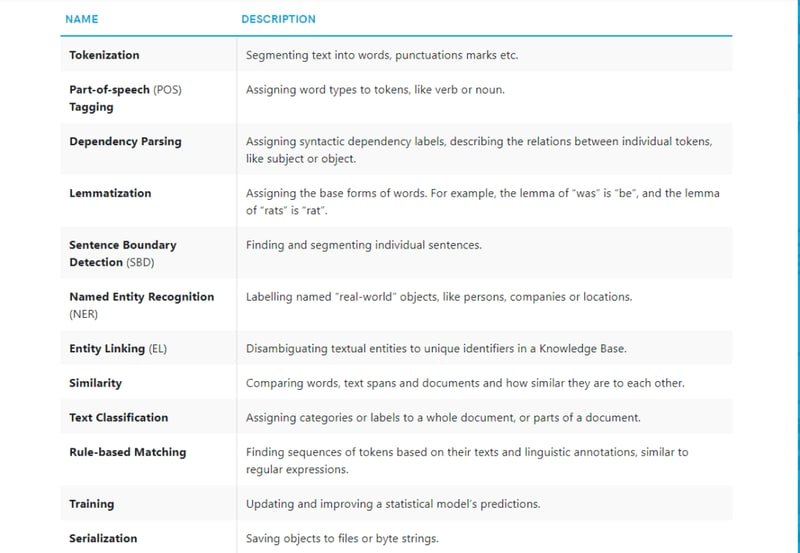
Below are some of spaCy's features. Some are about language ideas. Others are about general machine learning.
Pipeline in SpaCy
When we call nlp on a text, spaCy first tokenizes the text to produce a Doc object. The Doc is then processed in several different steps, also referred to as the processing pipeline.
The pipeline used by the default models consists of a tagger, a parser and an entity recognizer. Each pipeline component returns the processed Doc, which is then passed on to the next component.
Each component in the pipeline transforms the Doc object and passes it to the next stage, adding annotations layer by layer.
spaCy installation
We can run the following commands:-
pip install -U spacy
pip install -U spacy-lookups-data
python -m spacy download en_core_web_sm
Watch Full Video Here:
Processing text
Here we have imported the necessary libraries.
import spacy
from spacy.matcher import Matcher
from spacy.tokens import Span
from spacy import displacy
spacy.load() loads a model. When we call nlp on a text, spaCy tokenizes it and then calls each component on the Doc, in order. It then returns the processed Doc that we can work with.
nlp = spacy.load("en_core_web_sm")
doc = nlp('This is raw text')
When processing large volumes of text, the statistical models are usually more efficient if we let them work on batches of texts. spaCy's nlp.pipe method takes an iterable of texts and yields processed Doc objects. The batching is done internally.
texts = ["This is raw text", "There is lots of text"]
docs = list(nlp.pipe(texts))
Tips for efficient processing
- Process the texts as a stream using
nlp.pipeand buffer them in batches, instead of one-by-one. This is usually much more efficient. - Only apply the pipeline components we need. Getting predictions we do not need adds up and becomes very inefficient at scale. To prevent this, use the disable keyword argument to turn off components we do not need.
In this example, we use nlp.pipe to process a large list of texts as a stream. We only need the named entities in doc.ents, which the ner component sets. So we disable the other components, the tagger and parser. nlp.pipe yields Doc objects, and we loop over them to read the named entities.
The below code disable tagger and parser. We are printing the text and its label which is assigned by named entity recognizer(ner).
import spacy

texts = [
    "Net income was $9.4 million compared to the prior year of $2.7 million.",
    "Revenue exceeded twelve billion dollars, with a loss of $1b.",
]

nlp = spacy.load("en_core_web_sm")
docs = nlp.pipe(texts, disable=["tagger", "parser"])
for doc in docs:
    # Do something with the doc here
    print([(ent.text, ent.label_) for ent in doc.ents])
print()[('$9.4 million', 'MONEY'), ('the prior year', 'DATE'), ('$2.7 million', 'MONEY')]
[('twelve billion dollars', 'MONEY'), ('1b', 'MONEY')]How Pipelines Work
spaCy makes it very easy to create our own pipelines from reusable components. This includes spaCy's default tagger, parser and entity recognizer, but also our own custom processing functions. We can add a pipeline component to an existing nlp object, set it when we initialize a Language class, or define it inside a model package.
When we load a model, spaCy first consults the model's meta.json.
The meta typically includes the model details, the ID of a language class, and an optional list of pipeline components.
spaCy then does the following:
- Load the language class and data for the ID via
get_lang_classand set it up. The Language class holds the shared vocabulary, tokenization rules, and language-specific tags. - Iterate over the pipeline names and create each component using
create_pipe, which looks them up inLanguage.factories. - Add each pipeline component to the pipeline in order, using
add_pipe. - Make the model data available to the Language class by calling
from_diskwith the path to the model data directory.
{"lang": "en", "name": "core_web_sm", "description": "Example model for spaCy", "pipeline": ["tagger", "parser", "ner"]}A spaCy model consists of three components: the weights (binary data loaded from a directory), a pipeline of functions called in order, and language data like the tokenization rules and annotation scheme.
Disabling and modifying pipeline components
If we do not need a particular component of the pipeline, for example the tagger or the parser, we can disable loading it. This can sometimes make a big difference and improve loading speed.
nlp = spacy.load("en_core_web_sm", disable=["tagger", "parser"])
nlp
In some cases, we do want to load all pipeline components and their weights, because we need them at different points in our application. However, if we only need a Doc object with named entities, there is no need to run all pipeline components on it
doc = nlp("Apple is buying a startup")
for ent in doc.ents:
print(ent.text, ent.label_)Apple ORGNow we are disabling ner also. After disbaling ner we do not get any output.
nlp = spacy.load("en_core_web_sm", disable=["tagger", "parser", "ner"])
doc = nlp("Apple is buying a startup")
for ent in doc.ents:
    print(ent.text, ent.label_)
Now suppose we have a large document and want to disable some pipeline components for one part of the text. We can do that as shown below. At the end of the with block, the disabled components come back on their own. Here the tagger and parser are off for the first doc. The second doc is tagged and parsed.
nlp = spacy.load('en_core_web_sm')

# 1. Use as a contextmanager
with nlp.disable_pipes("tagger", "parser"):
    doc = nlp("I won't be tagged and parsed")
doc = nlp("I will be tagged and parsed")
Alternatively, disable_pipes returns an object that lets us call its restore() method to restore the disabled components when needed. This is useful when we want to avoid deep indentation of large blocks.
# 2. Restore manually
disabled = nlp.disable_pipes("ner")
doc = nlp("I won't have named entities")
disabled.restore()
Conclusion
In this blog, we covered spaCy's processing pipeline. We saw how raw text flows through the tokenizer, tagger, parser, and NER components in order. We also saw how to disable or pick components for better speed.
Key takeaways:
- spaCy's pipeline is a chain of components. Each one reads and annotates the same
Docobject. The output of one is the input to the next. nlp.pipe(texts, disable=[...])is much faster than callingnlp(text)in a loop. Batching spreads out the model overhead, and disabling unused components saves work.nlp.disable_pipes()as a context manager is the cleanest way to skip components for a moment. They come back on their own at the end of thewithblock.- A model's
meta.jsonfile sets which pipeline components load at startup. We can override this by passingdisable=tospacy.load().
Next steps:
- Add a custom pipeline component using
nlp.add_pipeas demonstrated in Phone, Email & Emoji Extraction with spaCy to see how the pipeline extends with application-specific logic. - Combine the NER pipeline with rule-based matching from Rule-Based Text Extraction and Matching with spaCy for a hybrid extraction system.
- Use
nlp.analyze_pipes()to audit dependency order and validate that custom components are inserted at the correct pipeline position.