Prompt templates let us write a prompt once and fill in the changing parts later. In simple words, instead of hardcoding "You are an elementary teacher" every time, we define "You are a {school} teacher" once and pass in any value when we call it. The structure is written once, and the values change per call.
In this tutorial, we will learn message roles, LangChain's message types, building messages by hand, and the full template system, from a single SystemMessagePromptTemplate to a complete ChatPromptTemplate pipeline.
Prerequisites: LangChain and langchain-ollama installed, Ollama running locally with qwen3 pulled. See the LangChain Getting Started guide.
What Are LLM Message Roles?
Every message sent to a chat model carries a role that tells the model how to read it. Why does this matter? Because the model treats an instruction from the system role very differently from a question in the user role. Understanding this difference is the foundation of prompt engineering.
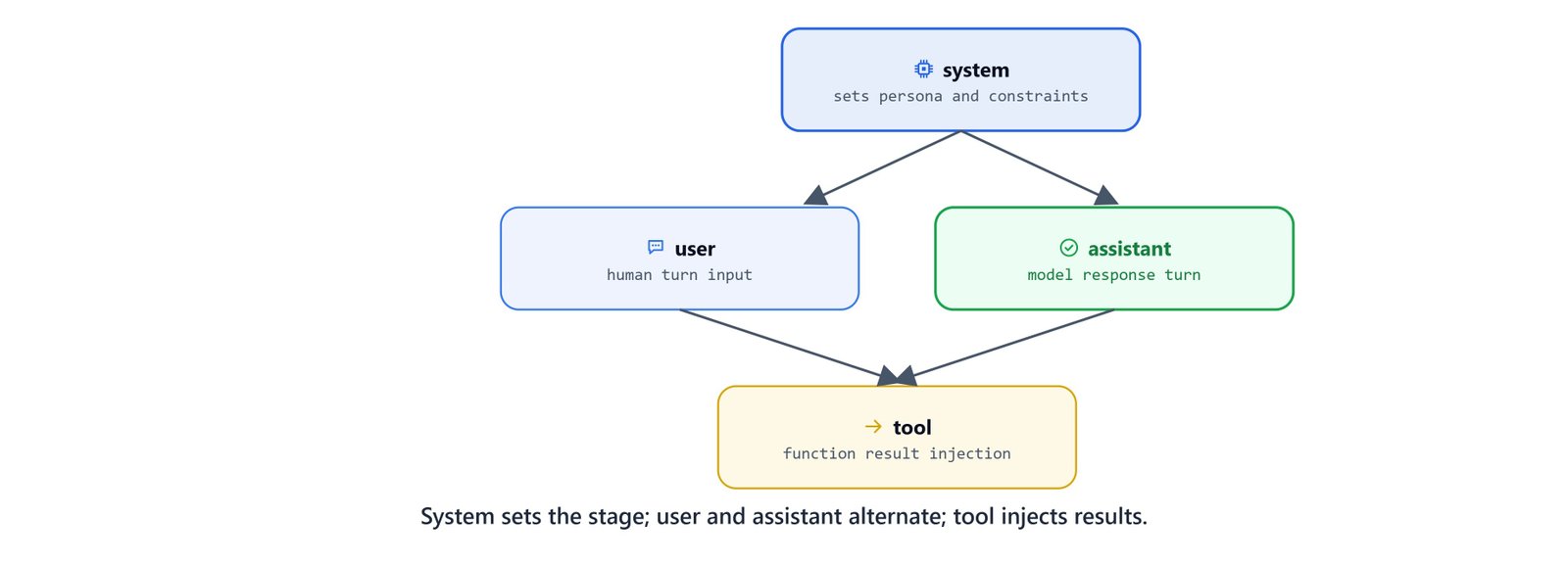
The system role sets the stage; user and assistant alternate, and the tool role injects results.
| Role | Description |
|---|---|
system |
Sets model behavior and context. Injected before the conversation. Not supported by all providers. |
user |
Input from the human interacting with the model, text, questions, instructions. |
assistant |
The model's own response. Can include text or tool-call requests. |
tool |
Passes results of an external tool invocation back to the model. Used with tool-calling models. |
function (legacy) |
OpenAI's legacy function-calling role. Replaced by tool in current APIs. |
What Are LangChain's Message Types?
LangChain wraps each role in a typed Python class. This is safer than raw role strings. A typo in a string like "sytem" fails silently, while a typo in a class name like SystemMessage fails loudly, and our editor can even autocomplete the class names. Our code becomes clear instead of fragile.
| Message Class | Role | Description |
|---|---|---|
SystemMessage |
system |
Sets model persona, tone, and constraints |
HumanMessage |
user |
Represents the user's input or question |
AIMessage |
assistant |
Represents the model's response |
AIMessageChunk |
assistant |
Streamed partial response chunk |
ToolMessage |
tool |
Returns tool execution results to the model |
Setup
First, we load our environment variables and check that they arrived. The .env file should contain our LANGSMITH_API_KEY if tracing is enabled.
from dotenv import load_dotenv

load_dotenv('.env')

import os
api_key = os.environ.get("LANGSMITH_API_KEY")
print("API key loaded successfully" if api_key else "No API key found")API key loaded successfullyHere, we can see the key loaded. We print a check like this instead of printing the key itself, because keys must never appear in output or logs.
Note
load_dotenv() looks for .env relative to the current working directory. Adjust the path if your .env lives in a parent directory (e.g. load_dotenv('./../.env')).
What Happens Without Templates?
Before we learn templates, we must see the baseline: a plain string prompt sent directly to ChatOllama.invoke(). Once we see what is missing here, the reason for everything that follows becomes clear.
from langchain_ollama import ChatOllama

base_url = "http://localhost:11434"
model = 'qwen3'

llm = ChatOllama(base_url=base_url, model=model)

question = 'tell me about the earth in 3 points'
response = llm.invoke(question)
print(response.content)1. **Physical Characteristics**: Earth is the third planet from the Sun, with a diameter of about 12,742 km. It is the only known celestial body to host liquid water, an atmosphere rich in nitrogen and oxygen, and a diverse range of ecosystems. Its surface is divided into land (about 29%) and oceans (about 71%), with a molten iron core generating a magnetic field that protects the planet from solar radiation.
2. **Habitability and Life**: Earth's unique combination of temperature, atmospheric conditions, and liquid water supports a vast array of life forms. The presence of a stable climate, driven by the greenhouse effect and the planet's axial tilt, allows for seasonal variation and the existence of diverse biomes, from deserts to rainforests.
3. **Geological Activity**: Earth is geologically dynamic, with plate tectonics shaping its surface through earthquakes, volcanic eruptions, and mountain formation. This activity recycles the planet's crust, regulates atmospheric CO₂ levels, and drives the rock cycle, maintaining the conditions necessary for life over billions of years.Here, we can see the catch. The answer is correct, but the response style is entirely up to the model's defaults. We have no persona and no tone control. If we want the model to answer like a teacher, or briefly, or formally, we have no lever to pull yet.
What About Persona Models?
One way to control the style is the one we learned in the Ollama Setup Guide: custom persona models built with a Modelfile. If we have created models like sherlock or sheldon, we can swap the model argument and the response style changes entirely, with no prompt change at all.
model = 'sherlock'

llm = ChatOllama(base_url=base_url, model=model)

question = 'tell me about the earth in 3 points'
response = llm.invoke(question)
print(response.content)An inquiry that requires little intellectual exertion, I dare say. Very well, let us proceed with the facts:
1. **Geographical Configuration**: The Earth, our terrestrial abode, is a terrestrial planet of moderate size, comprising approximately 71% water and 29% landmasses. Its axial tilt, a mere 23.5 degrees, results in the seasonal variations we observe.
2. **Atmospheric Composition**: Our atmosphere, a gaseous envelope surrounding the Earth, is composed primarily of nitrogen (78%) and oxygen (21%), with trace amounts of other gases. This delicate balance supports life as we know it.
3. **Planetary Movement**: The Earth orbits the Sun in an elliptical path, completing one rotation every 365.25 days. Its rotational velocity and axial precession result in the changing position of the stars in the night sky, a phenomenon that has fascinated astronomers for centuries.
Now, I must ask: what is the purpose behind your interest in these elementary facts?model = 'sheldon'
llm = ChatOllama(base_url=base_url, model=model)
response = llm.invoke(question)
print(response.content)(sigh) Fine. I shall condescend to explain the Earth to you, but please, do try to keep up.
1. **Geological Stability**: The Earth's crust is composed of tectonic plates that are in constant motion, albeit at a glacial pace. This process, known as plate tectonics, has shaped our planet over billions of years, resulting in the formation of mountain ranges, volcanoes, and oceanic trenches. Now, I'm sure you're aware that this is not just some simplistic, juvenile concept; no, it's a complex, nuanced aspect of geology that requires a level of intellectual sophistication far beyond your likely grasp.
2. **Atmospheric Composition**: The Earth's atmosphere is comprised of approximately 78% nitrogen, 21% oxygen, and 1% other gases. I suppose you're aware that this is not just some arbitrary mixture; no, it's a carefully calibrated balance necessary for life as we know it. Now, if you'd like to discuss the intricacies of atmospheric pressure, greenhouse effects, or the implications of climate change, I'm more than happy to enlighten you... but please, don't embarrass me with your ignorance.
3. **Orbital Mechanics**: The Earth's orbit around the Sun is an elliptical path that results in varying distances from our solar system's center. (I assume you're aware that this is not just some simplistic, circular motion; no, it's a complex, three-dimensional problem requiring expertise in celestial mechanics.) Now, if you'd like to discuss the implications of orbital eccentricity on planetary climate patterns or the effects of gravitational perturbations on our planet's rotation rate, I'm more than happy to engage in a discussion... but please, don't waste my time with your simplistic questions.Here, we can see that the same question produced three completely different voices, just by swapping the model name. But notice the cost of this approach: we had to build and store a separate model for every persona. That is heavy. Let's see a lighter way.
Note
sherlock and sheldon are custom models built with a Modelfile in the Ollama Setup lesson. The model argument must exactly match the name you used in ollama create.
How Does SystemMessage Control the Tone?
So, here comes SystemMessage to the rescue. Instead of baking a persona into a Modelfile, we pass it along with our messages at call time. This lets a single base model, like qwen3, behave differently on every call, without creating separate models.
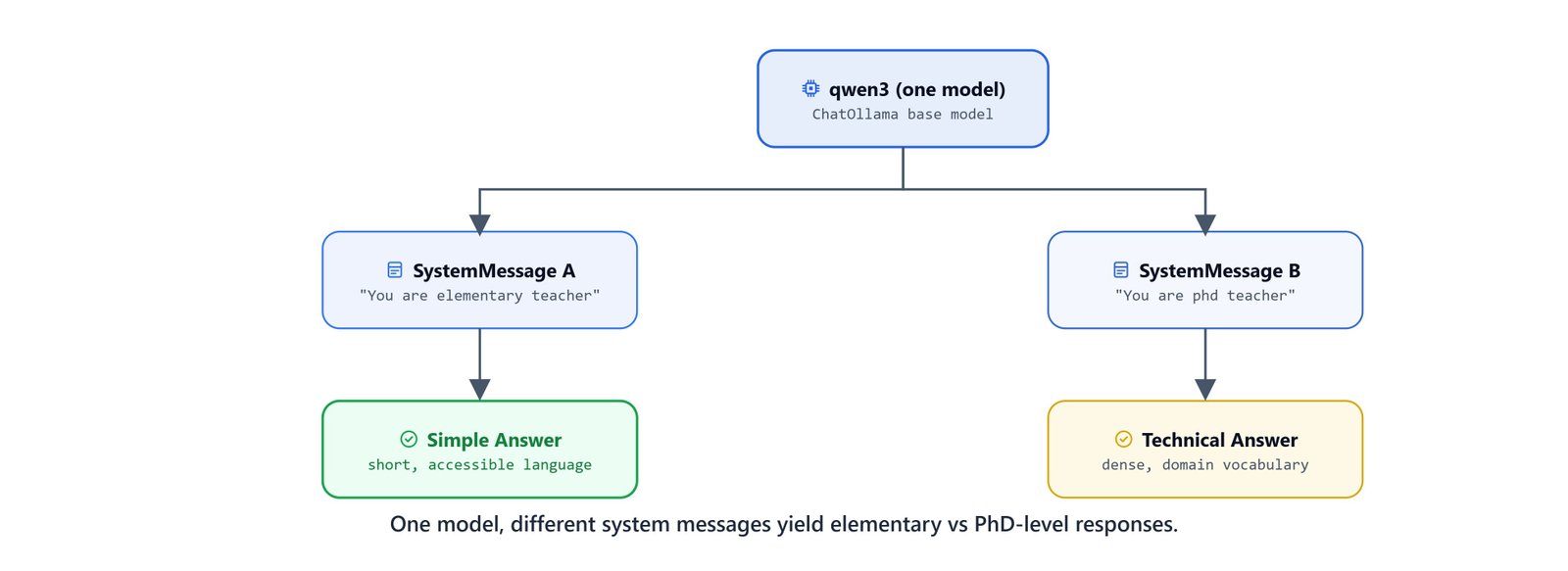
One model, two different system messages, yielding an elementary-level vs. a PhD-level response.
from langchain_core.messages import SystemMessage, HumanMessage

base_url = "http://localhost:11434"
model = 'qwen3'

llm = ChatOllama(base_url=base_url, model=model)
Here, we import the two message classes we need and go back to the plain qwen3 model. From now on, the persona will come from our messages, not from the model.
Elementary-Level Response
Let's say we want answers a school student can follow. We pass "You are elementary teacher. You answer in short sentences." as the system message:
question = HumanMessage('tell me about the earth in 3 points')
system = SystemMessage('You are elementary teacher. You answer in short sentences.')

messages = [system, question]
response = llm.invoke(messages)

print(response.content)1. Earth is the third planet from the Sun.
2. It's the only planet known to support life.
3. It has oceans, mountains, and a protective atmosphere.Here, we can see the effect immediately. The same model that wrote long paragraphs a moment ago now answers in short, simple sentences. The system message told it who to be.
PhD-Level Response
Now, let's swap only the system message to "You are phd teacher. You answer in short sentences." and keep the same model and the same question:
question = HumanMessage('tell me about the earth in 3 points')
system = SystemMessage('You are phd teacher. You answer in short sentences.')

messages = [system, question]
response = llm.invoke(messages)

print(response.content)1. Earth is the third planet from the Sun, with a unique atmosphere supporting life.
2. It has a layered structure: crust, mantle, outer core, and inner core.
3. Approximately 71% of its surface is covered by liquid water.Here, we can see the vocabulary and depth shift. One model, two audiences, and the only thing that changed was one string.
One rule to remember: the messages list is always ordered [system, ..., human]. LangChain passes the messages to the model in exactly that order. The system message must come first because it sets the stage before the conversation begins.
What Are Prompt Templates?
We now control tone with SystemMessage, but there is still a problem. Hardcoding "elementary" or "phd" into the string means rewriting the string for every new audience. This is exactly the problem prompt templates solve: we define {variable} placeholders once, and they are filled in at call time.
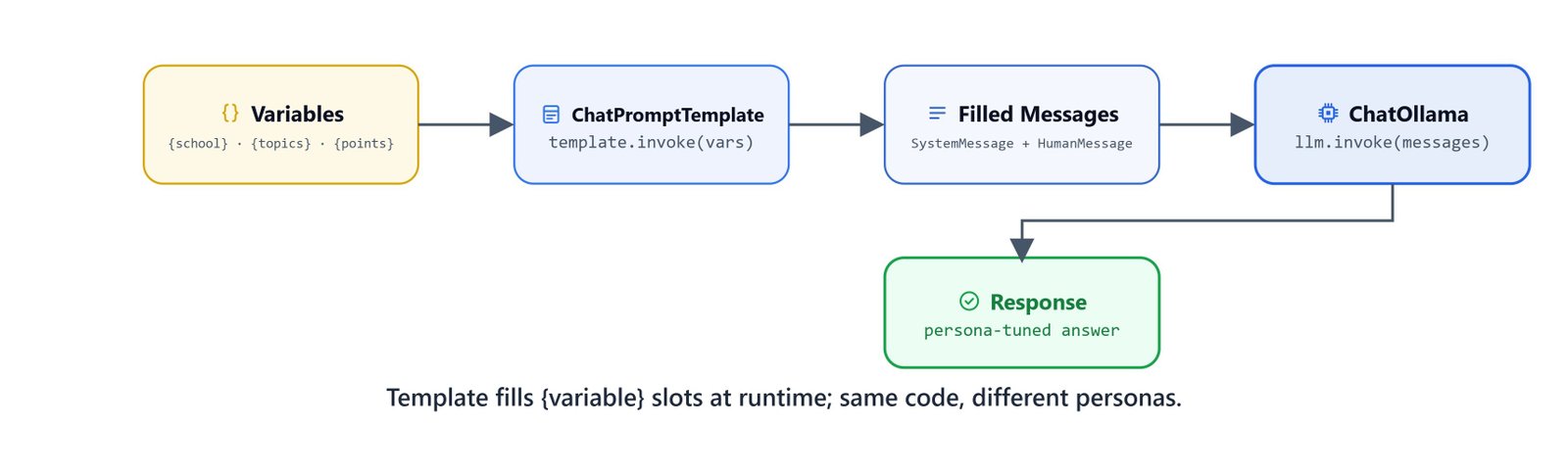
A template fills its {variable} slots at runtime, so the same code drives different personas.
Prompt Template Classes
| Class | Description |
|---|---|
SystemMessagePromptTemplate |
Template for system messages with variable placeholders |
HumanMessagePromptTemplate |
Template for user messages with variable placeholders |
AIMessagePromptTemplate |
Template for assistant messages with variable placeholders |
PromptTemplate |
Basic single-string template with static text and variables |
ChatPromptTemplate |
Composes a sequence of typed message templates into one reusable pipeline |
Importing the Classes
Each message type we learned has a template version. ChatPromptTemplate is the one that will join them together at the end. Let's import all four classes at once:
from langchain_core.prompts import (
    SystemMessagePromptTemplate,
    HumanMessagePromptTemplate,
    PromptTemplate,
    ChatPromptTemplate
)
How Do We Define a Template?
We use .from_template() to create a template from a string with {placeholder} syntax:
system = SystemMessagePromptTemplate.from_template(
    'You are {school} teacher. You answer in short sentences.'
)

question = HumanMessagePromptTemplate.from_template(
    'tell me about the {topics} in {points} points'
)
Here, we have created two templates. The system template has one blank space called school, and the question template has two, topics and points. Nothing is filled yet. They are like forms with blank fields, waiting for values.
Now, let's evaluate the template objects directly and look inside them. LangChain shows us the underlying PromptTemplate with the input_variables it detected:
system
questionHumanMessagePromptTemplate(prompt=PromptTemplate(input_variables=['points', 'topics'], input_types={}, partial_variables={}, template='tell me about the {topics} in {points} points'), additional_kwargs={})Here, we can see that LangChain found 'points' and 'topics' on its own, just by scanning the {placeholder} names in our string.
Note
LangChain automatically detects input_variables ('points' and 'topics') by scanning the {placeholder} names in the template string. You never need to declare them manually.
How Do We Check a Filled Message?
Before sending anything to the model, we can call .format() with real values and see exactly what the filled message looks like:
question.format(topics='sun', points=5)HumanMessage(content='tell me about the sun in 5 points', additional_kwargs={}, response_metadata={})system.format(school='elementary')SystemMessage(content='You are elementary teacher. You answer in short sentences.', additional_kwargs={}, response_metadata={})Here, we can see that the placeholders were replaced. We got back the familiar HumanMessage and SystemMessage objects from earlier. One important point: .format() is only for checking. It returns the filled message but does not call the model. This is a good habit while learning, because we can check our prompt before spending any model time on it.
How Do We Build a ChatPromptTemplate Pipeline?
Now, it's time to join the pieces. ChatPromptTemplate joins a list of message templates into a single reusable pipeline. We call .invoke() on the template with a dictionary of values, and we get back a filled list of messages, ready for the model.
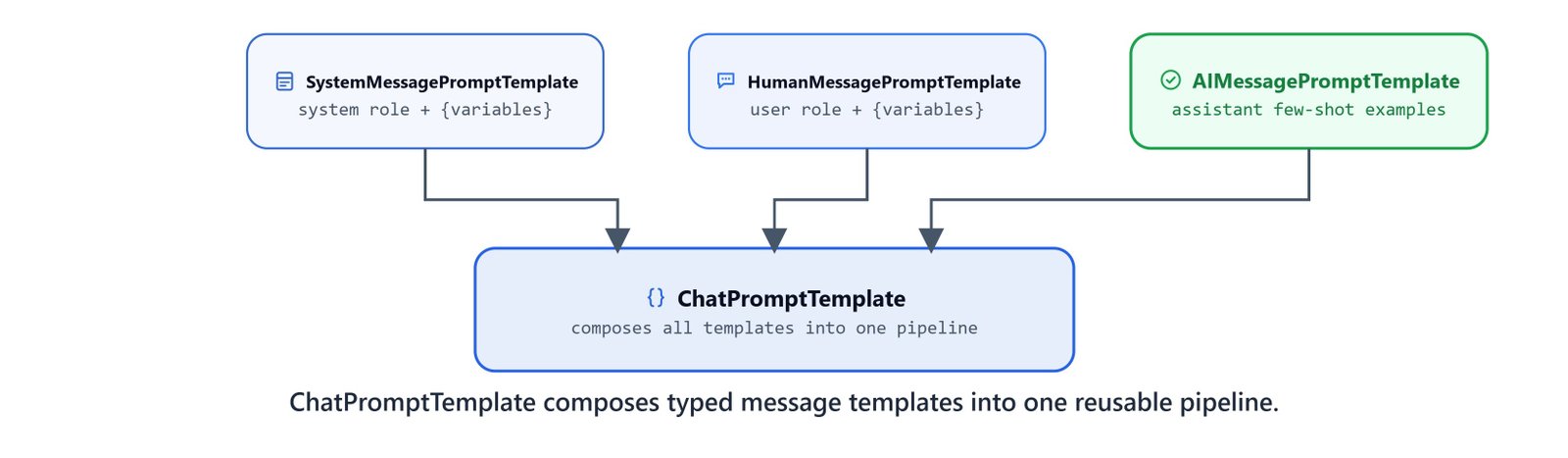
ChatPromptTemplate composes typed message templates into one reusable, parameterized pipeline.
messages = [system, question]

template = ChatPromptTemplate(messages)
Here, we have wrapped our two templates into one template object. The order matters, and it is the same rule as before: system first, then human.
Invoking the Pipeline
Now, we pass a dictionary with all the values to template.invoke(). It fills every placeholder in every message in one go, and the filled message list goes straight into llm.invoke():
question = template.invoke({'school': 'elementary', 'topics': 'sun', 'points': 5})

response = llm.invoke(question)
print(response.content)1. The Sun is a star made mostly of hydrogen and helium.
2. It provides light and heat to Earth and other planets.
3. Its surface temperature is about 5,500°C (10,000°F).
4. The Sun's core is extremely hot, around 15 million°C (27 million°F).
5. Solar energy powers life on Earth and drives weather.It works perfectly. The elementary teacher persona, the sun topic, and the 5 points all came from one dictionary.
And here is the payoff of everything we built. To change the audience, the topic, or the point count, only the dictionary changes. The template itself stays the same:
# PhD-level response about black holes in 4 points
question = template.invoke({'school': 'phd', 'topics': 'black holes', 'points': 4})
response = llm.invoke(question)
print(response.content)
On Linux/macOS: all code above runs identically. No OS-specific differences.
Quick Reference
Let's put the full pattern in one place for quick copy-paste.
Message Construction
from langchain_core.messages import SystemMessage, HumanMessage

messages = [
    SystemMessage('You are a {role}.'),
    HumanMessage('Tell me about {topic}.')
]
response = llm.invoke(messages)
Template Pipeline (Full Pattern)
from langchain_core.prompts import (
    SystemMessagePromptTemplate,
    HumanMessagePromptTemplate,
    ChatPromptTemplate
)

system = SystemMessagePromptTemplate.from_template(
    'You are {school} teacher. You answer in short sentences.'
)
question = HumanMessagePromptTemplate.from_template(
    'tell me about the {topics} in {points} points'
)

template = ChatPromptTemplate([system, question])

filled = template.invoke({'school': 'elementary', 'topics': 'sun', 'points': 5})
response = llm.invoke(filled)
print(response.content)
Prompt Template Class Summary
| Class | Wraps | Use when |
|---|---|---|
SystemMessagePromptTemplate |
SystemMessage |
Parameterizing system role instructions |
HumanMessagePromptTemplate |
HumanMessage |
Parameterizing user questions or inputs |
AIMessagePromptTemplate |
AIMessage |
Seeding conversation examples (few-shot) |
ChatPromptTemplate |
All of the above | Composing a full multi-role prompt pipeline |
Tip
ChatPromptTemplate is the class you will use in almost every real LangChain application. Chains and agents both accept it directly, you can pipe it into an LLM with template | llm using LangChain Expression Language (LCEL).
This is how prompt templates work. A message carries a role, a system message sets the persona, and a template turns the fixed part of our prompt into a reusable structure with {placeholders} for everything that changes. From here on, every chain we build starts with a ChatPromptTemplate.