When we build AI applications for finance, a single data source is rarely enough. Agents need historical documents like SEC filings to study long-term trends. They also need live market data for current stock prices and news. So we build a multimodal financial research agent with both database tools and live APIs. This gives us one assistant that covers the full picture.
In this blog, we assemble a dual-tool assistant with persistent thread memory and real-time streaming.
Agent Architecture Overview
Our agent uses a division of labor:
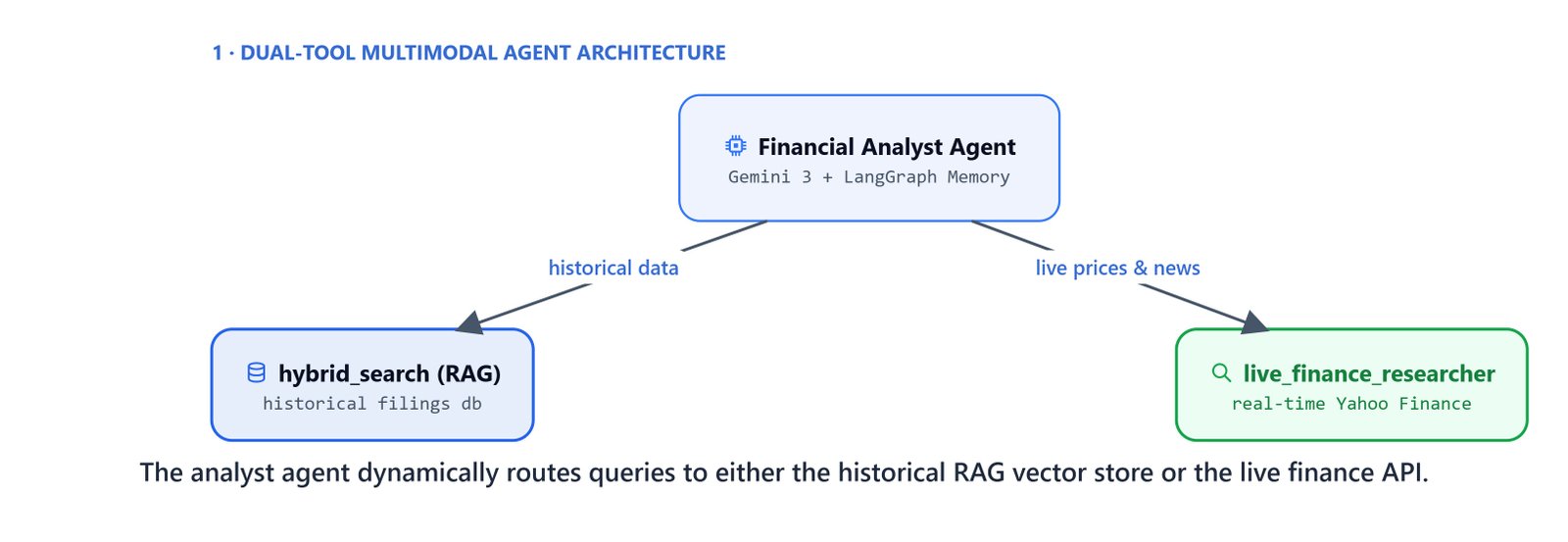
- Historical retrieval (RAG): searches the Qdrant hybrid index of parsed SEC filings.
- Live market data: queries the Yahoo Finance MCP server over stdio to fetch current metrics.
- Persistent session memory: uses a local SQLite database to keep chat conversations across separate runs.
       +-----------------------+
       |   User Query Prompt   |
       +-----------------------+
                   |
                   v
       +-----------------------+
       |  Financial Orchestrator| <---+ Memory DB (SQLite)
       +-----------------------+
          /                 \
         v                   v
+----------------+   +-----------------------+
|  hybrid_search |   |live_finance_researcher|
|  (Qdrant RAG)  |   |  (Yahoo Finance MCP)  |
+----------------+   +-----------------------+
Defining the Dual Tools
The agent requires two tools: hybrid_search and live_finance_researcher.
Create the tool script scripts/rag_tools.py that holds the live researcher subprocess bridge:
import sys
import subprocess
from langchain_core.tools import tool

@tool
def live_finance_researcher(query: str) -> str:
    """Research live stock data using Yahoo Finance MCP.

    Use this tool to get:
    - Current stock prices and real-time market data
    - Latest financial news
    - Stock recommendations and analyst ratings
    - Option chains and recent splits/dividends
    """
    # execute async finance_research client in a sync python subprocess
    code = f"""
import asyncio
from scripts.yahoo_mcp import finance_research
asyncio.run(finance_research("{query}"))
"""
    result = subprocess.run([sys.executable, '-c', code], capture_output=True, text=True)
return result.stdoutInitializing the Agent with Persistent SQLite Memory
To keep thread conversations, we initialize an SQLite-backed checkpointer.
import sqlite3
from dotenv import load_dotenv
from langchain_google_genai import ChatGoogleGenerativeAI
from langchain.agents import create_agent
from langgraph.checkpoint.sqlite import SqliteSaver
from scripts.rag_tools import hybrid_search, live_finance_researcher
from scripts.prompts import MULTIMODEL_AGENT_PROMPT

load_dotenv()

# Instantiate reasoning LLM model
model = ChatGoogleGenerativeAI(model='gemini-3-pro-preview')

def get_agent():
    # Store checkpointer databases inside the data folder
    conn = sqlite3.connect('data/financial_research_agent.db', check_same_thread=False)
    checkpointer = SqliteSaver(conn=conn)

    agent = create_agent(
        model=model,
        tools=[hybrid_search, live_finance_researcher],
        system_prompt=MULTIMODEL_AGENT_PROMPT,
        checkpointer=checkpointer
    )
    return agent

agent = get_agent()
Implementing Real-Time Token Streaming
To improve the user experience, we stream the agent's output tokens, tool calls, and execution logs in real time.
from langchain_core.messages import HumanMessage, AIMessage, ToolMessage

def stream_agent_response(agent, query: str, thread_id: str = "default_session"):
    config = {'configurable': {'thread_id': thread_id}}

    for chunk in agent.stream(
        {'messages': [HumanMessage(query)]},
        stream_mode='messages',
        config=config
    ):
        message = chunk[0] if isinstance(chunk, tuple) else chunk

        # Stream tool calls
        if isinstance(message, AIMessage) and message.tool_calls:
            for tool_call in message.tool_calls:
                print(f"\n  [Tool Triggered]: {tool_call['name']}")
                print(f"   Arguments: {tool_call['args']}\n")

        # Stream tool return logs
        elif isinstance(message, ToolMessage):
            print(f"\n  [Tool Completed] (returned {len(message.text)} chars)\n")

        # Stream text response tokens
        elif isinstance(message, AIMessage) and message.text:
            print(message.text, end='', flush=True)
Verifying the Integrated Agent Workflow
Query 1: Retrieving Historical SEC Filings
Let's test retrieving historical cash flow data from our Qdrant vector index.
agent = get_agent()
stream_agent_response(agent, "What was Apple's cash flow in 2023?", thread_id="thread_1") [Tool Triggered]: hybrid_search
Arguments: {'query': "Apple's cash flow in fiscal year 2023"}
[Tool Completed] (returned 22940 chars)
For the fiscal year ended September 30, 2023, Apple Inc. reported:
- **Cash from operating activities**: $110,543 million ($110.5 billion), driven by net income of $96,995 million.
- **Cash from investing activities**: $3,705 million.
- **Cash from financing activities**: ($108,488) million.
Source: apple 10-k 2023.md, page 42Here, we can see the agent hit the historical RAG tool and pull the exact cash-flow figures from Apple's 2023 filing.
Query 2: Retrieving Live Market Data
Now, let's ask for the current stock price and recent news, which triggers the live finance tool.
stream_agent_response(agent, "What is the current stock price of Apple (AAPL) and the latest news?", thread_id="thread_1") [Tool Triggered]: live_finance_researcher
Arguments: {'query': 'current stock price and latest news for Apple (AAPL)'}
[Tool Completed] (returned 795 chars)
Apple Inc. (AAPL) current market metrics:
* **Current Stock Price**: $271.84
* **Latest News**:
- Evercore ISI raised its price target for Apple to $325 (Outperform), citing Siri 2.0 and AI integrations.
- Apple has opened app store options in Japan to comply with regulatory changes.
Source: Yahoo Finance (live data)Query 3: Multi-Tool Synthesis
Let's test a complex query that needs both historical filings and live market data.
stream_agent_response(agent, "Compare Microsoft's Q2 2024 revenue from filings with its current stock performance.", thread_id="thread_2") [Tool Triggered]: hybrid_search
Arguments: {'query': 'Microsoft Q2 2024 revenue SEC filing'}
[Tool Completed] (returned 15800 chars)
[Tool Triggered]: live_finance_researcher
Arguments: {'query': 'Microsoft current stock price and performance'}
[Tool Completed] (returned 620 chars)
Comparative Analysis for Microsoft (MSFT):
### Historical Q2 2024 Performance (Quarter Ended Dec 31, 2023)
* **Net Revenue**: $62.0 billion (up 18% YoY).
* **Operating Income**: $27.0 billion (up 33% YoY).
Source: microsoft 10-q q2 2024.md, page 15
### Current Market Performance
* **Current Stock Price**: $491.02.
* **Market Capitalization**: $3.65 Trillion.
Source: Yahoo Finance (live data)Here, we can see the agent call both tools and merge the filing data with the live quote into one comparison. This is how a dual-tool multimodal agent works. It routes each question to historical RAG or the live finance API, remembers the thread in SQLite, and streams every token back as it goes.