
"Cancel my plan and refund the duplicate charge" asks for two things. The one-label classifier from Day 3 must pick one label, so one request gets dropped. In this blog, we will learn how Scikit-LLM can give one ticket both billing and cancellation.
We will also find out what the library does with each reply before we see it. Then we will check the returned labels as a set and score them against a human answer.
One Label or Several?
In one-label classification, each ticket gets exactly one category from the allowed list. In multi-label classification, each category becomes its own separate yes-or-no choice. In simple words, one ticket can be billing and cancellation at the same time.
This figure shows the whole path, from one mixed ticket to the set check.
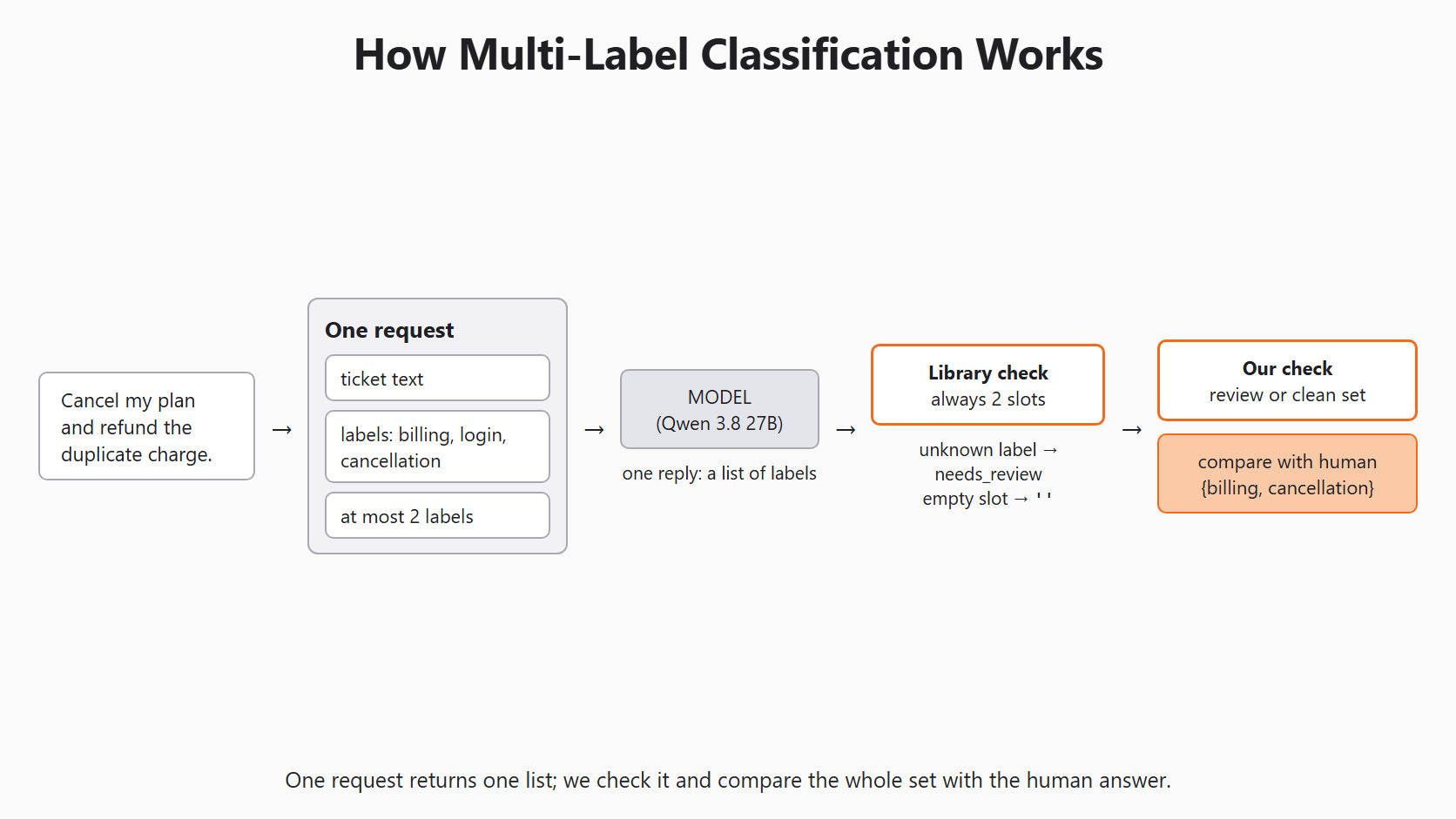
A one-label answer such as billing is partly useful for the support team. But it drops the cancellation request, so nobody stops the plan. A set of labels keeps both requests visible to the support agents.
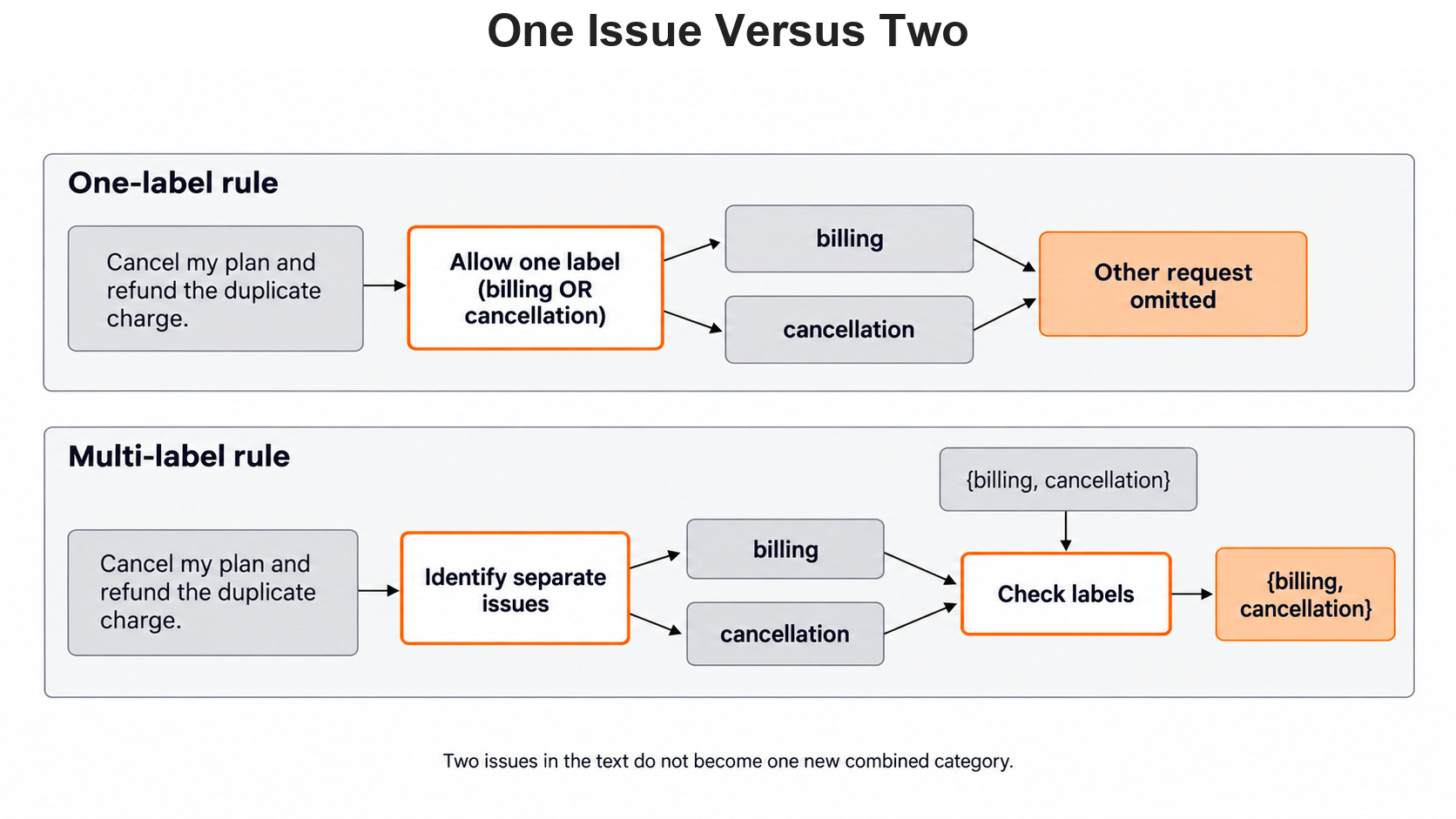
Why not add one combined category with a name like billing_and_cancellation instead? Because combined labels multiply quickly as the category list grows. Our three labels already make four mixed sets, and every new label adds more. Separate labels also show exactly which individual request the model missed.
A person writes the human answer by asking one small question for each label. There is a payment issue, so billing is yes. There is no sign-in problem, so login is no. The student wants the plan stopped, so cancellation is yes. Together, those three answers give the human set {billing, cancellation}.
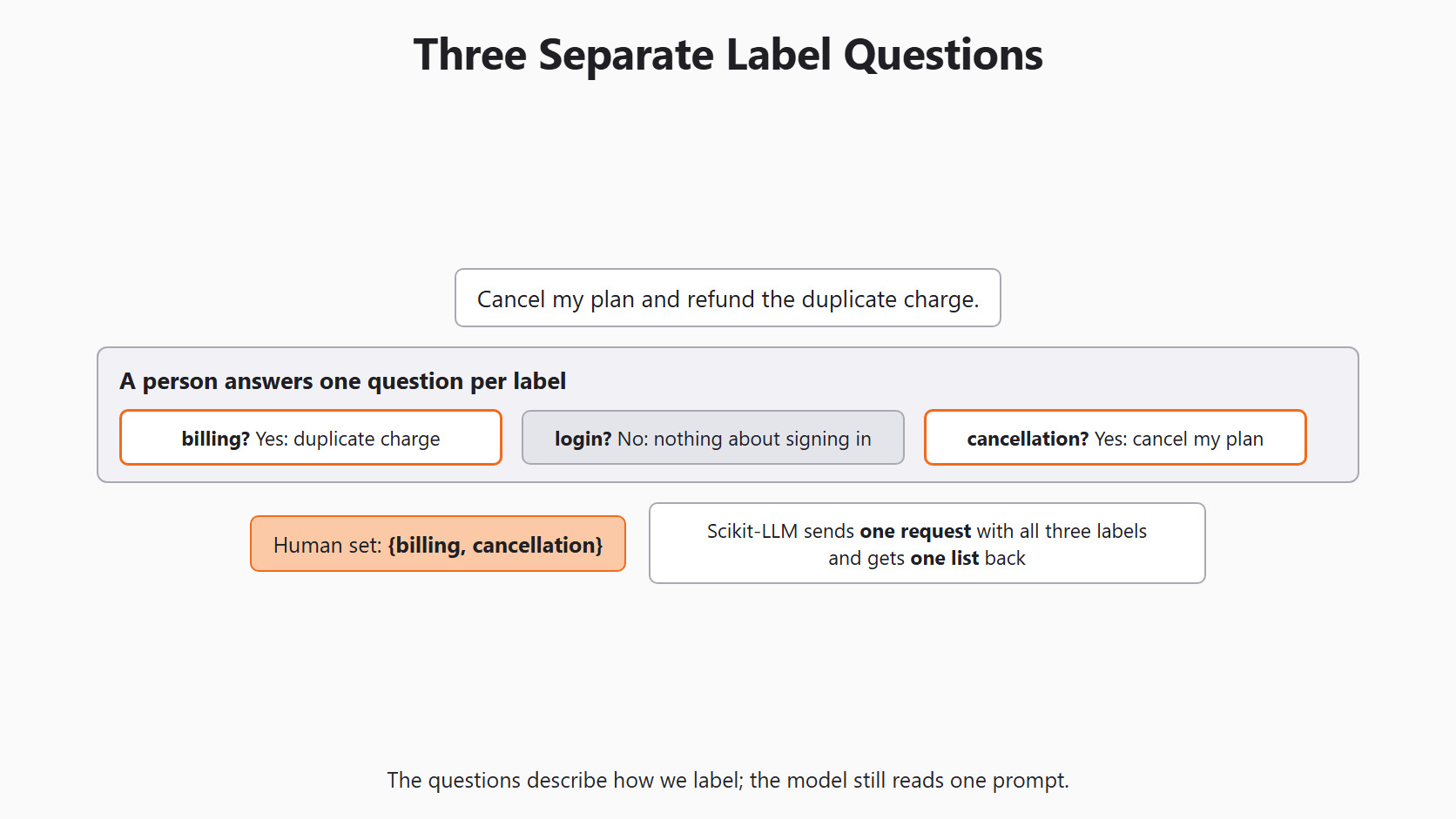
Scikit-LLM does not send three separate questions to the model, though. It sends one request that holds the ticket and all three labels. The model answers that request with one list of labels.
Setup
The classifier needs the same setup as every Scikit-LLM lesson, and Day 2 explains each line.
import os

from skllm.config import SKLLMConfig

# Default: Qwen 3.8 27B running on our own machine through Ollama
SKLLMConfig.set_gpt_url("http://localhost:11434/v1")
SKLLMConfig.set_gpt_key("ollama")
MODEL = "custom_url::qwen3.8:27b"

# Option: the free Qwen 3.8 27B on OpenRouter (uncomment these lines)
# SKLLMConfig.set_gpt_url("https://openrouter.ai/api/v1")
# SKLLMConfig.set_gpt_key(os.environ["OPENROUTER_API_KEY"])
# MODEL = "custom_url::qwen/qwen3.8-27b:free"Prepare Our Allowed Labels
The Scikit-LLM zero-shot guide documents the MultiLabelZeroShotGPTClassifier class for this job. We use it in place of the one-label class from Day 3.
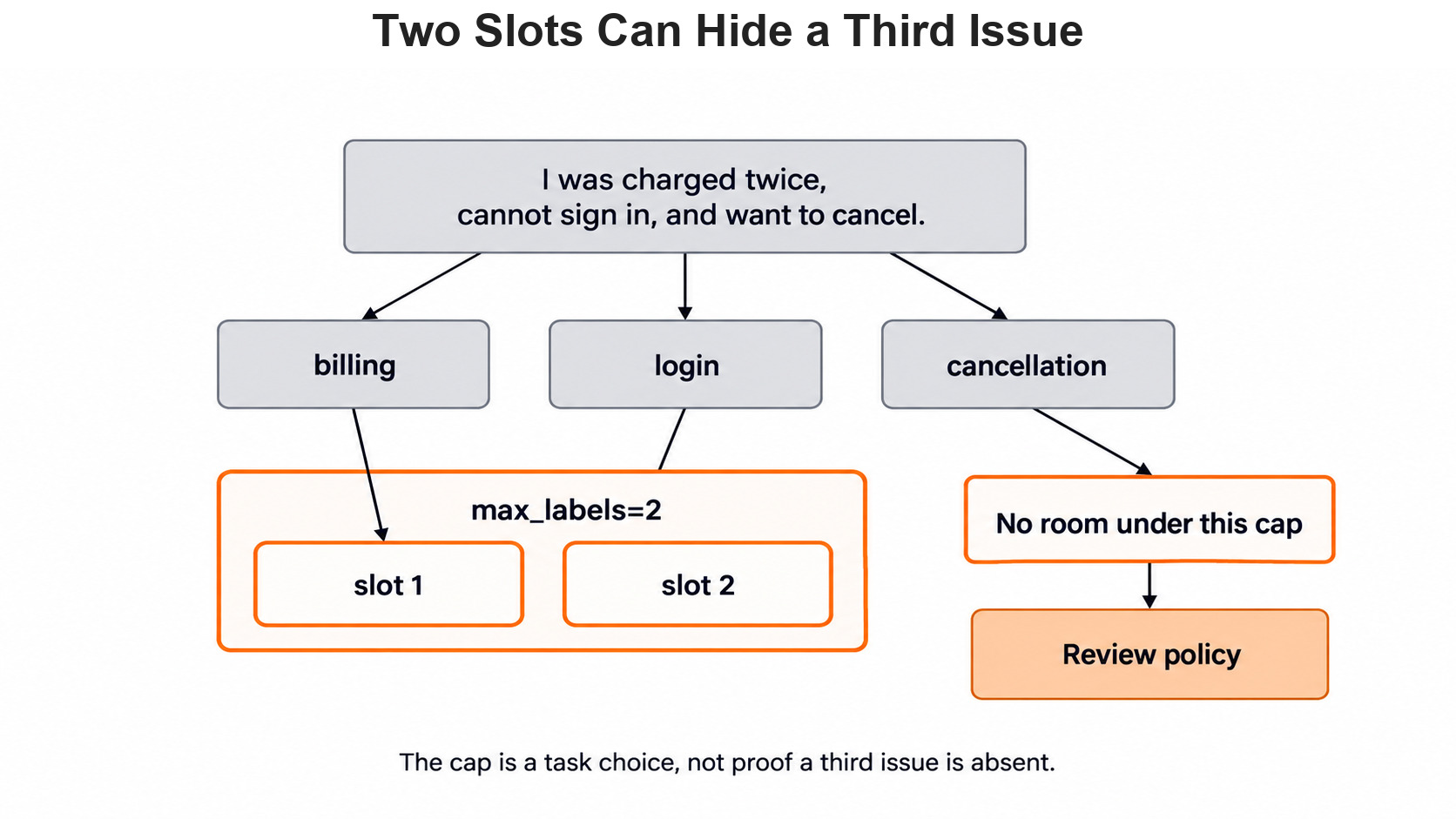
The max_labels value sets how many labels come back for each ticket. We use two because our teaching ticket contains exactly two separate requests. That is a choice for this lesson, not a fact about real inboxes. As on Day 3, any reply outside our labels becomes needs_review. Let's see the code as below:
from skllm.models.gpt.classification.zero_shot import (
    MultiLabelZeroShotGPTClassifier,
)

labels = ["billing", "login", "cancellation"]
clf = MultiLabelZeroShotGPTClassifier(
    model=MODEL,
    max_labels=2,
    default_label="needs_review",
)
clf.fit(None, [labels])
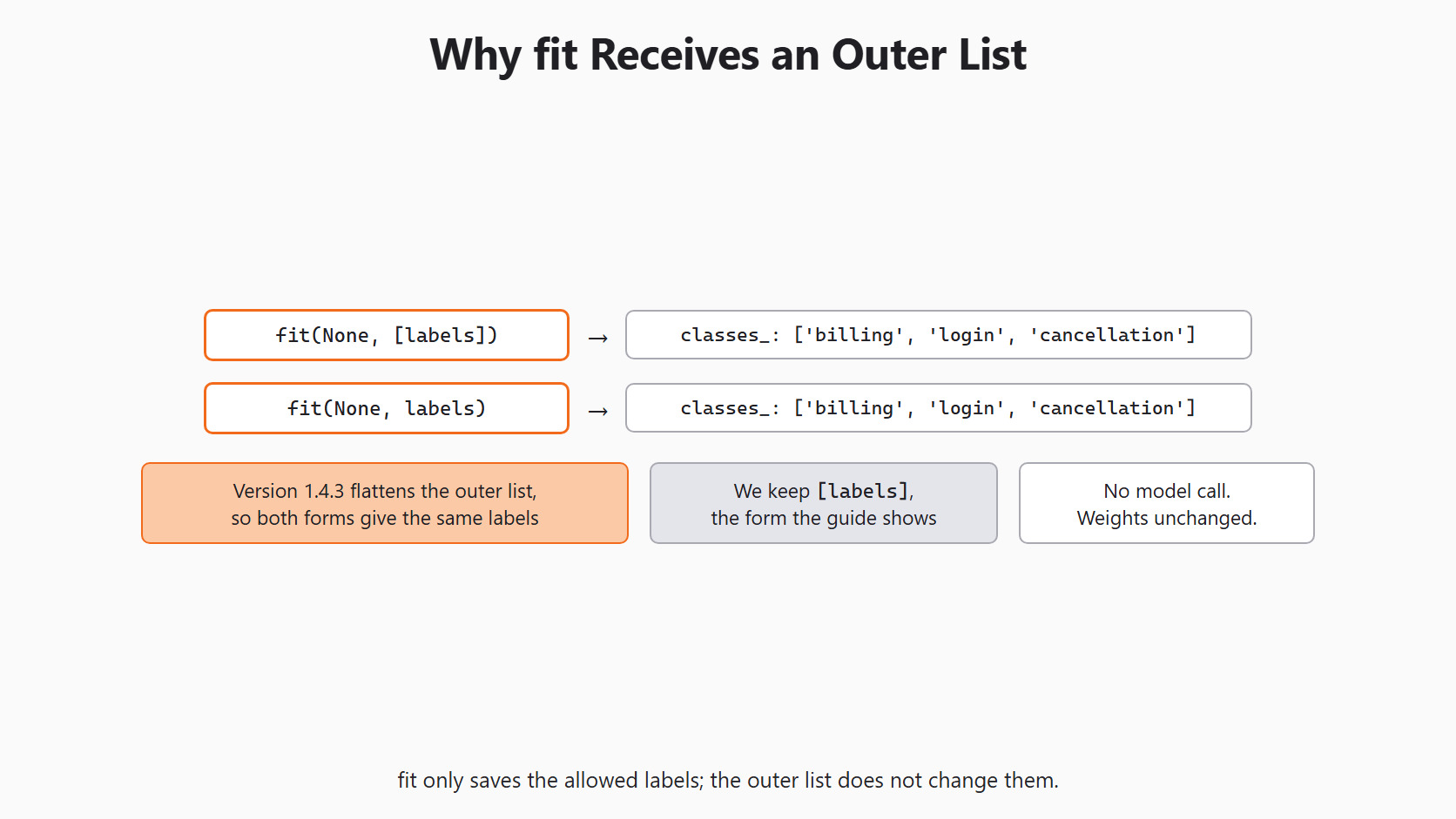
print(clf.classes_)['billing', 'login', 'cancellation']Here, we can see our three allowed labels in their original order. This fit() made no model call and trained nothing at all. It only saved the label list for the requests that come later.
The guide wraps the labels in an outer list, as in [labels]. We can test whether that outer list matters without calling the model:
flat = MultiLabelZeroShotGPTClassifier(
    model=MODEL,
    max_labels=2,
    default_label="needs_review",
)
flat.fit(None, labels)
print(flat.classes_)['billing', 'login', 'cancellation']Here, we can see the same three labels as before. In version 1.4.3, fit() flattens the outer list, so both forms give the same result. We keep [labels] because that is the form the guide shows.
A cap of two labels has a real cost for busy mixed tickets. If a ticket contains three real requests, one of them cannot fit.
What the Library Does With Each Reply
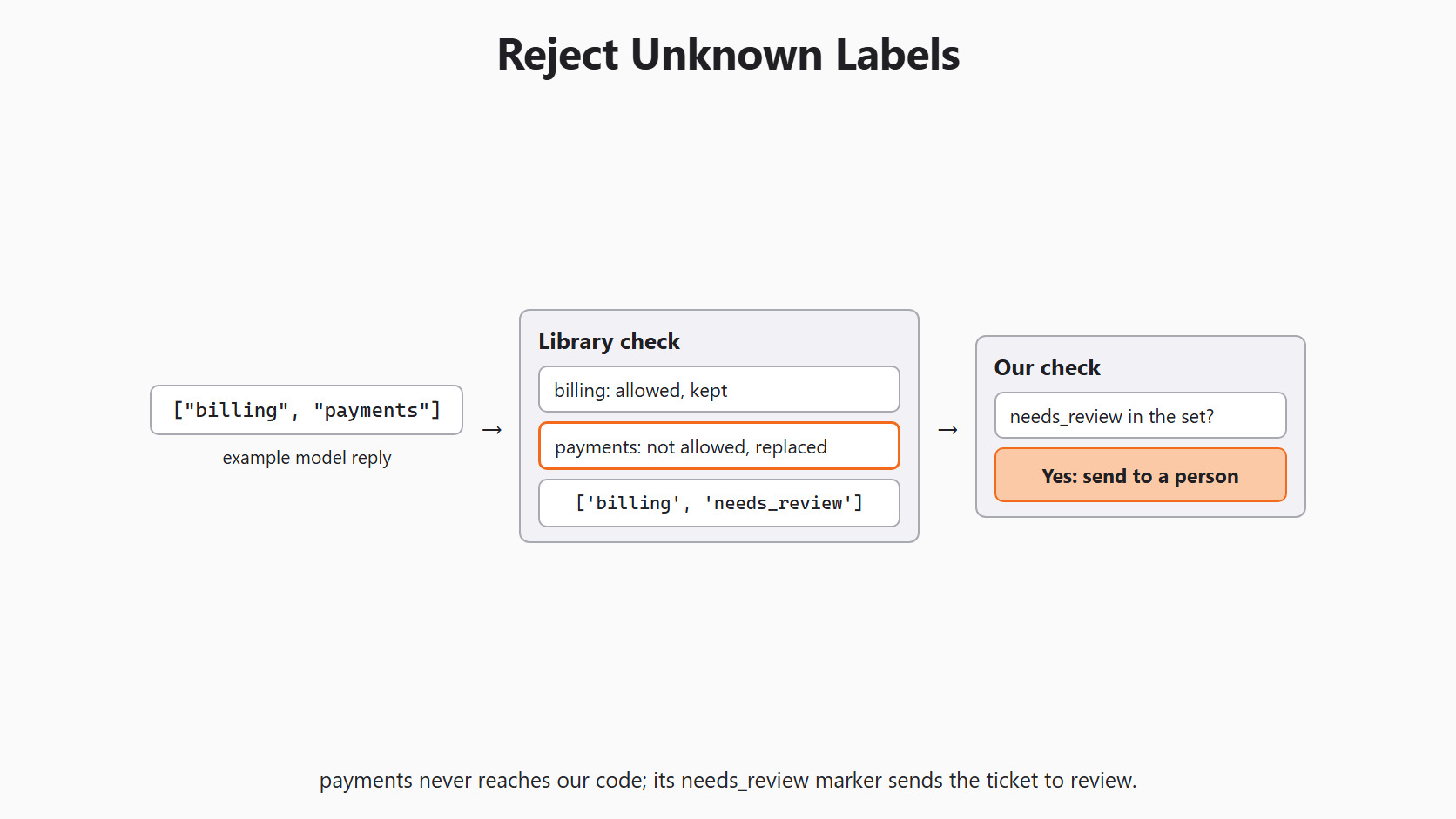
The model replies with some JSON text that holds a list of labels. Scikit-LLM checks that list with validate_prediction() before we ever see it. We can call the same check ourselves with made-up replies, so no model is involved:
print(clf.validate_prediction(["billing", "payments"]))
print(clf.validate_prediction(["cancellation"]))
print(clf.validate_prediction(["billing", "billing", "cancellation"]))
print(clf.validate_prediction("not a list"))['billing', 'needs_review']
['cancellation', '']
['billing', 'cancellation']
['', '']Here, we can see four rules at work in the library's check:
- An unknown label such as
paymentsis replaced withneeds_reviewbefore we see it. - A short list is filled with empty strings, so every row has exactly two slots.
- A repeated known label is kept only once in the returned row.
- A reply that is not a list at all becomes two empty strings.
Because of these rules, every prediction row has the same predictable shape, whatever the model writes.
The prompt tells the model to pick at least one label. So an empty row does not mean "no issue found". It means the library could not read a label list from the reply.
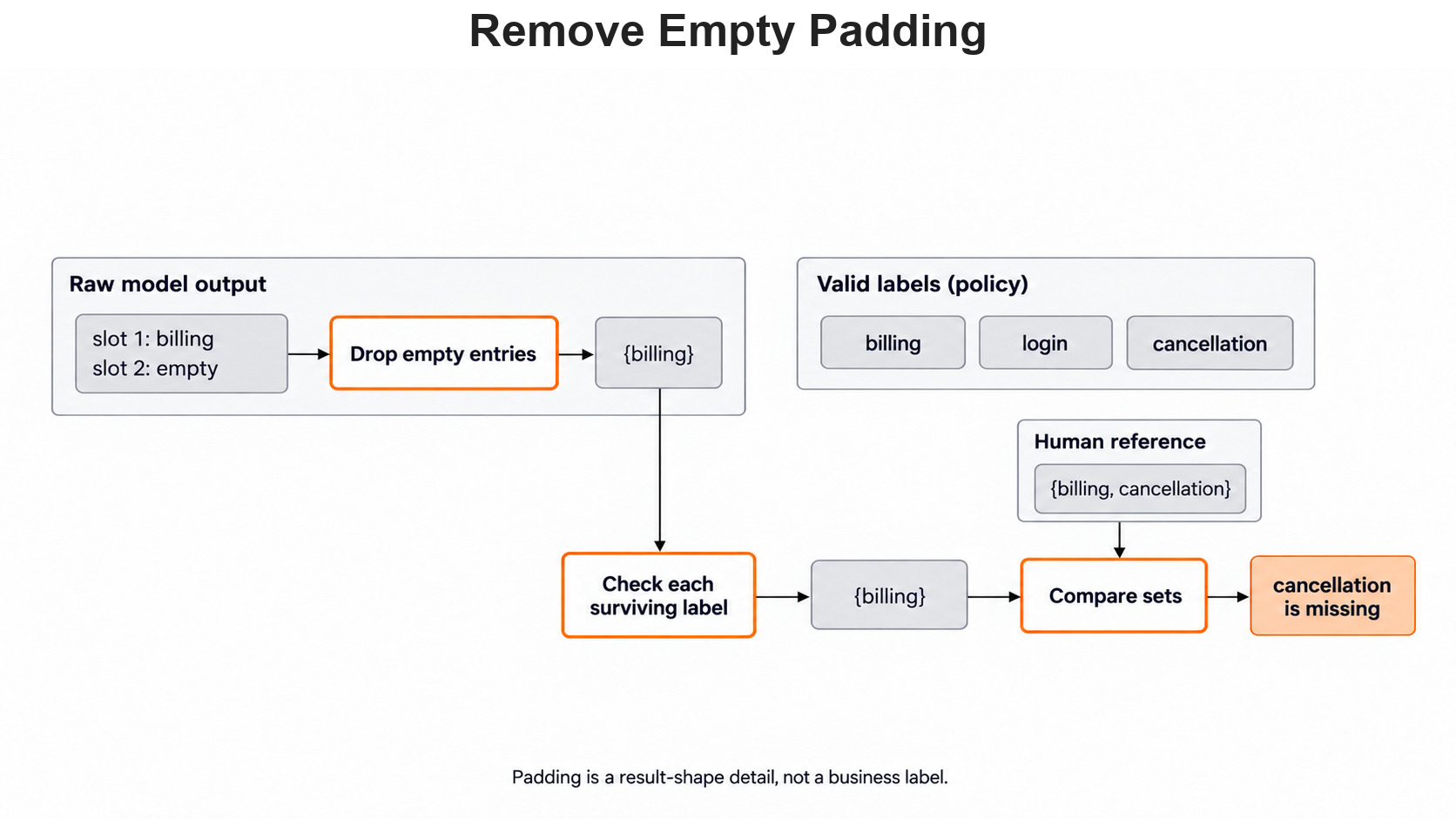
Empty strings are only padding that fills the row to its fixed length. They are never business labels, so we drop them before any check.
Send One Mixed Ticket
We use a synthetic ticket and write its human answer first. The human set has two labels, and it stays out of the request:
tickets = ["Cancel my plan and refund the duplicate charge."]
human = {"billing", "cancellation"}
raw = clf.predict(tickets)[0]
print(raw)
This prints a NumPy array that always contains exactly two strings. In normal use, each one is billing, login, cancellation, needs_review or an empty string.
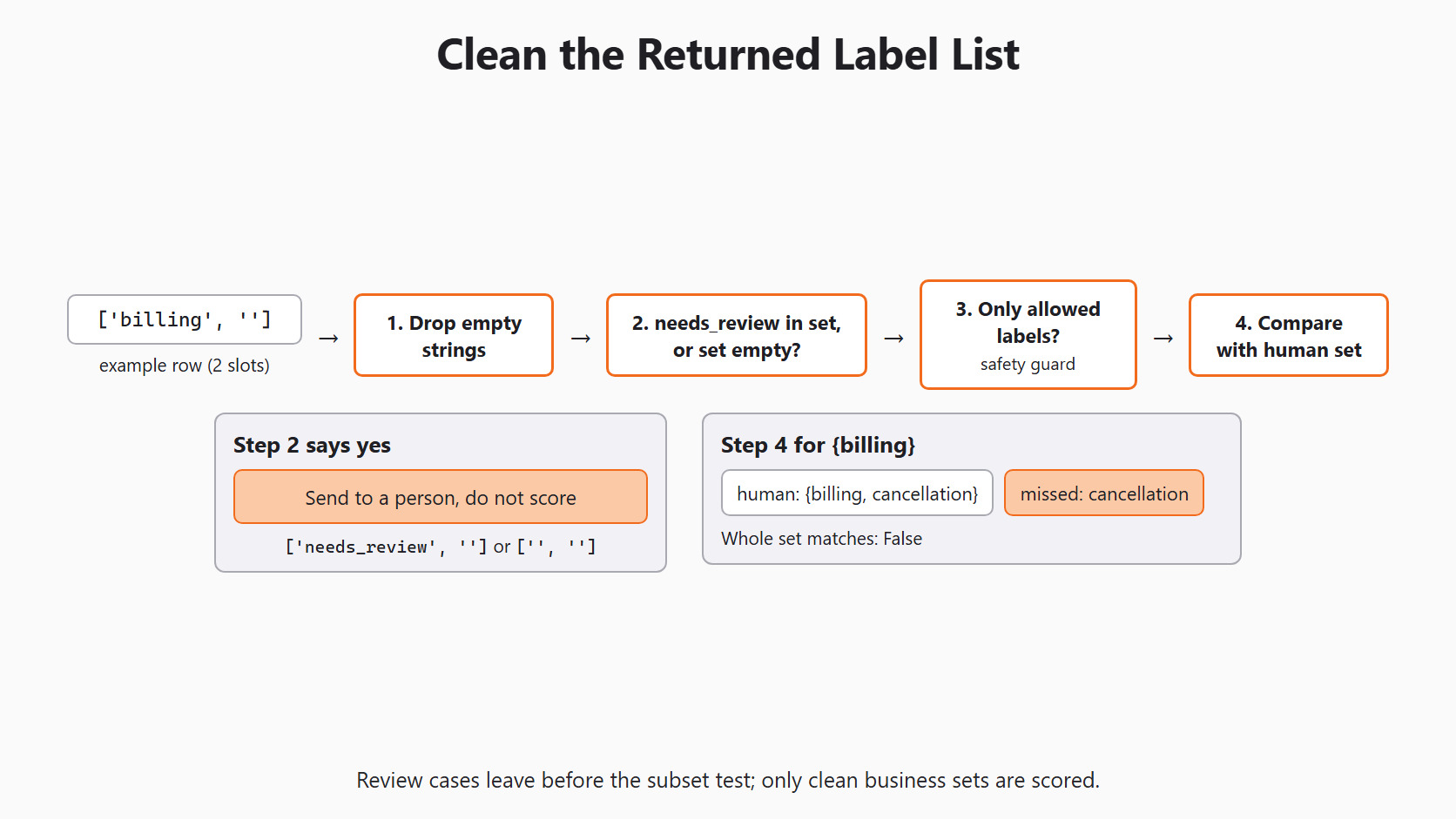
Now we turn the row into a set and decide what to do with it. The order of these checks matters. First, we remove the empty padding strings from the row. After that, we look for the two review cases. A set containing needs_review means some part of the reply fell outside our allowed labels. An empty set means the library could not read the reply. Both cases go to a person for review, and neither one is scored:
allowed = set(labels)
clean = {label for label in raw.tolist() if label}

if "needs_review" in clean or not clean:
    print("Send to a person:", raw.tolist())
else:
    if not clean <= allowed:
        raise ValueError(f"Unexpected labels: {clean - allowed}")
    print("Whole set matches:", clean == human)
    print("Missed:", human - clean, "| Extra:", clean - human)
Only a set of real business labels reaches the last branch. The subset test in that branch works as a safety guard. If a strange value ever slips through, the code stops with an error, so the mistake cannot hide. After that, we compare with the human set and print what was missed or added.
Warning
We must never run the subset test before the review check in this code. The library places needs_review inside the row, and that marker is not in allowed. So an ordinary review case would crash the check instead of reaching a person.
A Python set ignores order, so {billing, cancellation} and {cancellation, billing} count as the same answer.
How Do We Score Two Labels?
Exact-set accuracy asks one strict question: is the whole set right? If the model returns only {billing}, the answer is no, because cancellation is missing. A per-label view adds detail: billing was found, and cancellation was missed. We record both facts, because each one tells a different story.
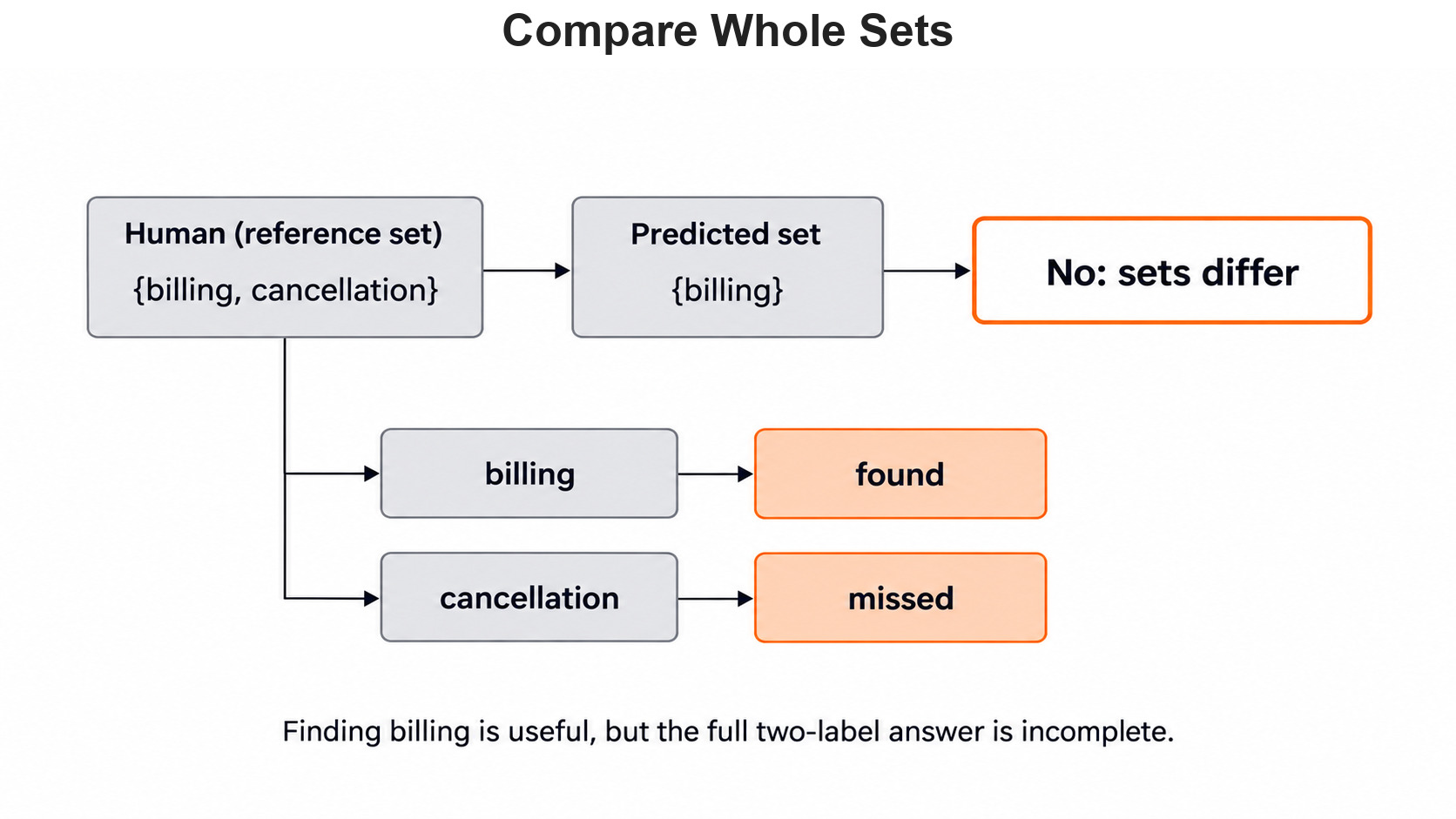
Let's say we have three hand-labeled tickets called T1, T2 and T3. The human sets are {billing, cancellation} for T1, {login} for T2 and {billing} for T3.
Now imagine the model returns {billing} for T1, {login} for T2 and {billing, cancellation} for T3. Only T2 is an exact match, so whole-ticket accuracy is 1/3. T1 misses cancellation, and T3 adds a cancellation that is not there.
Now we look at one label at a time across all three tickets. Precision asks how many of the predicted labels were actually right. Recall asks how many of the true labels the model managed to find. Billing is predicted on T1 and T3, and both are true, so billing scores 2/2 on both. Cancellation is predicted only once, on T3, where it is wrong, and it is missed on T1. So cancellation scores 0/1 for precision and 0/1 for recall in this small example. These are hand-worked counts, not a model result.
Turn Label Sets Into Rows
For many tickets, we write each set as a row of ones and zeros, one column per label. A one means the label applies, and a zero means it does not. The MultiLabelBinarizer class from scikit-learn builds these rows for us. We pass our label list on purpose, so our policy decides the columns, not a surprise reply:
from sklearn.preprocessing import MultiLabelBinarizer

known = ["billing", "login", "cancellation"]
encoder = MultiLabelBinarizer(classes=known)
human_sets = [
    {"billing", "cancellation"},
    {"login"},
    {"billing"},
]
human_rows = encoder.fit_transform(human_sets)
print(encoder.classes_)
print(human_rows)['billing' 'login' 'cancellation']
[[1 0 1]
[0 1 0]
[1 0 0]]Here, we can see the columns follow our chosen order: billing, login, cancellation. T1 has ones for billing and cancellation, just like its human set. T2 has a one for login, and T3 has a one for billing.
Now we can let scikit-learn verify our hand-worked counts automatically. We turn the imagined model sets into rows with the same encoder:
from sklearn.metrics import accuracy_score, precision_score, recall_score

pred_sets = [
    {"billing"},
    {"login"},
    {"billing", "cancellation"},
]
pred_rows = encoder.transform(pred_sets)
print(accuracy_score(human_rows, pred_rows))
print(precision_score(human_rows, pred_rows, average=None, zero_division=0))
print(recall_score(human_rows, pred_rows, average=None, zero_division=0))0.3333333333333333
[1. 1. 0.]
[1. 1. 0.]Here, we can see the same numbers we worked out by hand. On rows like these, accuracy_score counts whole-set matches, so it gives 1/3. Per label, billing and login score 1.0, while cancellation scores 0.0.
Only validated sets of business labels ever become rows. Review cases and failed calls stay out of the matrix, and we report their counts beside the scores. Otherwise, a classifier could look accurate simply by failing on the difficult tickets.
Decide the Label Cap From the Workflow
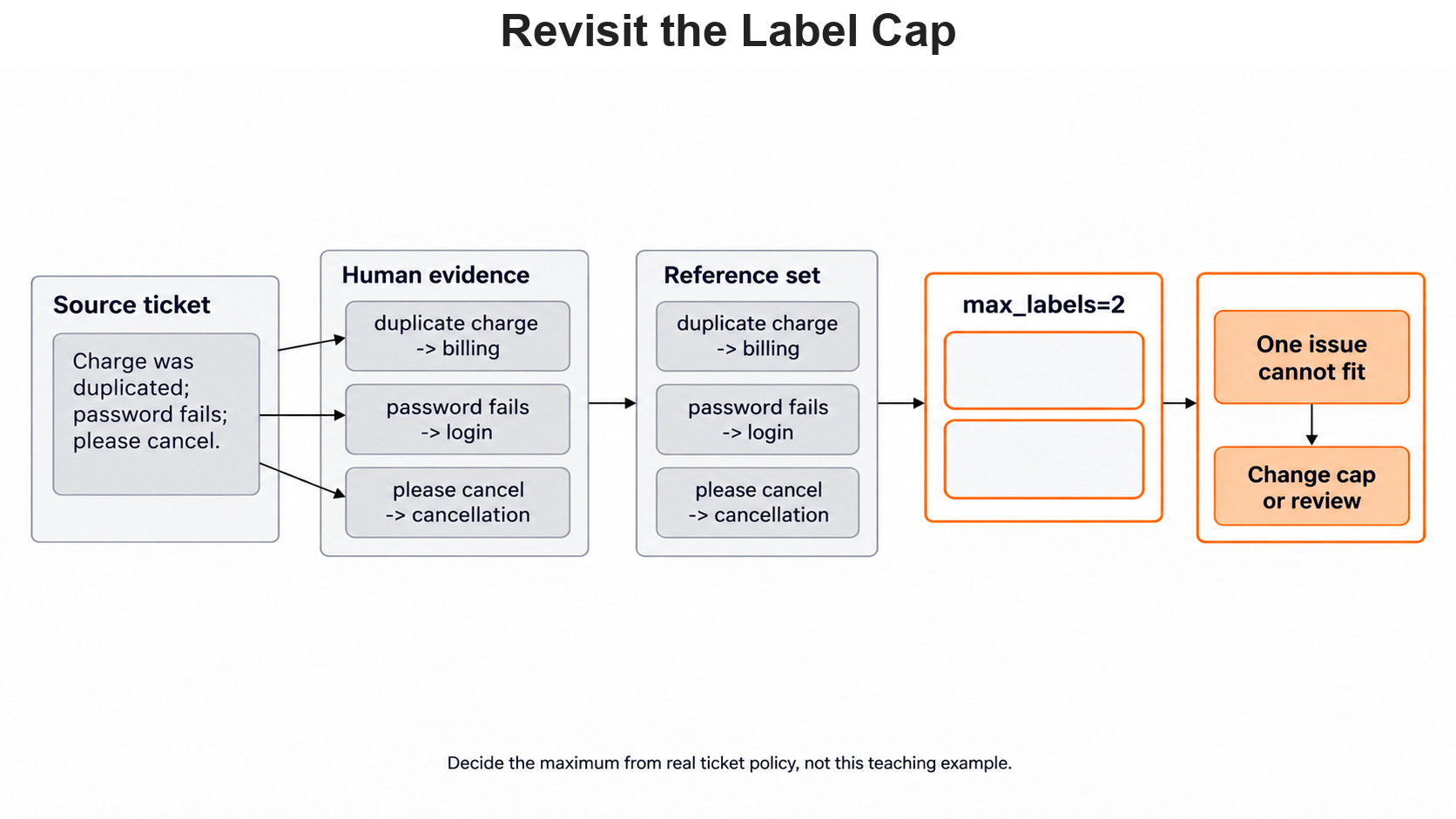
Our cap of two made the first ticket easy to follow. It is an upper limit on the returned list, not a fact about students. "I was charged twice, I cannot sign in, and I want to cancel" contains three separate requests. With only two slots, at least one support team will not see its issue.
An unlimited list of labels has a cost too. The model might add weakly related labels and create extra work for agents. So we first label a small collection of real tickets by hand. Then we compare a cap of two and a cap of three on the same messages. We count which real issues disappear and which false ones appear.
For practice, we can write the three-request ticket above and decide its human set first. Then we ask whether a cap of two is a product rule or only a teaching shortcut.
The few-shot guide also documents a MultiLabelFewShotGPTClassifier class for labeled examples. It works like the few-shot class from Day 5, but each example answer is a list of labels. The zero-shot results tell us which mixed tickets need such examples.
Conclusion
This is how multi-label classification works in Scikit-LLM. We set up a classifier with three allowed labels and a cap of two. We saw that the library turns unknown labels into needs_review and fills each row to two slots. Then we sent review cases to a person before scoring, and we checked the rest as whole sets and per label.
- One mixed ticket can need more than one business label.
- Every row has exactly
max_labelsslots, and empty strings are only padding. - Handle
needs_reviewand empty rows before the subset test and before scoring. max_labelsis a task choice that can cut off real issues.
Next steps:
- Go back to Day 5: few-shot learning to guide the model with labeled examples.
- Continue with Day 7: text embeddings to turn tickets into numbers we can search.


