PageRAG is an ingestion strategy that treats each page as a unit, not as fixed-size text chunks. Every page is stored with rich metadata. That means company, doc type, fiscal year, quarter, and page number. So financial filings are easy to filter ("Amazon 10-K, 2023, page 24"), and number tables stay intact within a page.
This is the first lesson in the Agentic RAG with LangGraph series. In this blog, we build the ingestion pipeline. Later lessons add retrieval and re-ranking and five agentic RAG patterns on top of it. The running example analyzes SEC filings for Amazon, Apple, and Google. The same pattern fits legal research, medical records, company wikis, and paper indexing.
Prerequisites: comfort with Python and basic vector-store concepts. We need Ollama installed and running, plus the packages below.
pip install -U docling langchain-chroma langchain-ollama langchain-core python-dotenv
ollama pull nomic-embed-text
Note
On Windows, download and run the installer from the Ollama website; the ollama command is then available in PowerShell.
On Linux/macOS: install with curl -fsSL https://ollama.com/install.sh | sh, then run the same ollama pull command.
Project Layout
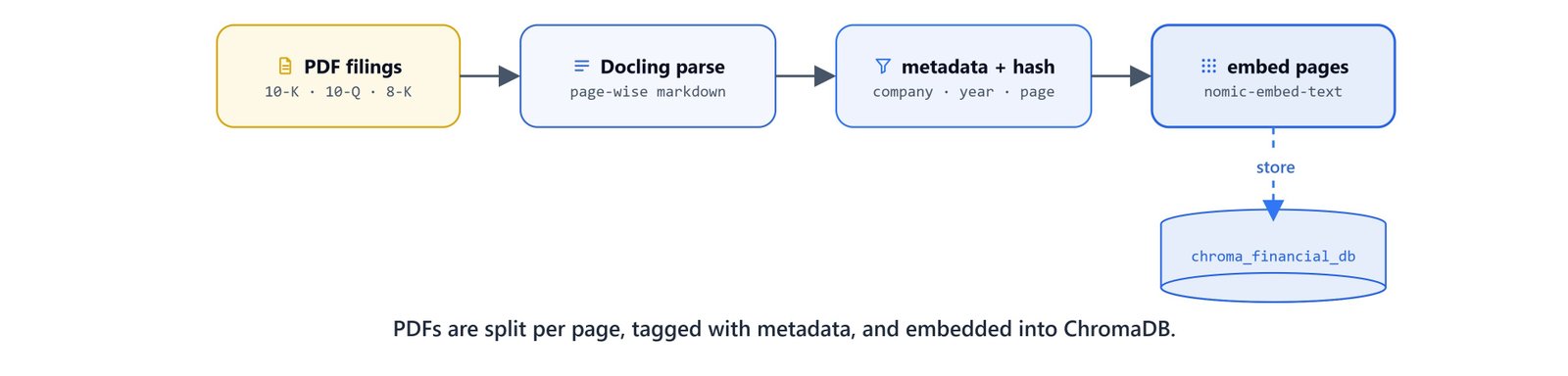
The PDFs live under data/<company>/, ChromaDB persists to ./chroma_financial_db, and the code runs from the project root. All paths are relative, so they work identically on Windows, Linux, and macOS.
project/
├── data/
│   ├── amazon/  amazon 10-k 2023.pdf, amazon 10-q q1 2024.pdf, ...
│   ├── apple/   apple 10-k 2024.pdf, ...
│   └── google/  google 10-k 2023.pdf, ...
└── chroma_financial_db/
Configuration and Vector Store
Load the environment variables, then set up the embedding model and the ChromaDB collection. The num_ctx=8192 setting gives the embedding model a large context window, so full pages embed without cutoff.
from dotenv import load_dotenv
load_dotenv()

import hashlib
from pathlib import Path

from langchain_chroma import Chroma
from langchain_ollama import OllamaEmbeddings
from langchain_core.documents import Document

from docling.document_converter import DocumentConverterDATA_DIR = "data"
CHROMA_DIR = "./chroma_financial_db"
COLLECTION_NAME = "financial_docs"
EMBEDDING_MODEL = 'nomic-embed-text'
BASE_URL = 'http://localhost:11434'embeddings = OllamaEmbeddings(model=EMBEDDING_MODEL, base_url=BASE_URL, num_ctx=8192)
vector_store = Chroma(
collection_name=COLLECTION_NAME,
embedding_function=embeddings,
persist_directory=CHROMA_DIR
)Extracting Metadata from Filenames
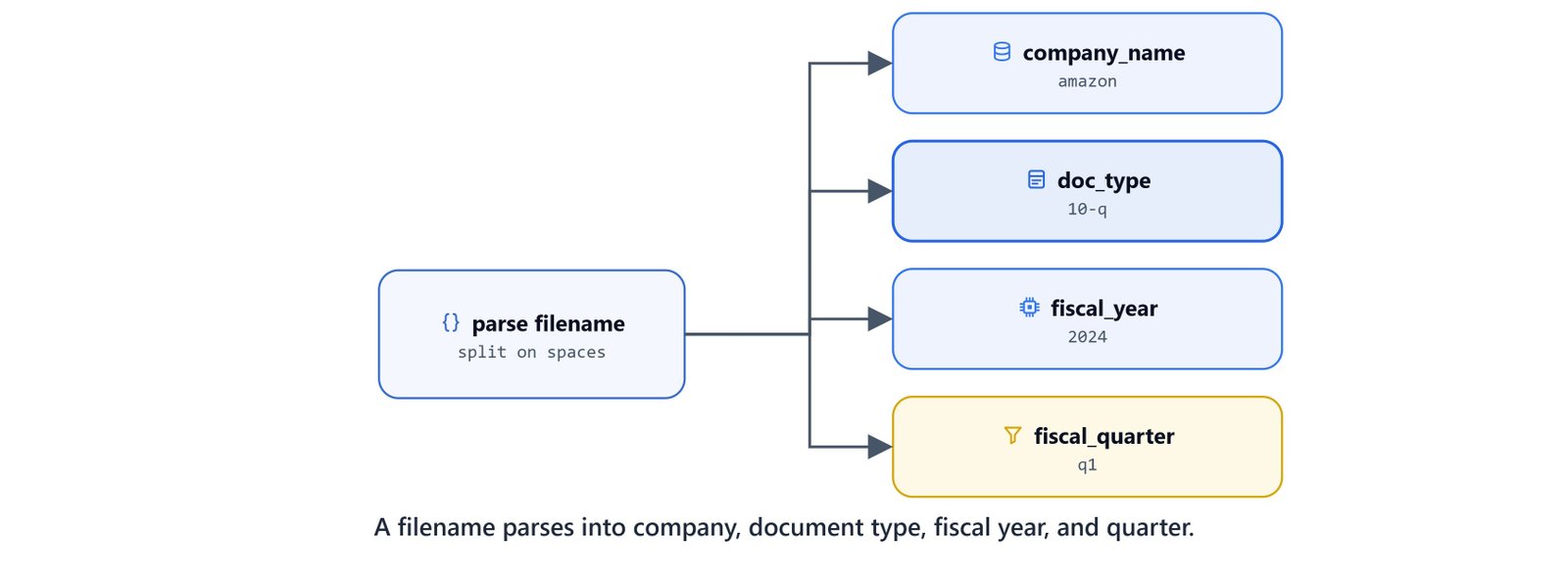
The PDFs follow a fixed naming convention, {company} {doc_type} {quarter} {year}.pdf (the quarter is dropped for annual 10-K reports). A small parser turns the filename into a metadata dictionary.
def extract_metadata_from_filename(filename: str) -> dict:
    name = filename.replace('.pdf', '')
    parts = name.split()

    metadata = {}
    if len(parts) == 4:
        metadata['fiscal_quarter'] = parts[2]
        metadata['fiscal_year'] = int(parts[3])
    else:
        metadata['fiscal_quarter'] = None
        metadata['fiscal_year'] = int(parts[2])

    metadata['company_name'] = parts[0]
    metadata['doc_type'] = parts[1]

return metadataextract_metadata_from_filename('amazon 10-q q1 2024.pdf'){'fiscal_quarter': 'q1', 'fiscal_year': 2024, 'company_name': 'amazon', 'doc_type': '10-q'}Page-wise PDF Extraction with Docling
Docling (IBM's open-source document converter) converts a PDF to Markdown. It can insert a placeholder at every page break. Splitting on that placeholder yields a list of pages, and it preserves tables and headings as Markdown.
def extract_pdf_pages(pdf_path):
    converter = DocumentConverter()
    result = converter.convert(pdf_path)

    page_break = "<!-- page break -->"
    markdown_text = result.document.export_to_markdown(page_break_placeholder=page_break)

    pages = markdown_text.split(page_break)
return pagespages = extract_pdf_pages('data/amazon/amazon 10-q q1 2024.pdf')
len(pages)52Note
The first conversion downloads Docling's OCR and layout models, so it can take a while. Later runs reuse the cached models. Docling uses our GPU automatically if one is available.
Deduplication with File Hashing
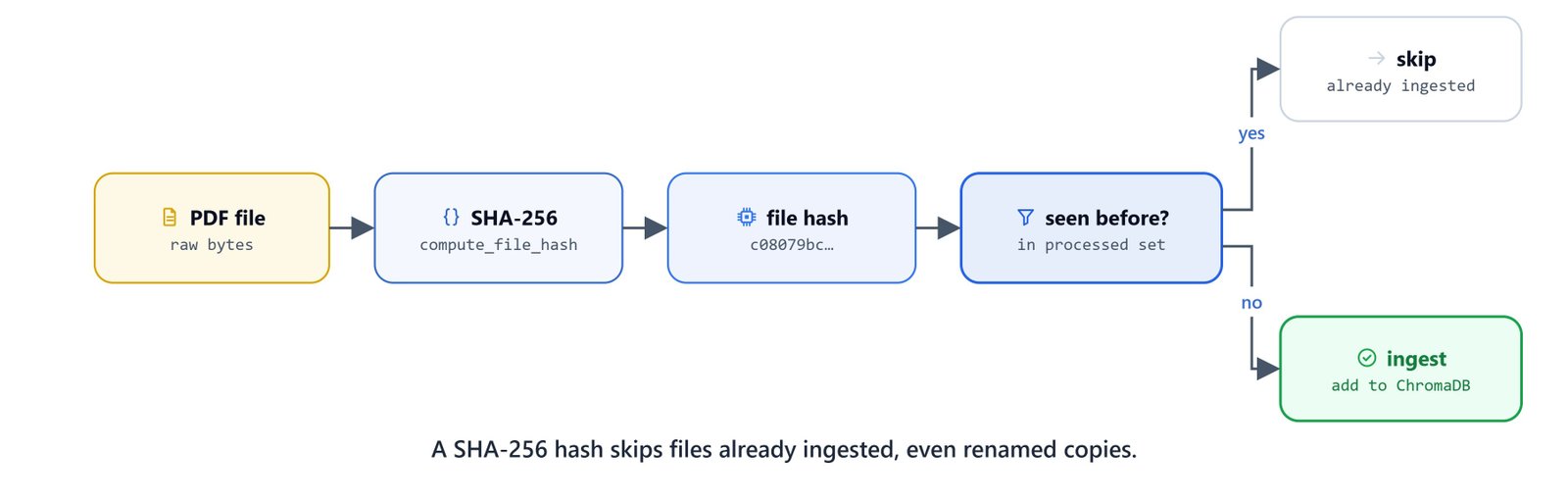
To avoid re-ingesting the same document, compute a SHA-256 hash of each file's bytes. Two files with the same content produce the same hash, even under different names. So a renamed copy is skipped correctly.
def compute_file_hash(file_path: str) -> str:
    sha256_hash = hashlib.sha256()
    with open(file_path, "rb") as f:
        for byte_block in iter(lambda: f.read(4096), b""):
            sha256_hash.update(byte_block)
return sha256_hash.hexdigest()compute_file_hash('data/amazon/amazon 10-q q1 2024.pdf')'c08079bc14250c896f3ca151f9a72ecc1ddcb9ca8e5b021539e91af10fae5c4b'Before ingesting, read the hashes already in ChromaDB, so processed files are skipped on re-runs.
existing_docs = vector_store.get(where={"file_hash": {"$ne": ""}}, include=['metadatas'])
processed_hashes = [m.get('file_hash') for m in existing_docs['metadatas'] if m.get('file_hash')]
processed_hashes = set(processed_hashes)
Ingesting Documents into ChromaDB

The ingestion function ties everything together. It skips processed files, extracts pages, tags each page as a Document, and adds them to the vector store.
def ingest_docs_in_vectordb(pdf_path):
    print(f"Processing: {pdf_path.name}")

    file_hash = compute_file_hash(pdf_path)
    if file_hash in processed_hashes:
        print(f"[SKIP] already processed: {pdf_path}")
        return

    pages = extract_pdf_pages(pdf_path)
    file_metadata = extract_metadata_from_filename(pdf_path.name)

    processed_pages = []
    for page_num, page_text in enumerate(pages, start=1):
        metadata_dict = file_metadata.copy()
        metadata_dict['page'] = page_num
        metadata_dict['file_hash'] = file_hash
        metadata_dict['source_file'] = pdf_path.name

        doc = Document(page_content=page_text, metadata=metadata_dict)
        processed_pages.append(doc)

    vector_store.add_documents(documents=processed_pages)
Use rglob to find every PDF under the data directory and ingest them all.
data_path = Path(DATA_DIR)
pdf_files = list(data_path.rglob("*.pdf"))

for pdf_path in pdf_files:
    ingest_docs_in_vectordb(pdf_path)
Confirm the collection size. Each page is one document.
vector_store._collection.count()1270Here, we can see 1,270 page-level documents in the store, one per page across all the filings.
A quick similarity search verifies the store is queryable:
results = vector_store.search("What is Tesla's revenue for Q1 2024", search_type="similarity")Tip
The store has no Tesla data, only Amazon, Apple, and Google. A plain similarity search still returns its closest matches regardless of relevance. We fix exactly this problem in the next lesson. We filter by metadata and re-rank by keyword in RAG Data Retrieval and Re-Ranking.
What You Built
In this blog, we built the PageRAG ingestion pipeline:
- Filename metadata:
extract_metadata_from_filenamereads company, doc type, fiscal year, and quarter from the name - Page-wise extraction: Docling turns each PDF into Markdown with page-break markers, and keeps tables and headings
- Dedup: a SHA-256 file hash skips documents already ingested, even renamed copies
- Rich-metadata storage: every page becomes a
Document, thennomic-embed-textembeds it into ChromaDB - A saved collection: 1,270 page-level documents ready for filtered search
This metadata-rich store is the foundation the rest of the series builds on. This is how PageRAG ingestion works. Next, we turn it into a precise retriever with metadata filtering and BM25 re-ranking.