Retrieval-Augmented Generation (RAG) solves the hallucination problem. In simple words, RAG does not let the LLM answer from memory alone. It first finds the most relevant passages in our own documents. Then it asks the LLM to answer using only those passages. The LLM becomes a reader, not an oracle.
In this lesson, we pick up directly from the Vector Stores and Retrievals tutorial. We load the FAISS vector store built there from disk. We wire it to a retriever and connect it to a qwen3 LLM through an LCEL RAG chain.
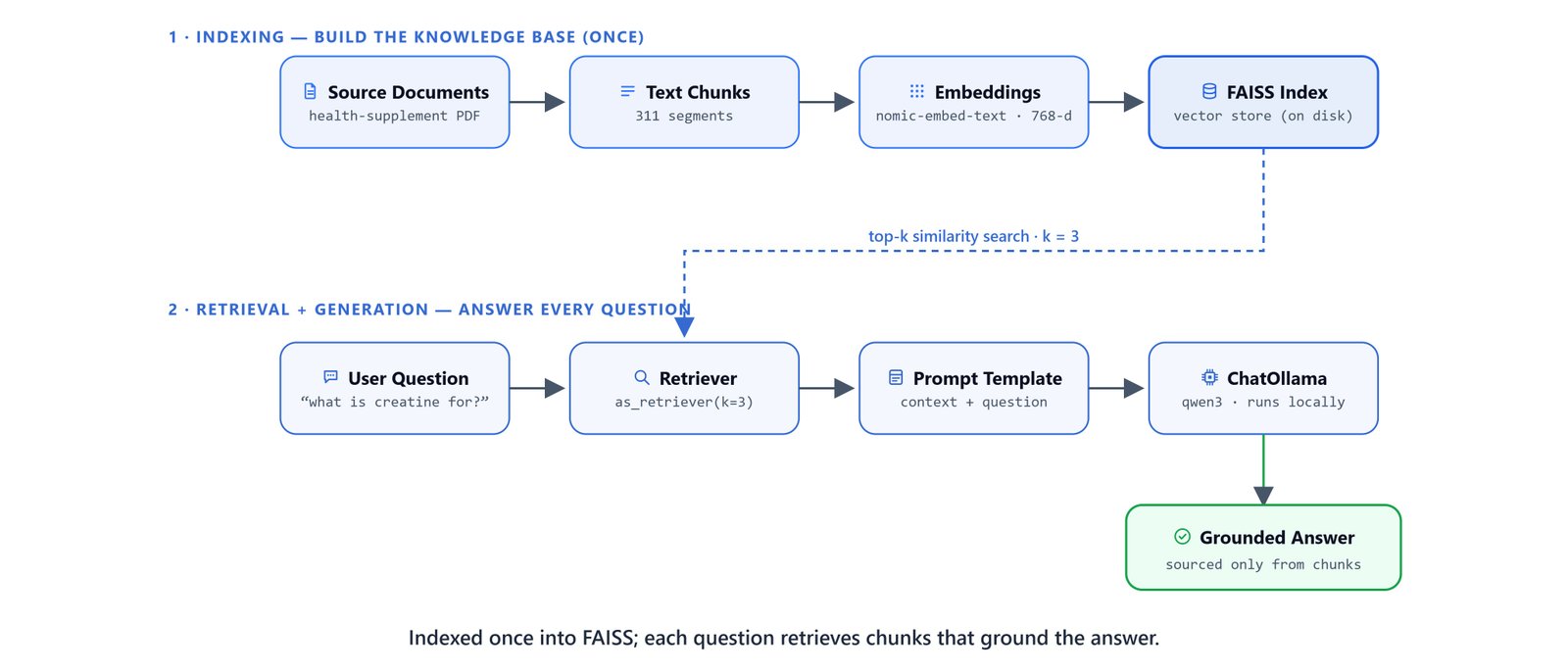
RAG runs two lanes: index your documents into FAISS, then retrieve relevant chunks and generate a grounded answer.
Prerequisites: The health_supplements/ FAISS vector store saved in the previous lesson. langchain-community, langchain-ollama, faiss-cpu, and python-dotenv installed. Ollama running with qwen3 and nomic-embed-text.
Setup
import os
import warnings
from dotenv import load_dotenv

os.environ['KMP_DUPLICATE_LIB_OK'] = 'True'
warnings.filterwarnings("ignore")

load_dotenv()TrueHow Do We Load the Saved Vector Store?
First, we import the embedding model and the FAISS vector store classes:
from langchain_ollama import OllamaEmbeddings

import faiss
from langchain_community.vectorstores import FAISS
from langchain_community.docstore.in_memory import InMemoryDocstore
Then, we load the saved vector store from disk. One rule to remember: the embedding model must be the same one used to build the index, nomic-embed-text at 768 dimensions:
embeddings = OllamaEmbeddings(model='nomic-embed-text', base_url='http://localhost:11434')

db_name = r"..\09. Vector Stores and Retrievals\health_supplements"
vector_store = FAISS.load_local(db_name, embeddings, allow_dangerous_deserialization=True)
Important
allow_dangerous_deserialization=True is required because FAISS.load_local() unpickles the docstore. Only load vector stores you created yourself or from trusted sources. If you created the health_supplements/ folder in the previous lesson, this is safe.
On Linux/macOS: adjust db_name to use forward slashes: "../09. Vector Stores and Retrievals/health_supplements".
Does the Retrieval Still Work?
Before building the chain, let's test that the loaded vector store still retrieves the right results.
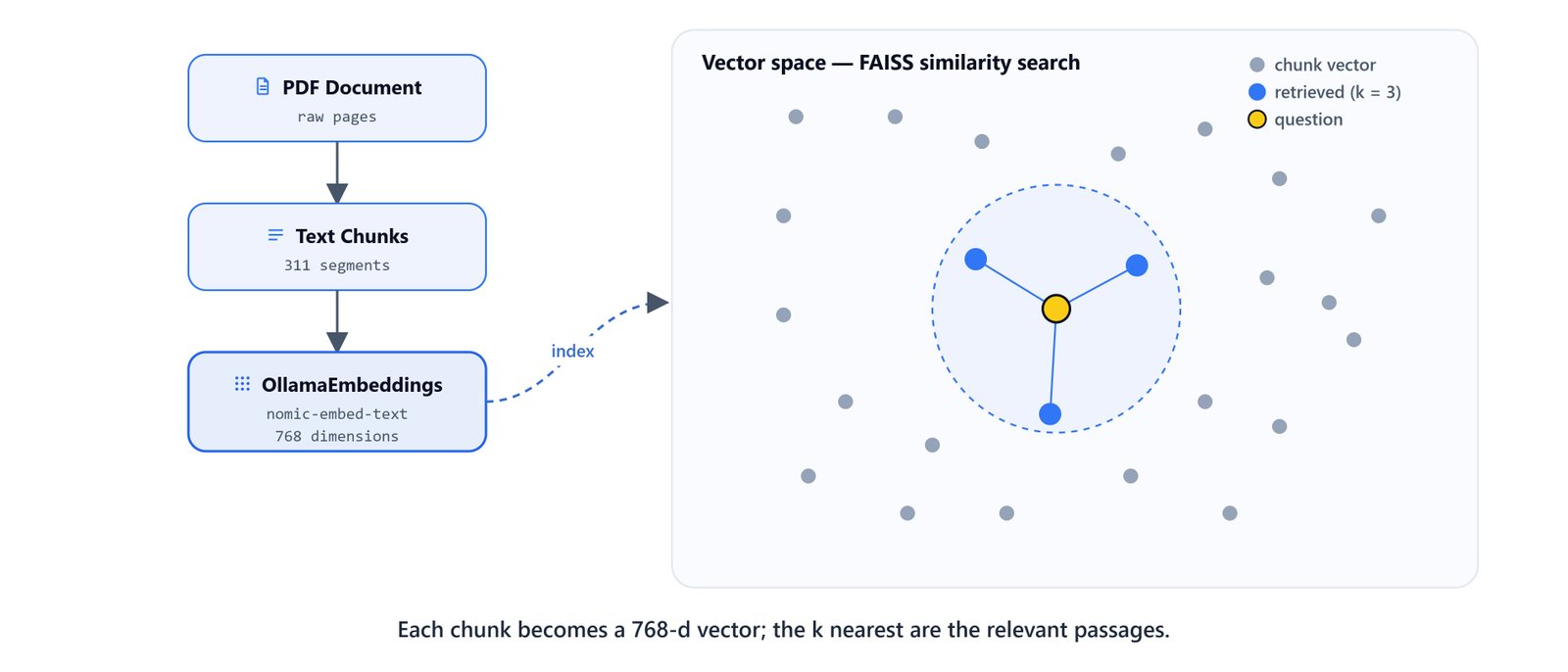
The query is embedded into the same 768-d space as the chunks; FAISS returns the k nearest passages.
Direct Search
question = "how to gain muscle mass?"
docs = vector_store.search(query=question, k=5, search_type="similarity")
It returns the 5 closest chunks. They cover protein, creatine, and strength training goals from the gym supplements research papers.
Creating the Retriever
retriever = vector_store.as_retriever(
    search_type='similarity',
    search_kwargs={'k': 3}
)

retriever.invoke(question)
It returns the top 3 relevant Document objects for the query. The retriever is the piece that plugs directly into the LCEL RAG chain.
Testing Other Queries
question = "how to lose weight?"
retriever.invoke(question)
It returns chunks about weight loss supplements from the health supplements PDF. The passages cover chromium, chitosan, Garcinia cambogia, and the weak evidence for supplement-based weight loss.
MMR Retriever
retriever = vector_store.as_retriever(
    search_type='mmr',
    search_kwargs={'k': 3, 'fetch_k': 20, 'lambda_mult': 1}
)

docs = retriever.invoke(question)
Maximal Marginal Relevance fetches 20 candidates. It then picks the 3 that are most relevant and most different from each other. This stops duplicate passages from adjacent pages of the same paper.
How Do We Build the RAG Chain?
LLM
from langchain_ollama import ChatOllama
from langchain_core.output_parsers import StrOutputParser
from langchain_core.runnables import RunnablePassthrough
from langchain_core.prompts import ChatPromptTemplatellm = ChatOllama(model='qwen3', base_url='http://localhost:11434')
llm.invoke('hi')AIMessage(content='Hello! How can I assist you today? 😊', ...)RAG Prompt
The prompt template is where we control the RAG behaviour. It tells the model three things. Answer only from the retrieved context. Say "I don't know" when the answer is missing. Keep responses short:
prompt = """You are an assistant for question-answering tasks.
            Use the following pieces of retrieved context to answer the question.
            If you don't know the answer, just say that you don't know.
            Use three sentences maximum and keep the answer concise.

            Question: {question}
            Context: {context}

            Answer:"""

prompt = ChatPromptTemplate.from_template(prompt)
Note
In LangChain v0.3+, hub.pull("rlm/rag-prompt") is deprecated. Define the prompt inline as shown above. This gives you full control over the system instructions, with no dependency on LangChain Hub.
Format Documents Helper
def format_docs(docs):
    return '\n\n'.join([doc.page_content for doc in docs])

context = format_docs(docs)
format_docs joins all the retrieved chunk texts with double newlines into a single context string for the prompt.
Assembling the Chain
rag_chain = (
    {"context": retriever | format_docs, "question": RunnablePassthrough()}
    | prompt
    | llm
    | StrOutputParser()
)
The chain has three stages:
Input mapping: a dict with two keys:
"context": the retriever pipes the query through FAISS, gets the top-kDocumentobjects, thenformat_docsjoins their text into one string"question":RunnablePassthrough()passes the original query string through unchanged
- Prompt:
ChatPromptTemplatefills{context}and{question}into the RAG prompt - LLM + Parser:
ChatOllamagenerates the answer;StrOutputParserextracts the string content
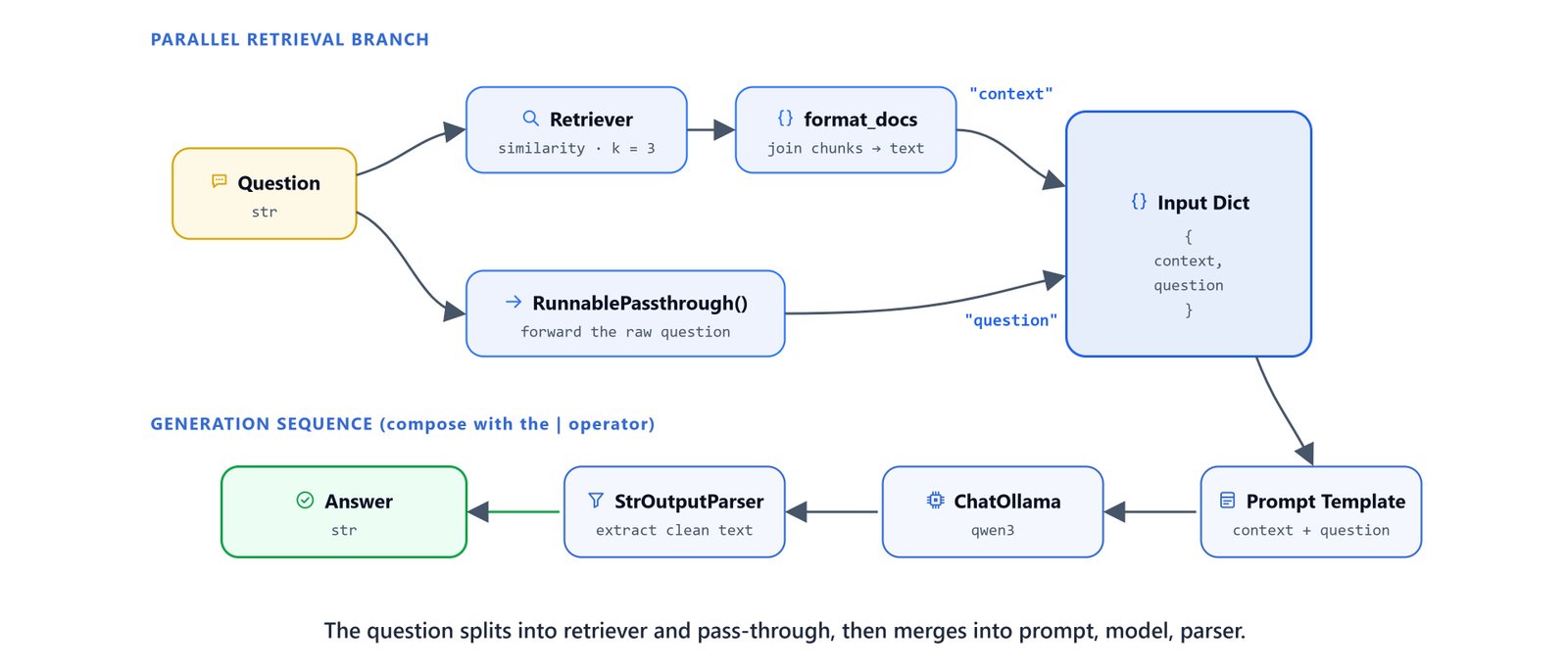
The retriever builds {context} while RunnablePassthrough forwards {question}. Both merge into prompt → LLM → parser.
Tip
RunnablePassthrough() is the key to splitting a single input string into two parallel paths. The query string is both used by the retriever (to find relevant chunks) and passed directly into the prompt (as {question}).
How Does the RAG Chain Answer?
question = "how to lose weight?"
response = rag_chain.invoke(question)

print(response)To lose weight, focus on lifestyle changes like balanced diet, regular physical activity, and avoiding addictive behaviors. Dietary supplements are not proven effective for weight loss and may pose health risks. Always consult healthcare professionals before using supplements, and avoid unregulated products.Here, we can see the answer is grounded in the health supplements PDF, specifically the section on weight loss supplements. The LLM did not answer from its general training knowledge. It read the retrieved passages and summarized them.
question = "how to gain muscle mass?"
response = rag_chain.invoke(question)

print(response)To gain muscle mass, use creatine monohydrate, which supports muscle growth without increasing fat. Combine it with strength training focused on muscle-building goals. Prioritize protein intake and consistent workout routines for optimal results.Again, the model pulls its advice from the gym supplements research papers: creatine, protein, training frequency. Everything comes from the retrieved chunks, not from general knowledge.
How RAG Works: Step-by-Step
User Query: "how to lose weight?"
     │
     ▼
retriever.invoke(query)               ← FAISS similarity search (top-k=3)
     │   Returns 3 Document chunks
     ▼
format_docs(docs)                     ← Join page_content with "\n\n"
     │   Returns one context string
     ▼
ChatPromptTemplate.from_template()    ← Fills {context} + {question}
     │   Returns formatted messages
     ▼
ChatOllama(model='qwen3')             ← Generates answer from context
     │   Returns AIMessage
     ▼
StrOutputParser()                     ← Extracts content string
     │
     ▼
"To lose weight, focus on lifestyle changes..."
The LLM never sees the full 311-chunk corpus. It only gets the 3 most relevant passages retrieved for each query. This keeps the prompt short, the answer accurate, and the cost low.
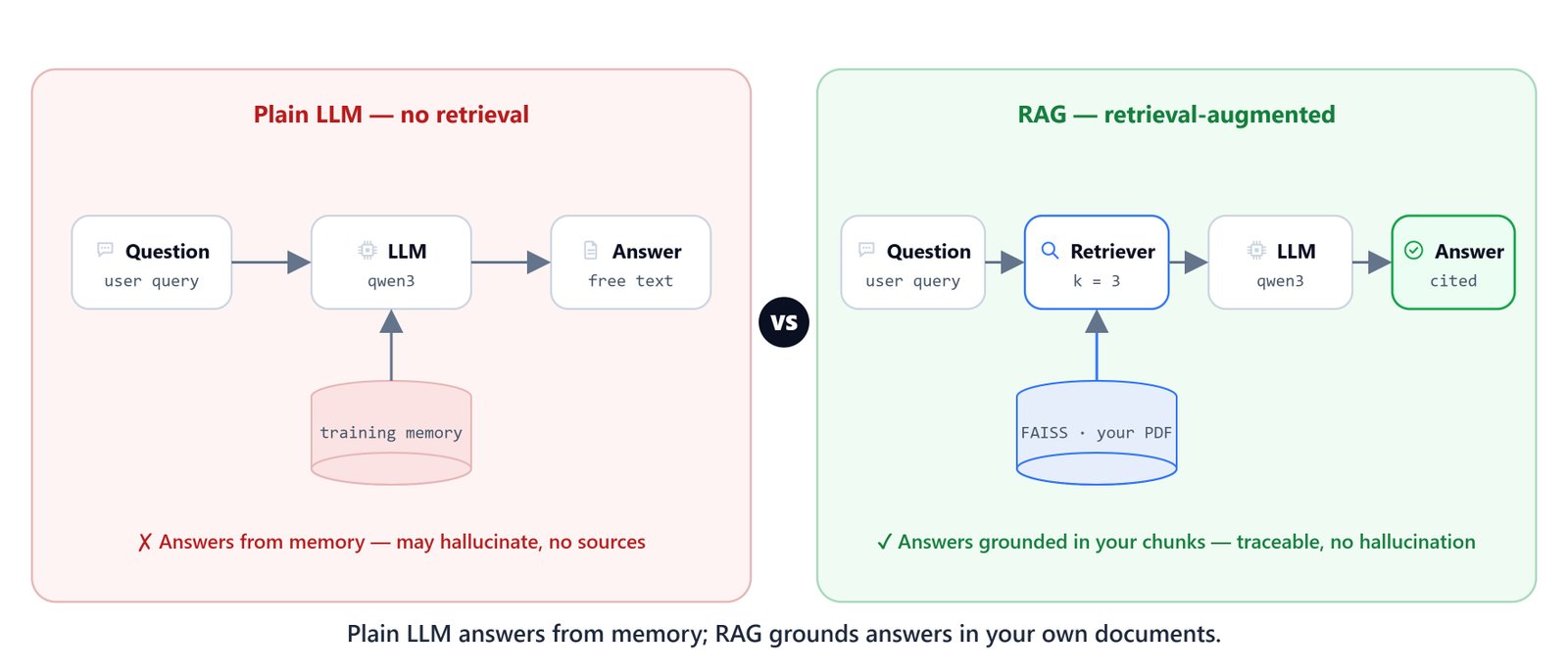
A plain LLM answers from memory and can hallucinate; RAG answers strictly from retrieved document passages.
Quick Reference
Full RAG Setup from a Saved Vector Store
import os
from langchain_ollama import OllamaEmbeddings, ChatOllama
from langchain_community.vectorstores import FAISS
from langchain_core.prompts import ChatPromptTemplate
from langchain_core.output_parsers import StrOutputParser
from langchain_core.runnables import RunnablePassthrough

# Load vector store
embeddings = OllamaEmbeddings(model='nomic-embed-text', base_url='http://localhost:11434')
vector_store = FAISS.load_local(
    "path/to/health_supplements",
    embeddings,
    allow_dangerous_deserialization=True
)

# Retriever
retriever = vector_store.as_retriever(search_type='similarity', search_kwargs={'k': 3})

# Prompt
prompt_template = """You are an assistant for question-answering tasks.
Use the following pieces of retrieved context to answer the question.
If you don't know the answer, just say that you don't know.
Use three sentences maximum and keep the answer concise.

Question: {question}
Context: {context}

Answer:"""

prompt = ChatPromptTemplate.from_template(prompt_template)

# LLM
llm = ChatOllama(model='qwen3', base_url='http://localhost:11434')

# Format helper
def format_docs(docs):
    return '\n\n'.join([doc.page_content for doc in docs])

# RAG Chain
rag_chain = (
    {"context": retriever | format_docs, "question": RunnablePassthrough()}
    | prompt
    | llm
    | StrOutputParser()
)

# Ask
response = rag_chain.invoke("how to lose weight?")
print(response)
What You Built
In this lesson, we completed the full RAG pipeline. Let me tabulate the components.
| Component | Implementation |
|---|---|
| Vector store | FAISS.load_local(), loads persisted 311-chunk index |
| Embedding model | OllamaEmbeddings('nomic-embed-text'), 768-dim vectors |
| Retriever | as_retriever(search_type='similarity', k=3) |
| RAG prompt | ChatPromptTemplate, context-only answering, 3-sentence limit |
| LLM | ChatOllama('qwen3'), local inference |
| Output | StrOutputParser(), clean string answer |
| Chain | `{context: retriever |
This is how RAG works. Every answer comes directly from the retrieved PDF chunks, not from the model's general training data. That is the promise of RAG: accurate, checkable, document-grounded answers.