An LLM speaks in free-form text, but our program needs real Python objects it can work with. Output parsers bridge exactly this gap. In simple words, instead of writing regex or json.loads() by hand and hoping the model formatted things correctly, we define a schema once (the shape of the output we want) and let the parser handle the formatting instructions, the parsing, and the validation.
Every LangChain output parser has two core methods.
Once we understand these two, every parser in this lesson will feel familiar:
get_format_instructions(): returns a string of instructions telling the model exactly how to format its responseparse(): takes the model's raw string response and returns a structured Python object
Prerequisites: LangChain installed with langchain-ollama and python-dotenv. Ollama running with qwen3. Familiar with LangChain chains (see the Chains guide).
What Output Parsers Are Available?
Let's first see the full menu, and then we will learn each parser by building with it.

Four parsers bridge the gap between the LLM's free-form text and typed Python objects.
| Parser | Output Type | Notes |
|---|---|---|
StrOutputParser |
str |
Extracts .content from AIMessage as plain text |
PydanticOutputParser |
Pydantic BaseModel instance |
Validates against a schema; raises on invalid JSON |
JsonOutputParser |
dict |
Returns a raw Python dict; less strict than Pydantic |
CommaSeparatedListOutputParser |
list[str] |
Splits comma-separated model output into a Python list |
DatetimeOutputParser |
N/A | Not available in LangChain v1 |
Setup
As always, we start by loading the environment variables:
from dotenv import load_dotenv

load_dotenv('.env')TrueOn Linux/macOS: use load_dotenv('./../.env') if your .env is in a parent directory.
Then, we import our familiar template classes and connect to the local qwen3 model:
from langchain_ollama import ChatOllama
from langchain_core.prompts import (
    SystemMessagePromptTemplate,
    HumanMessagePromptTemplate,
    ChatPromptTemplate,
    PromptTemplate
)

base_url = "http://localhost:11434"
model = 'qwen3'

llm = ChatOllama(base_url=base_url, model=model)How Does PydanticOutputParser Work?
Let's start with the strictest parser, because once we understand it, the others are easy. PydanticOutputParser checks the model's JSON response against a Pydantic schema. Why does strictness matter? Because if the model returns broken JSON or forgets a required field, we want to know immediately, with a clear error, not three functions later when our code crashes on a missing key.

The schema defines the shape; format_instructions tell the LLM exactly how to format its output.
Defining the Schema
First, we describe the shape we want. Let's say we want the model to tell jokes, and every joke must have a setup, a punchline, and an optional rating.
Every piece of this schema carries meaning for the model, not just for Python:
BaseModelis the Pydantic base class that gives ourJokevalidation powers.- Each
Field(description=...)is not decoration. The description is sent to the model so it knows what each field should contain. A clear description produces a better-filled field. Optional[int]withdefault=Nonetells both Python and the model thatratingmay be skipped, whilesetupandpunchlineare required, and missing them will fail validation.
Let's write the schema as below:
from typing import Optional
from pydantic import BaseModel, Field
from langchain_core.output_parsers import PydanticOutputParser

class Joke(BaseModel):
    """Joke to tell user"""

    setup: str = Field(description="The setup of the joke")
    punchline: str = Field(description="The punchline of the joke")
    rating: Optional[int] = Field(description="The rating of the joke is from 1 to 10", default=None)
Creating the Parser
Now, we wrap the schema in a parser. This is why we imported PydanticOutputParser along with the Pydantic classes above:
parser = PydanticOutputParser(pydantic_object=Joke)What Do the Format Instructions Look Like?
Remember the first of the two core methods? Let's see what get_format_instructions() actually generates, because this string is the whole trick:
instruction = parser.get_format_instructions()
print(instruction)The output should be formatted as a JSON instance that conforms to the JSON schema below.
As an example, for the schema {"properties": {"foo": {"title": "Foo", "description": "a list of strings", "type": "array", "items": {"type": "string"}}}, "required": ["foo"]}
the object {"foo": ["bar", "baz"]} is a well-formatted instance of the schema. The object {"properties": {"foo": ["bar", "baz"]}} is not well-formatted.
Here is the output schema:
{"description": "Joke to tell user", "properties": {"setup": {"description": "The setup of the joke", "title": "Setup", "type": "string"}, "punchline": {"description": "The punchline of the joke", "title": "Punchline", "type": "string"}, "rating": {"anyOf": [{"type": "integer"}, {"type": "null"}], "default": null, "description": "The rating of the joke is from 1 to 10", "title": "Rating"}}, "required": ["setup", "punchline"]}Here, we can see that the parser turned our Python class into a JSON schema, with an example of correct and incorrect output. We wrote a class, and the parser wrote the prompt engineering for us. This text now needs to reach the model.
Building the Prompt with Injected Instructions
We add the instructions using partial_variables. We use partial_variables instead of a normal variable because the format instructions never change between calls, while query changes every time. Baking the fixed part into the template means we only pass query when we invoke, and we can never forget the instructions:
prompt = PromptTemplate(
    template='''
    Answer the user query with a joke. Here is your formatting instruction.
    {format_instruction}

    Query: {query}
    Answer:''',
    input_variables=['query'],
    partial_variables={'format_instruction': parser.get_format_instructions()}
)

chain = prompt | llm
Checking Raw LLM Output (Without Parser)
Before adding the parser, let's run the chain without it and see the raw string the model produces. Seeing this middle step teaches us what the parser actually receives:
output = chain.invoke({'query': 'Tell me a joke about the cat'})
print(output.content){
"setup": "Why did the cat bring a ladder to the party?",
"punchline": "They wanted to climb the social ladder!",
"rating": 7
}Here, we can see the model followed our format instructions and produced clean JSON. But it is still a string. Our code cannot do output.setup yet.
Adding the Parser to the Chain
So, we add the parser as the third block, and it turns the raw JSON string into a validated Joke object:
chain = prompt | llm | parser
output = chain.invoke({'query': 'Tell me a joke about the dogs'})
print(output)setup='Why did the dog bring a ladder to the park?' punchline='He heard the treats were on a high shelf!' rating=8Here, output is no longer text. It is a real Joke Pydantic object, checked field by field, and we read its fields directly:
output.setup      # "Why did the dog bring a ladder to the park?"
output.punchline  # "He heard the treats were on a high shelf!"
output.rating     # 8
The gap is bridged. The model spoke text, and our program received a typed object.
How Does .with_structured_output() Work?
The Pydantic approach works, but it needed three pieces: a parser, a prompt with the instructions added, and a chain. There is also a shorter path. .with_structured_output() attaches the schema directly to the LLM and handles the format instructions for us.
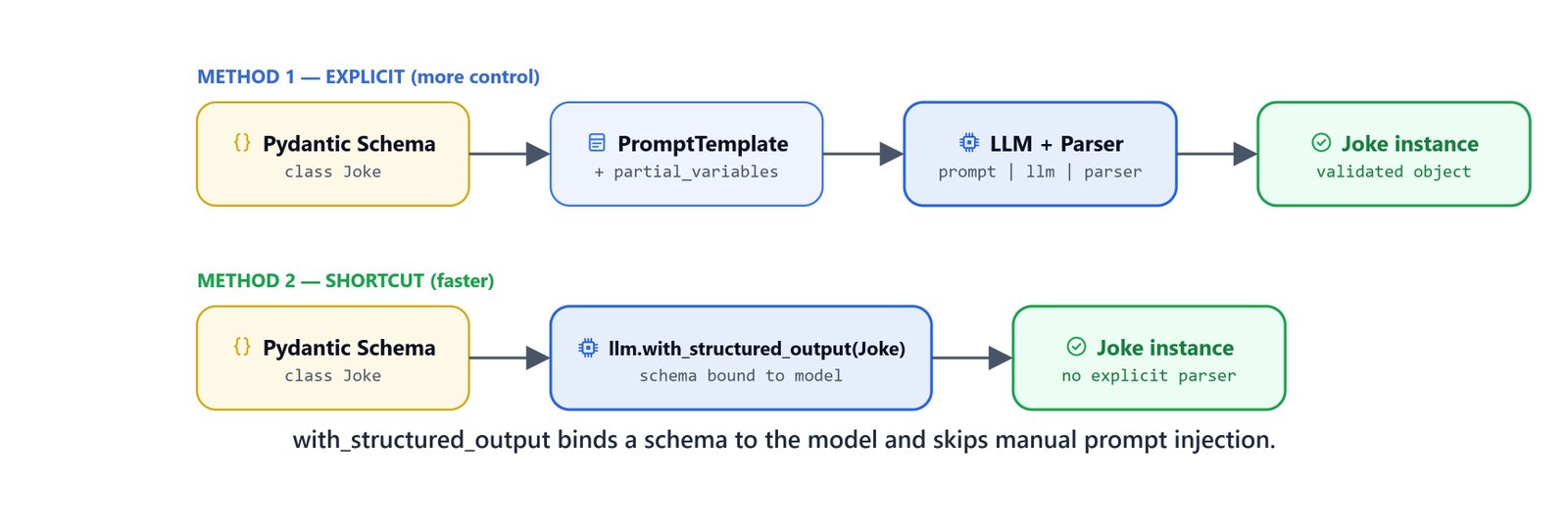
with_structured_output binds a schema to the model and skips the manual prompt-injection step entirely.
Baseline (Unstructured)
First, the baseline, so we can see the difference. A plain invoke gives us free-form text:
output = llm.invoke('Tell me a joke about the cat')
print(output.content)Why did the cat join a band?
Because it wanted to be in the **meow-sic** industry! 🎵🐾
*(Bonus: The band's name was "Whisker & The Purr-fectionists.")* 😸Funny, but shapeless. No field our code could reliably read.
With Structured Output
Now, we bind our Joke schema to the model:
structured_llm = llm.with_structured_output(Joke)output = structured_llm.invoke('Tell me a joke about the cat')
print(output)setup='Why did the cat sit on the computer?' punchline='To keep the mouse away!' rating=NoneHere, we can see the same typed Joke object as before, from one line of setup. No parser object, no prompt work, no chain. So, which method should we use? Compare the two outputs: this one has rating=None, while the Pydantic parser version filled in a rating. The note below explains why.
Note
rating is None here because the field is Optional and the model didn't include it. PydanticOutputParser with explicit format instructions tends to produce more complete output including optional fields. .with_structured_output() is faster to set up but gives the model less explicit guidance.
Tip
.with_structured_output() also accepts a TypedDict class or a JSON Schema dict as its argument, not just Pydantic models.
How Does JsonOutputParser Work?
Sometimes we want structured output but not the strictness. JsonOutputParser returns a raw Python dict without Pydantic validation. Less validation sounds like a step backward, but there are two reasons to want it: sometimes we do not care about field-level type checks, and, more importantly, this parser can stream, as we will see in the note at the end of this section.
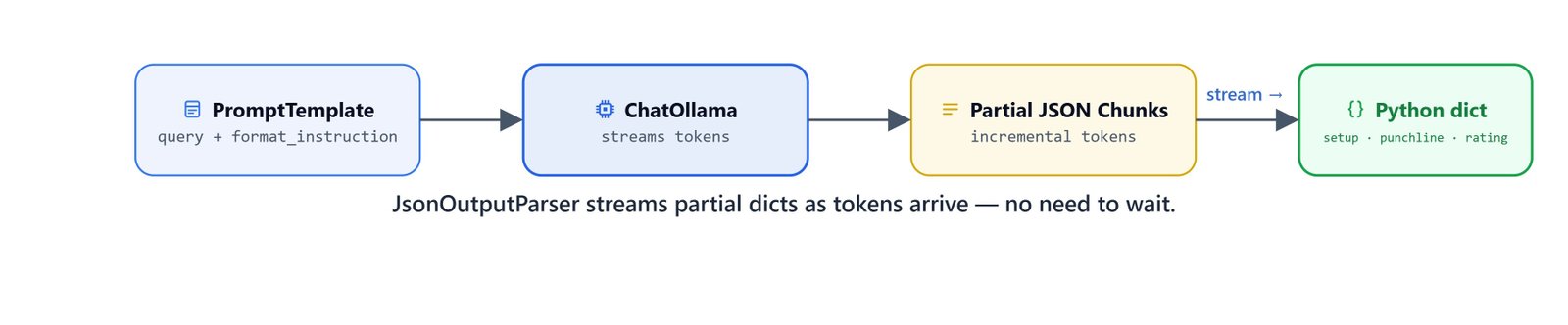
JsonOutputParser streams partial dicts as tokens arrive, no need to wait for the full response.
from langchain_core.output_parsers import JsonOutputParser

parser = JsonOutputParser(pydantic_object=Joke)
print(parser.get_format_instructions())The output should be formatted as a JSON instance that conforms to the JSON schema below.
As an example, for the schema {"properties": {"foo": {"title": "Foo", "description": "a list of strings", "type": "array", "items": {"type": "string"}}}, "required": ["foo"]}
the object {"foo": ["bar", "baz"]} is a well-formatted instance of the schema. The object {"properties": {"foo": ["bar", "baz"]}} is not well-formatted.
Here is the output schema:
{"description": "Joke to tell user", "properties": {"setup": {...}, "punchline": {...}, "rating": {...}}, "required": ["setup", "punchline"]}Here, we can see something interesting: we reuse the same Joke schema to generate the instructions, so the model gets the same guidance. The difference is only in what comes back to us.
Building and Running the JSON Chain
The prompt pattern is the same as the Pydantic one, and that is on purpose. Only the parser changes:
prompt = PromptTemplate(
    template='''
    Answer the user query with a joke. Here is your formatting instruction.
    {format_instruction}

    Query: {query}
    Answer:''',
    input_variables=['query'],
    partial_variables={'format_instruction': parser.get_format_instructions()}
)

chain = prompt | llm
output = chain.invoke({'query': 'Tell me a joke about the cat'})
print(output.content){
"setup": "Why did the cat sit on the computer?",
"punchline": "Because it heard there was a mouse in the keyboard!",
"rating": 7
}Now, we add the JsonOutputParser and get a Python dict directly:
chain = prompt | llm | parser
output = chain.invoke({'query': 'Tell me a joke about the cat'})
print(output){
"setup": "Why did the cat sit on the keyboard?",
"punchline": "Because it wanted to keep the mouse in the house.",
"rating": 8
}And we read the values like any Python dict, with square brackets instead of the dots we had with Pydantic:
output['setup']     # 'Why did the cat sit on the keyboard?'
output['rating']    # 8
Note
JsonOutputParser also supports streaming, it incrementally yields partial dicts as tokens arrive, unlike PydanticOutputParser which must wait for the complete response to validate.
How Does the CSV Parser Work?
Finally, the simplest parser of all. Not every output needs to be an object. Sometimes we just want a list: keywords, tags, names. CommaSeparatedListOutputParser asks the model for a comma-separated string, and then splits it into a Python list[str].
from langchain_core.output_parsers import CommaSeparatedListOutputParser

parser = CommaSeparatedListOutputParser()

print(parser.get_format_instructions())Your response should be a list of comma separated values, eg: `foo, bar, baz` or `foo,bar,baz`Here, we can see how light this parser's instruction is compared to the long JSON schema instructions we saw earlier. One line is all the model needs for a list.
Building the CSV Chain
The pattern stays the same as before: add the instruction with partial_variables, then pipe prompt, model, and parser together:
format_instruction = parser.get_format_instructions()

prompt = PromptTemplate(
    template='''
    Answer the user query with a list of values. Here is your formatting instruction.
    {format_instruction}

    Query: {query}
    Answer:''',
    input_variables=['query'],
    partial_variables={'format_instruction': format_instruction}
)
Let's try it on a real task: generating SEO keywords for a website.
chain = prompt | llm | parser

output = chain.invoke({'query': 'generate my website seo keywords. I have content about the NLP and LLM.'})
print(output)
The output is a Python list of strings, for example:
[
  "NLP",
  "LLM",
  "natural language processing",
  "large language models",
  "AI",
  "machine learning",
  "text processing",
  "deep learning",
  "transformers",
  "chatbots"
]
Here, we can see a ready-to-use Python list. No splitting, no cleanup, each keyword already its own string.
On Linux/macOS: all code above runs identically. No OS-specific differences.
Quick Reference
Let me tabulate the parsers for your better understanding, so that you can pick the right one for your use case.
Parser Comparison
| Parser | Import | Output type | Best for |
|---|---|---|---|
StrOutputParser |
langchain_core.output_parsers |
str |
Plain text extraction |
PydanticOutputParser |
langchain_core.output_parsers |
Pydantic model | Validated typed structs |
JsonOutputParser |
langchain_core.output_parsers |
dict |
Structured output with streaming |
CommaSeparatedListOutputParser |
langchain_core.output_parsers |
list[str] |
Simple enumeration |
Two Ways to Get Structured Output
# Method 1 — PydanticOutputParser (explicit, more control)
parser = PydanticOutputParser(pydantic_object=Joke)
prompt = PromptTemplate(
    template="...\n{format_instruction}\n\nQuery: {query}\nAnswer:",
    input_variables=['query'],
    partial_variables={'format_instruction': parser.get_format_instructions()}
)
chain = prompt | llm | parser
output = chain.invoke({'query': 'Tell me a joke about cats'})
# output is a Joke instance

# Method 2 — with_structured_output (simpler, less control)
structured_llm = llm.with_structured_output(Joke)
output = structured_llm.invoke('Tell me a joke about cats')
# output is a Joke instance
Key Imports
from langchain_core.output_parsers import (
    StrOutputParser,
    PydanticOutputParser,
    JsonOutputParser,
    CommaSeparatedListOutputParser,
)
from pydantic import BaseModel, Field
from typing import Optional
What You Built
In this lesson, we went from receiving a raw AIMessage string to getting fully typed, validated Python objects directly out of an LCEL chain. Let's recap what each parser gives us.
PydanticOutputParser: the most explicit approach. It adds a JSON schema to the prompt throughget_format_instructions(), then checks the response and turns it into a Pydantic model. We choose it when field-level validation matters..with_structured_output(): the fastest path. We attach the schema to the LLM directly and skip the prompt work. It suits quick experiments, or models that follow instructions well.JsonOutputParser: returns a raw Pythondictwithout Pydantic validation. It supports streaming, so it is the right choice when we want partial JSON results as the tokens arrive.CommaSeparatedListOutputParser: the simplest option. It asks the model for a comma-separated string and splits it into alist[str]. Ideal for keywords, tag lists, or any simple list.
And one pattern ties the whole lesson together: partial_variables. By baking get_format_instructions() into the PromptTemplate once, our chain always sends the correct schema to the model, and we never pass it by hand on any .invoke() call. The model speaks text, the parser hands us objects, and our program never touches raw strings again.